Export Emails to Docs
Consolidate emails into nicely organized Google Docs
As of June 2026, Export Emails to Docs has 9,000 users and a 4.60/5 rating from 10 reviews in the Workflow & Planning category.
Usersno change0%
9.0K
9,000
Ratingno change0%
4.60
10 reviews
Reviewsno change0%
10
Version
1.0.2.17
Manifest V3
History
1 snapshotsTracking since Apr 18, 2026.
View as table
| Date | Users | Rating | Reviews | Version |
|---|---|---|---|---|
| Apr 18, 2026 | 9.0K | 4.60 | 10 | 1.0.2.17 |
| Now | 9.0K | 4.60 | 10 | 1.0.2.17 |
Permissions & access
- Permissions
- scriptingstoragebackgroundtabs
- Host access
- https://mail.google.com/, https://www.cloudhq.net/
Screenshots



About
Many organizations need to investigate email messages and collaborate on them.
The problem is that searching through emails can be a very frustrating task.

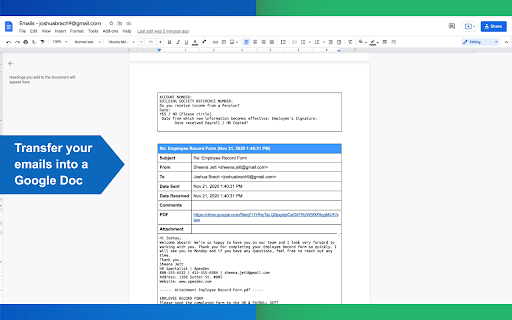
Export Emails to Google Docs™ by cloudHQ solves this problem: it exports and saves your emails into neatly organized Google Docs™.


For example, in education, teachers and administrators need to give regular updates on their students' progress to parents and/or guardians via email. When meeting with those parents and/or guardians at parent teacher conferences, or when discussing a student's case with other teachers, it's hard to refer back to those emails because it could be voluminous.  Export Emails to Google Docs™ by cloudHQ helps to solve this reporting problem by organizing email threads into neatly organized Google Docs™.

Features:
✔️ Save individual email messages or multiple conversations to Google Docs™
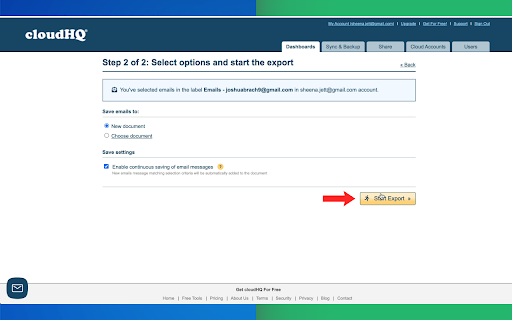
✔️ Automatic continuous save of a Gmail™ Label to Google Docs™
✔️ All emails are saved as PDF documents to Google Drive™ and are organized by: the sender, the recipient and the Gmail™ Label (where applicable).
✔️ All attachments are saved as well
✔️ Multiple ways to organize content
✔️ Multiple formats: as table, plain text without any, summarized, etc.

Don't delay getting started and save your emails to Google Docs™ today!

If you need to export emails to Google documents on mobile then try our Google Workspace™ addon: https://workspace.google.com/marketplace/app/export_emails_to_docs_by_cloudhq/454913119326


cloudHQ. Helping your productivity, 1 click at a time.

cloudHQ website: https://www.cloudhq.net/
App website: https://www.emails-to-docs.com/
Pricing: https://www.emails-to-docs.com/pricing
Support page: https://support.cloudhq.net/category/browser-extensions/export-emails-to-docs/
FAQ page: https://support.cloudhq.net/export-emails-to-google-docs-faq-frequently-asked-questions/
Blog: https://blog.cloudhq.net

Gmail, Google Docs, and Google Workspace are trademark of Google LLC. Use of these trademarks is subject to Google Permissions.

cloudHQ is trademark of cloudHQ LLC. https://www.cloudhq.net/trademark
Technical
- Version
- 1.0.2.17
- Manifest
- V3
- Size
- 582KiB
- Min Chrome
- 88
- Languages
- 1
- Featured
- Yes
Metadata
- ID
- mmldpaklpefcmbknkimieipafeniinem
- Developer ID
- u9999076a1cee8608be24fd86bc3000b6
- Developer Email
- [email protected]
- Created
- Sep 21, 2021
- Last Updated (Store)
- Dec 6, 2025
- Last Scraped
- Jun 2, 2026
- Privacy Policy
- https://www.cloudhq.net/privacy
Similar extensions
Alternatives to Export Emails to Docs, ranked by description similarity.
Save Emails to Drive by cloudHQ
Save any Gmail™ email to Google Drive™ with one click. Autosave of all emails in a label. Multiple formats: PDF, HTML, EML, TXT, ...
40.0K
★ 4.3

Backup and Sync Google Drive to other clouds
Export Google Docs and Sheets to other clouds with one click
50.0K
★ 4.2

Email List Builder by cloudHQ
Build a spreadsheet with all your Gmail contacts and emails
5.0K
★ 4.5

Save Emails as PDF by cloudHQ
Export, convert and save Gmail™ emails as a PDF document
100.0K
★ 4.3
Save Emails to Egnyte by cloudHQ
Save any Gmail™ email to Egnyte with one click
176
★ 4.6
Back up emails to SharePoint
Save any Gmail emails or labels to Microsoft 365 SharePoint
187
★ 4.7

Notes for Gmail™ by cloudHQ
Add annotations on your emails to remember something, or to coach how to craft a good email.
10.0K
★ 4.1
Export Emails to Sheets by cloudHQ
Back up, export or parse your Gmail email messages and labels to Google Sheets
40.0K
★ 4.3
Data sourced from the Chrome Web Store · last verified Jun 2, 2026.