Back up emails to SharePoint
Save any Gmail emails or labels to Microsoft 365 SharePoint
As of June 2026, Back up emails to SharePoint has 187 users and a 4.69/5 rating from 13 reviews in the Workflow & Planning category.
Usersup 1.1 percent+1.1%
187
187
Ratingno change0%
4.69
13 reviews
Reviewsno change0%
13
Version
1.0.2.2
Manifest V3
History
7 snapshotsTracking since Apr 1, 2026.
View as table
| Date | Users | Rating | Reviews | Version |
|---|---|---|---|---|
| Apr 1, 2026 | 185 | 4.69 | 13 | 1.0.2.2 |
| Apr 19, 2026 | 184 | 4.69 | 13 | 1.0.2.2 |
| Apr 29, 2026 | 187 | 4.69 | 13 | 1.0.2.2 |
| May 8, 2026 | 173 | 4.69 | 13 | 1.0.2.2 |
| May 16, 2026 | 177 | 4.69 | 13 | 1.0.2.2 |
| May 25, 2026 | 181 | 4.69 | 13 | 1.0.2.2 |
| Jun 4, 2026 | 175 | 4.69 | 13 | 1.0.2.2 |
| Now | 187 | 4.69 | 13 | 1.0.2.2 |
Permissions & access
- Permissions
- scriptingstoragebackground
- Host access
- https://mail.google.com/, https://www.cloudhq.net/
Screenshots
About
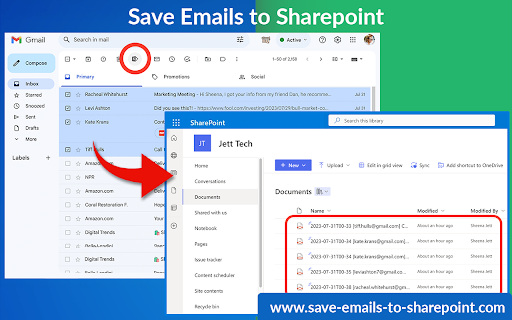
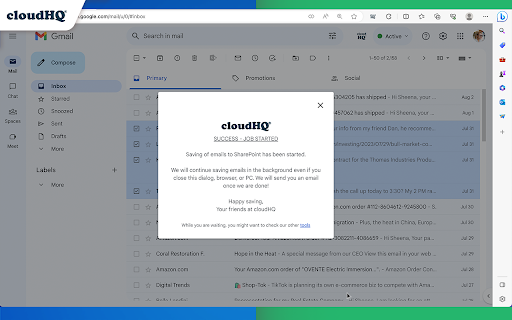
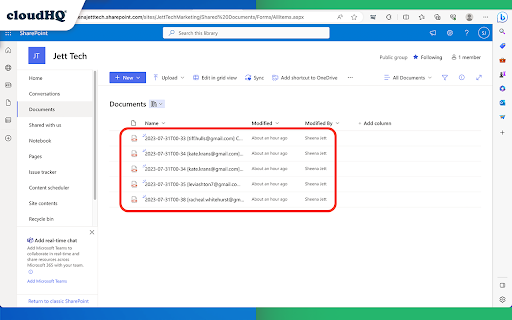
This extension allows you to save your Gmail messages or labels directly to Microsoft 365 SharePoint with just one click.

This tool offers various functionalities like saving individual emails or in batches, archiving all emails at once, continuous automatic saving, and organization-wide email backup.

Here’s what you can do:
- Save individual emails, or in batches
- Label backup
- Archive all your emails
- Continuously save emails automatically
- Setup email backup

Here is how to use this extension:
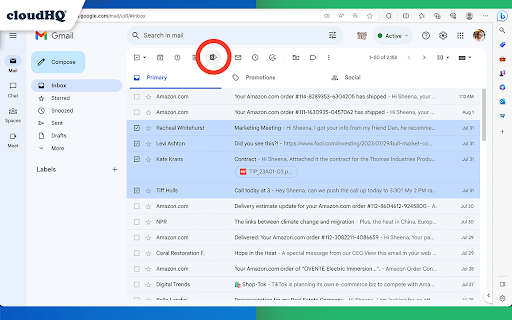
1. Select the emails you want to save.
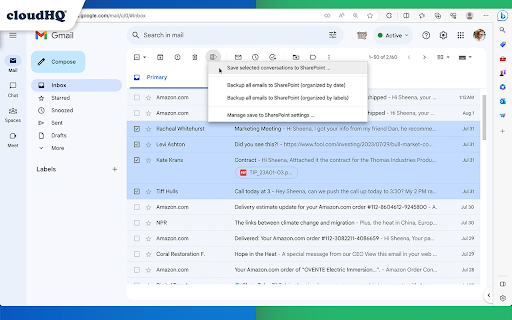
2. Click on the "Save Emails to SharePoint" icon, and select the SharePoint Site, Document Library, and folder.
3. Choose the email export options.
4. Click on "Save".

Key features:
- save any email to a folder in SharePoint Document Library
- save entire Gmail label to a folder in SharePoint Document Library
- setup real time backup of entire Gmail account to a folder in your SharePoint Document Library

Choose your saving preferences:
- Consolidate email conversations into a single document or separate them
- Decide whether to place attachments within the email body or in separate files
- Save your emails in various file formats
- Customize the way your files are named to suit your organizational needs

By saving Gmail emails to Microsoft SharePoint, you gain:
* Enhanced Information Security:
Keep your sensitive email information secure and managed within SharePoint’s robust platform.

* Streamlined File Management:
Organize your emails seamlessly alongside your SharePoint documents.

cloudHQ. Helping your productivity, one click at a time.

Visit our Website: https://www.save-emails-to-sharepoint.com/
Explore Pricing: https://www.save-emails-to-sharepoint.com/pricing
Need Help? Support Page: https://support.cloudhq.net/?s=sharepoint
Discover Insights. Blog: https://blog.cloudhq.net/


Google Workspace, Google Sheets, Google Drive, Google Alerts and Gmail are trademarks of Google LLC. Use of this trademark is subject to Google Permissions.

cloudHQ is trademark of cloudHQ LLC. https://www.cloudhq.net/trademark
Technical
- Version
- 1.0.2.2
- Manifest
- V3
- Size
- 594KiB
- Min Chrome
- 88
- Languages
- 1
- Featured
- No
Metadata
- ID
- aeacdnjbenoheafihciobeabjicpphfl
- Developer ID
- u81f3c56dc2f94f2a56d81700433a9954
- Developer Email
- [email protected]
- Created
- Nov 8, 2023
- Last Updated (Store)
- Nov 27, 2025
- Last Scraped
- Jun 4, 2026
- Support URL
- https://support.cloudhq.net/?s=sharepoint
- Privacy Policy
- https://www.cloudhq.net/privacy
Similar extensions
Alternatives to Back up emails to SharePoint, ranked by description similarity.
Save Emails to Drive by cloudHQ
Save any Gmail™ email to Google Drive™ with one click. Autosave of all emails in a label. Multiple formats: PDF, HTML, EML, TXT, ...
40.0K
★ 4.3

Save Emails as PDF by cloudHQ
Export, convert and save Gmail™ emails as a PDF document
100.0K
★ 4.3
Save Emails to Egnyte by cloudHQ
Save any Gmail™ email to Egnyte with one click
176
★ 4.6

Save Emails to Dropbox by cloudHQ
Save any Gmail email to Dropbox with one click. Autosave of all emails in a label. Multiple export formats: PDF, HTML, TXT, ...
10.0K
★ 4.7
Export Emails to Docs
Consolidate emails into nicely organized Google Docs
9.0K
★ 4.6

Backup and Sync Google Drive to other clouds
Export Google Docs and Sheets to other clouds with one click
50.0K
★ 4.2

Label Sharing for Gmail™ by cloudHQ
Email and label sharing plus real-time team collaboration and chat without ever leaving Gmail™
20.0K
★ 4.5
Export Emails to Sheets by cloudHQ
Back up, export or parse your Gmail email messages and labels to Google Sheets
40.0K
★ 4.3
Data sourced from the Chrome Web Store · last verified Jun 4, 2026.