Save Emails to Egnyte by cloudHQ
Save any Gmail™ email to Egnyte with one click
As of June 2026, Save Emails to Egnyte by cloudHQ has 176 users and a 4.64/5 rating from 11 reviews in the Workflow & Planning category.
Usersdown 4.9 percent−4.9%
176
176
Ratingno change0%
4.64
11 reviews
Reviewsno change0%
11
Version
1.0.2.6
Manifest V3
History
7 snapshotsTracking since Apr 4, 2026.
View as table
| Date | Users | Rating | Reviews | Version |
|---|---|---|---|---|
| Apr 4, 2026 | 185 | 4.64 | 11 | 1.0.2.6 |
| Apr 20, 2026 | 179 | 4.64 | 11 | 1.0.2.6 |
| Apr 29, 2026 | 182 | 4.64 | 11 | 1.0.2.6 |
| May 9, 2026 | 174 | 4.64 | 11 | 1.0.2.6 |
| May 17, 2026 | 172 | 4.64 | 11 | 1.0.2.6 |
| May 26, 2026 | 182 | 4.64 | 11 | 1.0.2.6 |
| Jun 4, 2026 | 177 | 4.64 | 11 | 1.0.2.6 |
| Now | 176 | 4.64 | 11 | 1.0.2.6 |
Permissions & access
- Permissions
- scriptingstoragebackground
- Host access
- https://mail.google.com/, https://mail-attachment.googleusercontent.com/, https://inbox.google.com/, https://www.cloudhq.net/
Screenshots


About
Concerned about the security of your overflowing inbox? Seeking a streamlined solution to safeguard and organize all your emails?

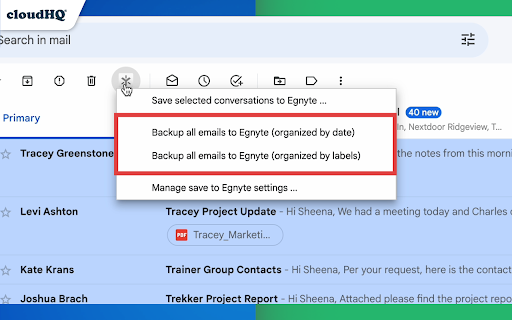
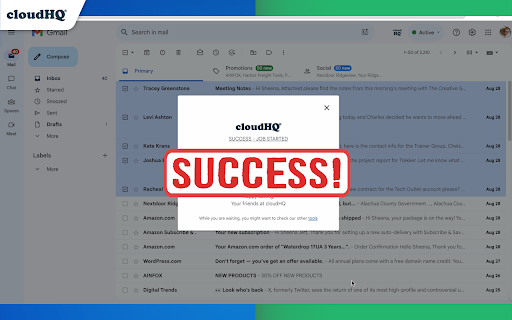
Saving Gmail emails to Egnyte can be a hassle. But with cloudHQ's "Save Gmail to Egnyte," it's really simple! Just click, and save!

You can save:
- One email at a time
- Multiple emails at a time
- All emails at once
- All emails at once, and on a continual basis
- All emails across an organization

You can also select how you want to save your emails to Egnyte:
- Save each email conversation separately, or combined in one file
- With attachments below the email message, or attachments in a separate file
- PDF, HTML, TXT, EML formats
- The name format for the file name (date first, from, attachment name, etc)

Saving emails to Egnyte ensures:
  * Controlled External File Sharing:  Safely ensure company files are trackable and controllable.
  * Data Privacy Management: Protect and manage your email data.

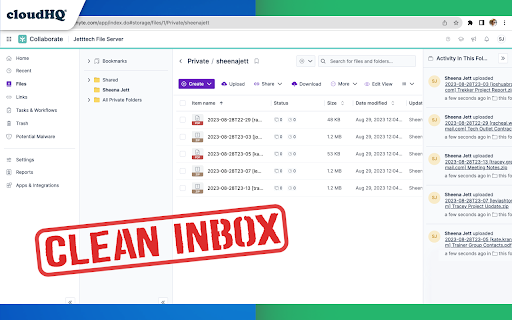
With its flexible folder structure and metadata tagging, Egnyte allows you to move through the cloud with ease, and its document control and alert system lets you keep tabs on all your important emails.

Say goodbye to cluttered inboxes and security concerns, and welcome a streamlined, efficient email management system. After all, it's more than just an extension; it's a step towards optimal productivity and security.

cloudHQ. Helping your productivity, one click at a time.


**This is only for Egnyte for Gmail. Saving Outlook Emails to Egnyte is coming soon.**

Website: https://www.save-emails-to-egnyte.com/
Pricing: https://www.save-emails-to-egnyte.com/pricing
Support page: https://support.cloudhq.net/how-to-save-emails-to-egnyte/
Blog: https://blog.cloudhq.net

cloudHQ is trademark of CloudHQ LLC. https://www.cloudhq.net/trademark
Technical
- Version
- 1.0.2.6
- Manifest
- V3
- Size
- 566KiB
- Min Chrome
- 88
- Languages
- 1
- Featured
- No
Metadata
- ID
- nhbndnfkegbblfiganfghfafpahigomp
- Developer ID
- u2528b48dd23c6d9f9083c185d9f9b907
- Developer Email
- [email protected]
- Created
- Dec 1, 2016
- Last Updated (Store)
- Nov 29, 2025
- Last Scraped
- Jun 4, 2026
- Support URL
- https://support.cloudhq.net
- Privacy Policy
- https://www.cloudhq.net/privacy
Similar extensions
Alternatives to Save Emails to Egnyte by cloudHQ, ranked by description similarity.
Save Emails to Drive by cloudHQ
Save any Gmail™ email to Google Drive™ with one click. Autosave of all emails in a label. Multiple formats: PDF, HTML, EML, TXT, ...
40.0K
★ 4.3

Save Emails as PDF by cloudHQ
Export, convert and save Gmail™ emails as a PDF document
100.0K
★ 4.3
Back up emails to SharePoint
Save any Gmail emails or labels to Microsoft 365 SharePoint
187
★ 4.7

Save Emails to Dropbox by cloudHQ
Save any Gmail email to Dropbox with one click. Autosave of all emails in a label. Multiple export formats: PDF, HTML, TXT, ...
10.0K
★ 4.7
Export Emails to Docs
Consolidate emails into nicely organized Google Docs
9.0K
★ 4.6

Notes for Gmail™ by cloudHQ
Add annotations on your emails to remember something, or to coach how to craft a good email.
10.0K
★ 4.1

Get My Receipts by cloudHQ
Extract digital receipts and invoices from your email
4.0K
★ 4.6

Label Sharing for Gmail™ by cloudHQ
Email and label sharing plus real-time team collaboration and chat without ever leaving Gmail™
20.0K
★ 4.5
Data sourced from the Chrome Web Store · last verified Jun 4, 2026.