
Save Emails as PDF by cloudHQ
Export, convert and save Gmail™ emails as a PDF document
As of June 2026, Save Emails as PDF by cloudHQ has 100,000 users and a 4.26/5 rating from 610 reviews in the Workflow & Planning category.
Usersno change0%
100.0K
100,000
Ratingno change0%
4.26
610 reviews
Reviewsup 0.3 percent+0.3%
610
Version
1.1.2.23
Manifest V3
90-day change · In the last 90 days this extension 1 version update.
History
3 snapshotsTracking since Apr 18, 2026.
View as table
| Date | Users | Rating | Reviews | Version |
|---|---|---|---|---|
| Apr 18, 2026 | 100.0K | 4.26 | 608 | 1.1.2.22 |
| May 18, 2026 | 100.0K | 4.26 | 608 | 1.1.2.23 |
| May 23, 2026 | 100.0K | 4.26 | 609 | 1.1.2.23 |
| Now | 100.0K | 4.26 | 610 | 1.1.2.23 |
Permissions & access
- Permissions
- scriptingstoragebackground
- Host access
- https://mail.google.com/, https://www.cloudhq.net/
Screenshots


About
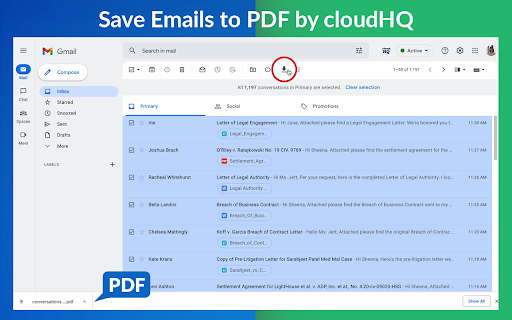
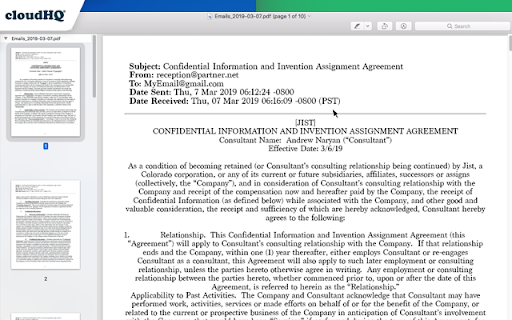
This extension lets you easily save Gmail emails and labels as a PDF document. Our service works in just 3 clicks, and you're done!
With this extension you can:
✔️ Create a hard copy backup of messages for your own records
✔️ Merge multiple emails into one PDF
✔️ Backup multiple messages into separate PDFs
✔️ Save only the attachments of your Gmail messages into PDF
✔️ Great to upload your correspondence and:
- Upload them into your CRM, like Salesforce, Zoho, etc.
- Send it to your lawyer for legal proceedings
- Send your bills, receipts, or invoices to your accountant
- Send it to your human resources department for any internal issues
This this extension is great for:
1. Real estate agents:
🏡Package all your Gmail messages regarding your sales transactions and upload them into SkySlope or another CRM that you're using.
2. Lawyers and legal professionals:
⚖️ Save, organize and sort all Gmail messages into one document and submit it to court.
⚖️ Convert all online conversations (sent documents, received documents, etc.) into a single file that you can then easily Clio or another CRM that you're using.
3. Project Managers and Team leads:
🚧 Archive all project communication as one document and keep it organized.
🚧 Setup an automatic saving of Gmail labels with project-related conversations to your Google Shared Drive for collaboration with your team.
4. Business owners:
💼 Get all your Gmail messages with receipts and organize them by date, customer, etc.
6. Contractors:
👩💻 Archive all communication with your clients.
7. Anybody who needs to convert, save and archive important online conversations, this is FOR YOU!
🕵️👮🏾♀️👨🎨🧑🎤👨💻🤵🏻♀️👩🔬🧕🏽🧑💼🧑🔧👩🏿🏫🧏👷
Here's everything you can do with this Convert Gmail to PDF Chrome extension:
1. You can save:
- A single message or conversation
- Multiple messages or conversations
- An entire Gmail label
- Messages and conversations matching filters
- Your entire account
2. To any of these platforms:
- A downloadable PDF to your local hard drive
- Google Drive
- Dropbox
- Box
- Egnyte
- OneDrive
3. Feature Options you can choose to:
* Include or exclude attachments
* Append emails to an existing PDF document
* Save your attachments only (not the body itself, but just the attachment)
* Add page numbers
* Condensed format (all signatures, quotations and other unnecessary data is removed)
* Select an appropriate page size for printing purposes
* Encrypt your file with password protection (highly encouraged for legal documents)
* Forward your Gmail mails as a pdf attachment to someone else
* Save your online conversation as one document with your selection
* Convert and save your online conversation as a zip file with each Gmail message or conversation in separate PDF files
* Convert and save your online communication one text (TXT) file
* Convert and save your online communication as one HTML document
* Share packages with your online conversations using secure share links
We know that not one size fits all—especially when it comes to your Google e-mail, but with these flexible features, you should be covered with this extension.
cloudHQ. Helping your productivity, 1 click at a time.
cloudHQ website: https://www.cloudhq.net
Website: https://www.save-emails-as-pdf.com
Pricing: https://www.save-emails-as-pdf.com/pricing
Support page: https://support.cloudhq.net/category/browser-extensions/save-emails-to-pdf/
Blog: https://blog.cloudhq.net
Gmail, Google Calendar, and Google Workspace are trademarks of Google LLC. Use of these trademarks is subject to Google Permissions.
cloudHQ is trademark of cloudHQ LLC.
https://tsdr.uspto.gov/documentviewer?caseId=sn97775615&docId=ORC20250405001500&linkId=2#docIndex=1&page=1Technical
- Version
- 1.1.2.23
- Manifest
- V3
- Size
- 1.4MiB
- Min Chrome
- 88
- Languages
- 11
- Featured
- Yes
Metadata
- ID
- dngbhajancmfmdnmhhdknhooljkddgnk
- Developer ID
- uc6e885dff6cd0631d1ffe667c63fd7a7
- Developer Email
- [email protected]
- Created
- May 7, 2016
- Last Updated (Store)
- Apr 16, 2026
- Last Scraped
- Jun 20, 2026
- Privacy Policy
- https://www.cloudhq.net/privacy
Similar extensions
Alternatives to Save Emails as PDF by cloudHQ, ranked by description similarity.

Save Emails from Gmail as PDF
Convert and save Gmail emails as PDF files with one click. Download your emails locally for secure and private message backup.
7.0K
★ 4.6

Save Emails to Dropbox by cloudHQ
Save any Gmail email to Dropbox with one click. Autosave of all emails in a label. Multiple export formats: PDF, HTML, TXT, ...
10.0K
★ 4.7
Save Emails to Drive by cloudHQ
Save any Gmail™ email to Google Drive™ with one click. Autosave of all emails in a label. Multiple formats: PDF, HTML, EML, TXT, ...
40.0K
★ 4.3

Convert Email to PDF
Batch convert email to PDF. Save Gmail emails as PDF online. Fast email to PDF converter. No printing needed.
359
★ 3.7

Bulk Gmail to PDF Exporter
Export single or multiple Gmail conversations to PDF
292
★ 4.2
Back up emails to SharePoint
Save any Gmail emails or labels to Microsoft 365 SharePoint
187
★ 4.7
Export Emails to Sheets by cloudHQ
Back up, export or parse your Gmail email messages and labels to Google Sheets
40.0K
★ 4.3

M2pdf: Save, Export & Download Gmail to PDF
Export and download Gmail emails to PDF with attachments. 100% private, local processing. Your data stays securely in your browser.
535
★ 4.2
Data sourced from the Chrome Web Store · last verified Jun 20, 2026.