
Notes for Gmail™ by cloudHQ
Add annotations on your emails to remember something, or to coach how to craft a good email.
As of June 2026, Notes for Gmail™ by cloudHQ has 10,000 users and a 4.07/5 rating from 137 reviews in the Workflow & Planning category.
Usersno change0%
10.0K
10,000
Ratingno change0%
4.07
137 reviews
Reviewsno change0%
137
Version
1.0.1.7
Manifest V3
90-day change · In the last 90 days this extension 1 version update.
History
1 snapshotsTracking since Apr 18, 2026.
View as table
| Date | Users | Rating | Reviews | Version |
|---|---|---|---|---|
| Apr 18, 2026 | 10.0K | 4.07 | 137 | 1.0.1.6 |
| Now | 10.0K | 4.07 | 137 | 1.0.1.7 |
Changelog
- Apr 18, 2026description
If emails were letters, Notes for Gmail™ by cloudHQ would be sticky post-it notes.

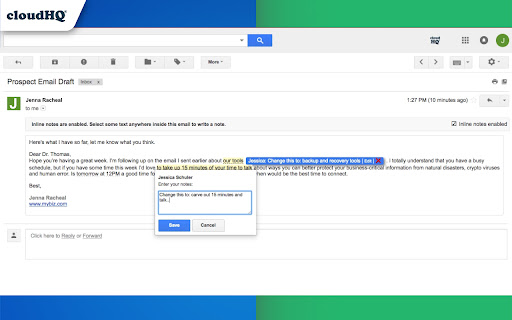
Highlight a section of an email that you received, and make a note about it. Keep it for yourself or email it to someone else.
The notes are embedded directly within your email message and stored on Google Gmail™ servers, allowing you to view them on your mobile phone as well.

No more having to respond to someone by saying "see edits below in red", or wishing that you could write a note on an email. Now, you can just use Notes for Gmail™ by cloudHQ and never lose a thought.

It is also useful to add information to your email message, such as the project ID or customer ID, so you can easily search for that email.

Perfect for:
✔️ Lawyers
✔️ Assistants
✔️ Editors
✔️ Sales Managers
✔️ Project Managers
✔️ Customer Representatives
✔️ Anyone who wants to make a mental note about an email that they received.

cloudHQ. Helping your productivity, 1 click at a time.

cloudHQ Website: https://www.cloudhq.net
App Website: https://www.gmail-notes.com/
Pricing:  https://www.gmail-notes.com/pricing
Support page: https://support.cloudhq.net/category/browser-extensions/gmail-notes/
Blog: https://blog.cloudhq.net

Gmail is trademark of Google LLC. Use of this trademark is subject to Google Permissions.


cloudHQ is trademark of CloudHQ LLC. https://www.cloudhq.net/trademark
If emails were letters, Notes for Gmail™ by cloudHQ would be sticky post-it notes.

Highlight a section of an email that you received, and make a note about it. Keep it for yourself or email it to someone else.
The notes are embedded directly within your email message and stored on Google Gmail™ servers, allowing you to view them on your mobile phone as well.

No more having to respond to someone by saying "see edits below in red", or wishing that you could write a note on an email. Now, you can just use Notes for Gmail™ by cloudHQ and never lose a thought.

It is also useful to add information to your email message, such as the project ID or customer ID, so you can easily search for that email.

cloudHQ. Helping your productivity, 1 click at a time.

cloudHQ Website: https://www.cloudhq.net
App Website: https://www.gmail-notes.com/
Pricing:  https://www.gmail-notes.com/pricing
Support page: https://support.cloudhq.net/category/browser-extensions/gmail-notes/
Blog: https://blog.cloudhq.net

Gmail is trademark of Google LLC. Use of this trademark is subject to Google Permissions.

cloudHQ is trademark of cloudHQ LLC. https://www.cloudhq.net/trademark
Permissions & access
- Permissions
- scriptingstoragebackground
- Host access
- https://mail.google.com/, https://inbox.google.com/, https://www.cloudhq.net/
Screenshots


About
If emails were letters, Notes for Gmail™ by cloudHQ would be sticky post-it notes.

Highlight a section of an email that you received, and make a note about it. Keep it for yourself or email it to someone else.
The notes are embedded directly within your email message and stored on Google Gmail™ servers, allowing you to view them on your mobile phone as well.

No more having to respond to someone by saying "see edits below in red", or wishing that you could write a note on an email. Now, you can just use Notes for Gmail™ by cloudHQ and never lose a thought.

It is also useful to add information to your email message, such as the project ID or customer ID, so you can easily search for that email.

cloudHQ. Helping your productivity, 1 click at a time.

cloudHQ Website: https://www.cloudhq.net
App Website: https://www.gmail-notes.com/
Pricing:  https://www.gmail-notes.com/pricing
Support page: https://support.cloudhq.net/category/browser-extensions/gmail-notes/
Blog: https://blog.cloudhq.net

Gmail is trademark of Google LLC. Use of this trademark is subject to Google Permissions.

cloudHQ is trademark of cloudHQ LLC. https://www.cloudhq.net/trademark
Technical
- Version
- 1.0.1.7
- Manifest
- V3
- Size
- 584KiB
- Min Chrome
- 88
- Languages
- 1
- Featured
- Yes
Metadata
- ID
- elogffplkfhmdkmkiganmbghjhfdfpfm
- Developer ID
- u2528b48dd23c6d9f9083c185d9f9b907
- Developer Email
- [email protected]
- Created
- Jul 24, 2017
- Last Updated (Store)
- Apr 7, 2026
- Last Scraped
- Jun 13, 2026
- Website
- gmail-notes.com
- Privacy Policy
- https://www.cloudhq.net/privacy
Similar extensions
Alternatives to Notes for Gmail™ by cloudHQ, ranked by description similarity.

Label Sharing for Gmail™ by cloudHQ
Email and label sharing plus real-time team collaboration and chat without ever leaving Gmail™
20.0K
★ 4.5
Export Emails to Docs
Consolidate emails into nicely organized Google Docs
9.0K
★ 4.6

Gmail Notes - Add notes to email in Gmail
Add note to Gmail emails for remind something, like a sticky.
1.0K
★ 4.3

Save Emails as PDF by cloudHQ
Export, convert and save Gmail™ emails as a PDF document
100.0K
★ 4.3

Save Emails to Drive by cloudHQ
Save any Gmail™ email to Google Drive™ with one click. Autosave of all emails in a label. Multiple formats: PDF, HTML, EML, TXT, ...
40.0K
★ 4.3
Save Emails to Egnyte by cloudHQ
Save any Gmail™ email to Egnyte with one click
176
★ 4.6

Get My Receipts by cloudHQ
Extract digital receipts and invoices from your email
4.0K
★ 4.6

Email List Builder by cloudHQ
Build a spreadsheet with all your Gmail contacts and emails
5.0K
★ 4.5
Data sourced from the Chrome Web Store · last verified Jun 13, 2026.