Export Emails to Sheets by cloudHQ
Back up, export or parse your Gmail email messages and labels to Google Sheets
As of June 2026, Export Emails to Sheets by cloudHQ has 40,000 users and a 4.32/5 rating from 148 reviews in the Workflow & Planning category.
Usersno change0%
40.0K
40,000
Ratingno change0%
4.32
148 reviews
Reviewsno change0%
148
Version
1.0.2.25
Manifest V3
History
1 snapshotsTracking since Apr 18, 2026.
View as table
| Date | Users | Rating | Reviews | Version |
|---|---|---|---|---|
| Apr 18, 2026 | 40.0K | 4.32 | 148 | 1.0.2.25 |
| Now | 40.0K | 4.32 | 148 | 1.0.2.25 |
Permissions & access
- Permissions
- scriptingstoragebackground
- Host access
- https://mail.google.com/, https://inbox.google.com/, https://www.cloudhq.net/
Screenshots


About
EXCELLENT for business: The data sitting in your Gmail™ emails can be a goldmine.

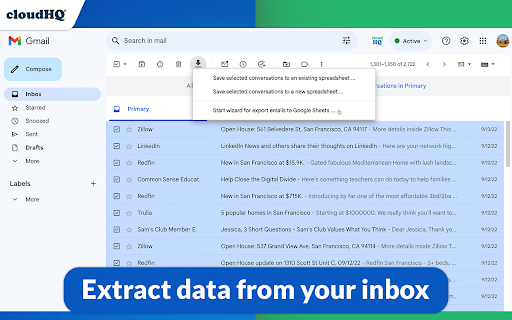
This tool will extract any data (such as invoice#, amount, etc.) from your Gmail™ messages and save it your Google Sheets™ spreadsheet.

~~~Why Use an Email Parser?~~~

✅ Extract specific information from their emails, such as dates, numbers, or names, and use that information in other applications or tools.

✅ Organize and classify their emails based on specific criteria, such as sender, subject, or keywords.

✅ Automate certain tasks, such as sending automatic replies or moving emails to different folders based on their content.

✅ Backup and archive their emails in a more structured and searchable format, such as a Google Sheets™ spreadsheet or a database.

✅ Share or collaborate on their emails with other people, such as team members or clients, in a more efficient and secure way.

Overall, email parsing can be a useful tool for anyone who wants to better manage, analyze, and share their email data.

~~~What to Use an Email Parser for?~~~

✔️ Email discovery / email backup
✔️ Collect all invoices and receipts
✔️ Email analytics
✔️ Email list builder
✔️ Applicant tracking system
✔️ Shipping and delivery report
✔️ Order status and customer feedback
✔️ Collect real estate report
✔️ Identify all bounced emails
✔️ Collect Google Alerts™  (about your name, your company, the industry that you're in, etc)
✔️ Email marketing campaign statistics
✔️ Export emails from foreign-language customers so that you can get them translated
✔️ Share incoming support issues from customers with the rest of your support team

And so much more.


~~~Key features~~~

⭐ Real time export of all emails in your Gmail™  label, and any new incoming emails to Google Sheets™
⭐ Pre-built rules to export all contact information like: phone#, email addresses, url links from email body
⭐ 1-Click wizards
⭐ Powerful email parser editor to define the exact information you want exported to Google Sheets™ (how to extract data from your email message)
⭐ Email messages can be exported to PDF and saved in Google Drive™
⭐ Attachments (like invoices, receipts, etc.) saved as a PDF in Google Drive™
⭐ Artificial Intelligence rules are used to detect what to export from your email body, like amount paid, order #, or other patterns it can detect.
⭐ Export all email headers (including X- headers)
⭐ Google Workspace™ team support (control export of emails from admin console)

Try it today and stop wasting your precious time. We have this application that does this monotonous job for us! Our goal is to give you the tools to make the best strategic decisions for you. Once your data is presented in a way that can be more easily understood, you hold the power of knowledge to make those strategic decisions. Google Sheets™ will help you understand the bigger picture of whatever you need to keep track of in an up-to-date spreadsheet report of parsed email data.

How it works:

1. Install the extension
2. On the left side, select the label to export and select "Save label to spreadsheet" in the label menu
3. The options dialog will open
4. Select columns to export (Subject, sender, etc.) and options (continuous export, name of a spreadsheet, etc.)
5. Our user-friendly editor will help you define what information you want to parse from your emails, and extract that information into Google Sheets™  (like order#, user comment, etc.)
6. Start the export


cloudHQ. Helping your productivity, 1 click at a time.

cloudHQ website: https://www.cloudhq.net/
App website: https://www.emails-to-sheets.com/
Pricing: https://www.emails-to-sheets.com/pricing
Support page: https://support.cloudhq.net/category/browser-extensions/export-emails-to-excel-csv-or-google-sheet
Blog: https://blog.cloudhq.net
Demo: https://www.cloudhq.net/demo

Google Workspace, Google Sheets, Google Drive, Google Alerts and Gmail are trademarks of Google LLC. Use of this trademark is subject to Google Permissions.

cloudHQ is trademark of CloudHQ LLC. https://www.cloudhq.net/trademark
Technical
- Version
- 1.0.2.25
- Manifest
- V3
- Size
- 1.11MiB
- Min Chrome
- 88
- Languages
- 11
- Featured
- Yes
Metadata
- ID
- ibpbagbedfnlepijbnjeanihpoohkocm
- Developer ID
- u4a6681ad10967be47ff28a54f9291df1
- Developer Email
- [email protected]
- Created
- Dec 29, 2018
- Last Updated (Store)
- Dec 6, 2025
- Last Scraped
- Jun 3, 2026
- Support URL
- https://support.cloudhq.net/category/browser-extensions/export-emails-to-excel-csv-or-google-sheet/
- Privacy Policy
- https://www.cloudhq.net/privacy
Similar extensions
Alternatives to Export Emails to Sheets by cloudHQ, ranked by description similarity.

Save Emails as PDF by cloudHQ
Export, convert and save Gmail™ emails as a PDF document
100.0K
★ 4.3

Email List Builder by cloudHQ
Build a spreadsheet with all your Gmail contacts and emails
5.0K
★ 4.5

Get My Receipts by cloudHQ
Extract digital receipts and invoices from your email
4.0K
★ 4.6

Sheets Genie
Turn Google Sheets into a business automation & web scraping powerhouse.
351
★ 5.0
Export Emails to Docs
Consolidate emails into nicely organized Google Docs
9.0K
★ 4.6
Sheetgo | Connect, Filter, Merge, Excel, CSV
Connect Google Sheets, Excel, CSV, BigQuery, Google Docs and Gmail to import, export, merge, split and filter data automatically.
10.0K
★ 4.3

Powerful Email Extractor - Pro Free Limited Time
🎉 PRO VERSION FREE! Extract emails from web pages with automated URL processing. Limited time offer!
37
★ 5.0

Save Emails from Gmail as PDF
Convert and save Gmail emails as PDF files with one click. Download your emails locally for secure and private message backup.
7.0K
★ 4.6
Data sourced from the Chrome Web Store · last verified Jun 3, 2026.