Save Emails to Drive by cloudHQ
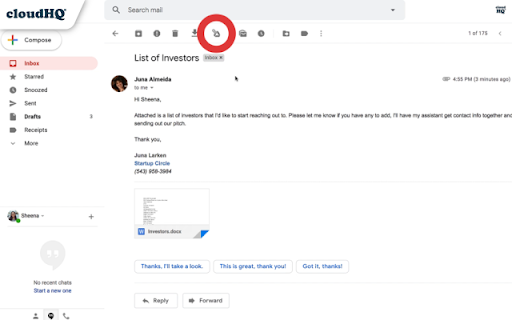
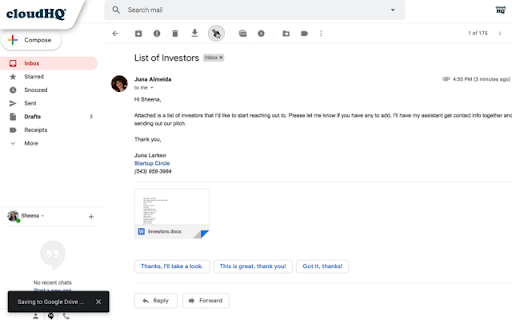
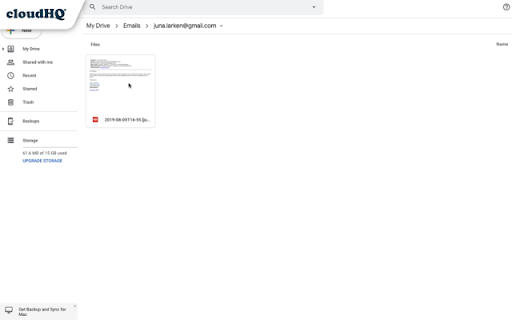
Save any Gmail™ email to Google Drive™ with one click. Autosave of all emails in a label. Multiple formats: PDF, HTML, EML, TXT, ...
As of June 2026, Save Emails to Drive by cloudHQ has 40,000 users and a 4.35/5 rating from 164 reviews in the Workflow & Planning category.
Usersdown 20.0 percent−20.0%
40.0K
40,000
Ratingno change0%
4.35
164 reviews
Reviewsno change0%
164
Version
1.0.2.19
Manifest V3
90-day change · In the last 90 days this extension lost 10.0K users, 1 version update.
History
2 snapshotsTracking since Apr 19, 2026.
View as table
| Date | Users | Rating | Reviews | Version |
|---|---|---|---|---|
| Apr 19, 2026 | 50.0K | 4.35 | 164 | 1.0.2.18 |
| Jun 22, 2026 | 50.0K | 4.35 | 164 | 1.0.2.19 |
| Now | 40.0K | 4.35 | 164 | 1.0.2.19 |
Permissions & access
- Permissions
- scriptingstoragebackground
- Host access
- https://mail.google.com/, https://inbox.google.com/, https://www.cloudhq.net/
Screenshots

About
In just 1 click, save your Gmail™ emails (and its attachments)  or labels directly to your Google Drive™.

This is a perfect solution to liberate your emails from Gmail so that you can file emails in your Google Drive™.

Tip: You can organize emails in a file under your client folder, where you can easily add your comments and share them with a colleague.

There's no complicated downloads, and 100% free for you to use.

Key features:
✅ Quick save of any email - save it and share it with just one click
✅ Auto save of labels
✅ Google Workspace™ support
✅ Team integration and Google Shared Drive™ support
✅ Google Workspace™ admin integration: admin can control and configure everything from the console
✅ Real time backup and archive of your emails

You can save emails into following formats, and includes attachments in:
- PDF
- TXT
- HTML
- EML (email archive)

Furthermore, you can save emails to your Google Drive in the following formats:
* A single file for each conversation
* A separate file for each individual email
* One file for all emails under a specific label

Saving your emails/labels to Google Drive™ offers excellent benefits:
✔️ Allows law firms to automatically archive emails pertinent to specific cases or clients.
✔️ Enables any company to back up emails to Google Shared Drive for enhanced security and collaboration.
✔️ Employees can quickly save and share emails with their teams.
✔️ Individuals can create hard copy backups of emails for personal record-keeping.

For best practices and real-world examples of how law and real estate firms use our product, please refer to these support notes:
https://support.cloudhq.net/best-practice-how-real-estate-firms-use-save-emails-to-google-drive/
https://support.cloudhq.net/organizing-workflow-in-law-firms-with-cloudhq-save-emails-to-google-drive/

The free plan includes 50 emails/month. Our Premium Plan allow unlimited email saves and backup.

cloudHQ website: https://www.cloudhq.net/
App website: https://www.save-emails-to-google-drive.com/
Pricing: https://www.save-emails-to-google-drive.com/pricing
Support page: https://support.cloudhq.net/category/browser-extensions/save-emails-to-google-drive/
Blog: https://blog.cloudhq.net

Gmail, Google Shared Drive, Google Drive, and Google Workspace are trademarks of Google LLC. Use of these trademarks is subject to Google Permissions.

cloudHQ is trademark of CloudHQ LLC. https://www.cloudhq.net/trademark
Technical
- Version
- 1.0.2.19
- Manifest
- V3
- Size
- 1.12MiB
- Min Chrome
- 88
- Languages
- 11
- Featured
- Yes
Metadata
- ID
- glgaegbgegomicnedooifcbnmppmofkf
- Developer ID
- uc6e885dff6cd0631d1ffe667c63fd7a7
- Developer Email
- [email protected]
- Created
- May 26, 2016
- Last Updated (Store)
- Apr 16, 2026
- Last Scraped
- Jun 22, 2026
- Website
- save-emails-to-google-drive.com
- Privacy Policy
- https://www.cloudhq.net/privacy
Similar extensions
Alternatives to Save Emails to Drive by cloudHQ, ranked by description similarity.

Label Sharing for Gmail™ by cloudHQ
Email and label sharing plus real-time team collaboration and chat without ever leaving Gmail™
20.0K
★ 4.5

Save Emails as PDF by cloudHQ
Export, convert and save Gmail™ emails as a PDF document
100.0K
★ 4.3

Save Emails to Dropbox by cloudHQ
Save any Gmail email to Dropbox with one click. Autosave of all emails in a label. Multiple export formats: PDF, HTML, TXT, ...
10.0K
★ 4.7
Back up emails to SharePoint
Save any Gmail emails or labels to Microsoft 365 SharePoint
187
★ 4.7
Save Emails to Egnyte by cloudHQ
Save any Gmail™ email to Egnyte with one click
176
★ 4.6
Export Emails to Docs
Consolidate emails into nicely organized Google Docs
9.0K
★ 4.6

Backup and Sync Google Drive to other clouds
Export Google Docs and Sheets to other clouds with one click
50.0K
★ 4.2

Save To Drive
Save Emails, Images, Pages to Google Drive™ in 1 Click!
2.0K
★ 3.1
Data sourced from the Chrome Web Store · last verified Jun 22, 2026.