
Label Sharing for Gmail™ by cloudHQ
Email and label sharing plus real-time team collaboration and chat without ever leaving Gmail™
As of June 2026, Label Sharing for Gmail™ by cloudHQ has 20,000 users and a 4.54/5 rating from 215 reviews in the Workflow & Planning category.
Usersno change0%
20.0K
20,000
Ratingno change0%
4.54
215 reviews
Reviewsno change0%
215
Version
1.1.2.4
Manifest V3
History
1 snapshotsTracking since Apr 21, 2026.
View as table
| Date | Users | Rating | Reviews | Version |
|---|---|---|---|---|
| Apr 21, 2026 | 20.0K | 4.54 | 215 | 1.1.2.4 |
| Now | 20.0K | 4.54 | 215 | 1.1.2.4 |
Permissions & access
- Permissions
- scriptingstoragebackground
- Host access
- https://mail.google.com/, https://www.cloudhq.net/
Screenshots



About
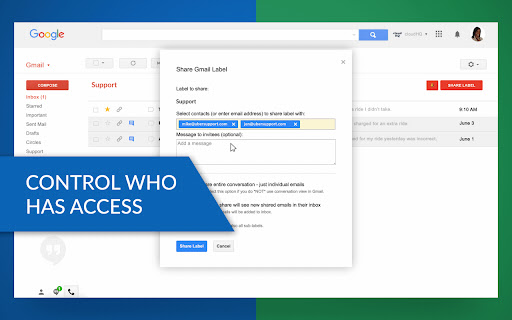
Share Gmail™ labels (and emails) as you would share folders in Google Drive™.

This extension allows you to use your Gmail™ as a collaboration tool, without ever having to leave your email screen.  Its an amazingly simple way to way to share labels with projects / cases, assign tasks, and track status of hiring process, support and sales queries.

This is ideal for:

- Customer service and support
- Sales teams
- Legal teams
- Hiring / Recruitment
- Anyone who wants to share an entire Gmail label with someone else

Here's how to use this extension:
1) Install the extension and create a cloudHQ account.
2) Choose the label you want to share.
3) Send an invitation.

For best practices and real-world examples of how law and real estate firms use our product, please refer to these support notes:
General best practices: https://support.cloudhq.net/best-practices-for-cloudhq-label-and-email-sharing/
Organizing workflow in law firms:  https://support.cloudhq.net/organizing-workflow-in-law-firms-with-gmail-label-and-email-sharing/
Organizing workflow in real estate firms: https://support.cloudhq.net/organizing-workflow-in-real-estate-firms-with-cloudhq-label-and-email-sharing/

cloudHQ. Helping your productivity, 1 click at a time.

cloudHQ website: https://www.cloudhq.net/share
App website: https://www.gmail-label-sharing.com/
Pricing: https://www.gmail-label-sharing.com/pricing
Support page: https://support.cloudhq.net/category/browser-extensions/gmail-label-and-email-sharing/
Blog: https://blog.cloudhq.net

Gmail, Google Shared Drive, Google Drive, and Google Workspace are trademarks of Google LLC. Use of these trademarks is subject to Google Permissions.

cloudHQ is trademark of CloudHQ LLC. https://www.cloudhq.net/trademark
Technical
- Version
- 1.1.2.4
- Manifest
- V3
- Size
- 631KiB
- Min Chrome
- 88
- Languages
- 11
- Featured
- Yes
Metadata
- ID
- pmmaemmobdmccnfepmkckendmealjapo
- Developer ID
- uc6e885dff6cd0631d1ffe667c63fd7a7
- Developer Email
- [email protected]
- Created
- Aug 12, 2015
- Last Updated (Store)
- Nov 29, 2025
- Last Scraped
- Jun 5, 2026
- Privacy Policy
- https://www.cloudhq.net/privacy
Similar extensions
Alternatives to Label Sharing for Gmail™ by cloudHQ, ranked by description similarity.
Save Emails to Drive by cloudHQ
Save any Gmail™ email to Google Drive™ with one click. Autosave of all emails in a label. Multiple formats: PDF, HTML, EML, TXT, ...
40.0K
★ 4.3

Save Emails as PDF by cloudHQ
Export, convert and save Gmail™ emails as a PDF document
100.0K
★ 4.3

Notes for Gmail™ by cloudHQ
Add annotations on your emails to remember something, or to coach how to craft a good email.
10.0K
★ 4.1

Save Emails to Dropbox by cloudHQ
Save any Gmail email to Dropbox with one click. Autosave of all emails in a label. Multiple export formats: PDF, HTML, TXT, ...
10.0K
★ 4.7
Back up emails to SharePoint
Save any Gmail emails or labels to Microsoft 365 SharePoint
187
★ 4.7

DragApp: Gmail shared inbox
Turn Gmail into a collaboration tool for teams to manage shared inbox, Help Desk, CRM, Task Management and more from Gmail.
10.0K
★ 4.1
Export Emails to Docs
Consolidate emails into nicely organized Google Docs
9.0K
★ 4.6

Sharebox - Native Shared Inboxes for Google Workspace™
Collaborative Gmail extension for shared inboxes
15
★ 5.0
Data sourced from the Chrome Web Store · last verified Jun 5, 2026.