Web to Figma
Web to Figma extension to capture pages and components and import them into Figma as editable designs. No more screenshots.
As of June 2026, Web to Figma has 30,000 users and a 2.19/5 rating from 21 reviews in the Productivity category.
Usersup 50.0 percent+50.0%
30.0K
30,000
Ratingdown 2.7 percent−2.7%
2.19
21 reviews
Reviewsup 5.0 percent+5.0%
21
Version
0.0.9
Manifest V3
90-day change · In the last 90 days this extension gained 10.0K users.
History
2 snapshotsTracking since Apr 1, 2026.
View as table
| Date | Users | Rating | Reviews | Version |
|---|---|---|---|---|
| Apr 1, 2026 | 20.0K | 2.25 | 20 | 0.0.9 |
| Apr 21, 2026 | 30.0K | 2.25 | 20 | 0.0.9 |
| Now | 30.0K | 2.19 | 21 | 0.0.9 |
Permissions & access
- Permissions
- storagedebuggeralarmsactiveTab
- Host access
- None declared
Screenshots

About
How it works

Web to Figma lets you import full webpages using the plugin, or import specific components from a website, using our Chrome Extension. Convert any HTML to design file in Figma.


Import components or webpages using the Chrome Extension:

1. Download the Web to Figma Chrome Extension
2. Go to any page in your Chrome Browser
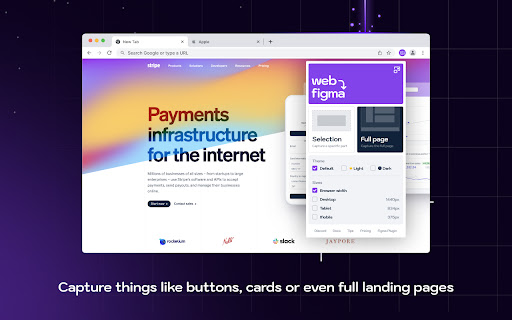
3. Invoke the extension, and then choose if you want to capture the entire page or a single component
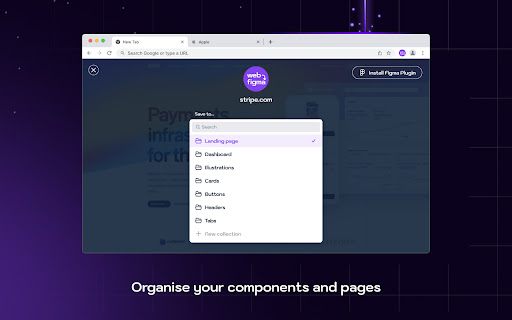
4. Once the extension captures the page, save the page/component to a Collection
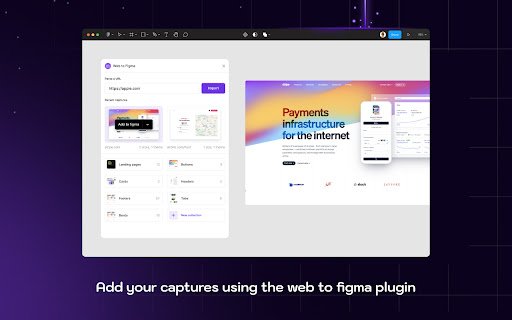
5. Go to Figma and run the plugin
6. Go to the Collections tab of the plugin
7. Find your latest capture and click on Add to Figma


Import webpages using the plugin:

1. Install the plugin
2. From within any file, run the plugin by going to Plugins menu and selecting Web to Figma
3. In the Import tab of the plugin, enter the URL of the webpage that you want to import. For example, https://github.com/home
4. Choose the relevant settings
5. Click on Import


Benefits

1. Create a library of design inspirations using Collections
2. Create a moodboard
3. Collaborate with developers by importing their implementation and comparing against the reference design
4. Learn how some of the more complex websites have been structured
5. Quickly explore various design patterns when solving a new task
Technical
- Version
- 0.0.9
- Manifest
- V3
- Size
- 946KiB
- Min Chrome
- 88
- Languages
- 1
- Featured
- No
Metadata
- ID
- mafpepbepbabkenbfpcdjmmjmeeemoal
- Developer ID
- u5023733710e5c72ac6e089b1cadacc20
- Developer Email
- [email protected]
- Created
- Oct 26, 2023
- Last Updated (Store)
- May 4, 2025
- Last Scraped
- Jun 4, 2026
- Website
- web-to-figma.design
- Support URL
- —
- Privacy Policy
- https://web-to-figma.design/privacy
Similar extensions
Alternatives to Web to Figma, ranked by description similarity.

Web to Canvas
Convert any webstite to editable Figma design. Requires the associated Figma plugin
8

Drafito
Import webpage to Figma
3.0K

html.to.design
Convert any website into fully editable Figma designs. Requires the associated Figma plugin!
600.0K
★ 4.7

html.tomake.design (llama)
Convert any website into fully editable Figma designs. Requires the companion Figma plugin!
1.0K
★ 4.0

Firejet - Website To Design
Convert any website into Figma designs. Simply navigate to the website you wish to import and click "Save Page to Figma"!
340

HTML to Figma (by Yashi Tech Solutions)
Convert webpages into a Figma design
10.0K
★ 3.0

Hyperplane - Website & HTML to Design
Convert any website or HTML into editable designs with Figma Support. Scan live pages or localhost and capture multiple viewports.
172

Chrome2Figma
Import any image from Chrome to Figma without downloading it to computer.
How to setup:
1. Install and setup Figma plugin…
98
Data sourced from the Chrome Web Store · last verified Jun 4, 2026.