
M2pdf: Save, Export & Download Gmail to PDF
Export and download Gmail emails to PDF with attachments. 100% private, local processing. Your data stays securely in your browser.
As of June 2026, M2pdf: Save, Export & Download Gmail to PDF has 535 users and a 4.19/5 rating from 16 reviews in the Workflow & Planning category.
Usersup 72.0 percent+72.0%
535
535
Ratingup 33.4 percent+33.4%
4.19
16 reviews
Reviewsup 128.6 percent+128.6%
16
Version
1.2.8
Manifest V3
90-day change · In the last 90 days this extension 4 version updates, changed permissions.
History
11 snapshotsTracking since Apr 1, 2026.
View as table
| Date | Users | Rating | Reviews | Version |
|---|---|---|---|---|
| Apr 1, 2026 | 311 | 3.14 | 7 | 1.1.0 |
| Apr 17, 2026 | 308 | 3.14 | 7 | 1.1.0 |
| Apr 22, 2026 | 324 | 3.70 | 10 | 1.1.1 |
| Apr 27, 2026 | 329 | 4.13 | 15 | 1.2.2 |
| May 4, 2026 | 352 | 4.13 | 15 | 1.2.2 |
| May 10, 2026 | 385 | 4.13 | 15 | 1.2.7 |
| May 15, 2026 | 405 | 4.13 | 15 | 1.2.8 |
| May 21, 2026 | 449 | 4.13 | 15 | 1.2.8 |
| May 28, 2026 | 475 | 4.19 | 16 | 1.2.8 |
| Jun 4, 2026 | 484 | 4.19 | 16 | 1.2.8 |
| Jun 9, 2026 | 494 | 4.19 | 16 | 1.2.8 |
| Now | 535 | 4.19 | 16 | 1.2.8 |
Changelog
- Apr 22, 2026description
Save and backup Gmail emails as PDF with attachments, instantly and privately.

M2pdf is a powerful Chrome extension that lets you save Gmail emails into clean, high-quality PDF files in one click.
Export single emails or batch export entire conversations, labels, or search results, all without leaving Gmail.

M2PDF works entirely inside your browser. Your emails are never uploaded or stored anywhere, ensuring complete privacy and security.

Key Features:

• One-Click Conversion - Convert any Gmail email to PDF instantly.

• 100% Private & Secure - All conversions happen locally in your browser.

• Export Attachments - Automatically download all attachments along with your email PDFs.

• Batch Conversion - Convert up to 100 emails at once.

• Export & Backup Filtered Emails - Search in Gmail by sender, label, or date, export and backup everything.

• Smart File Naming & Organization - Automatically organize files with clean names and folder structure.

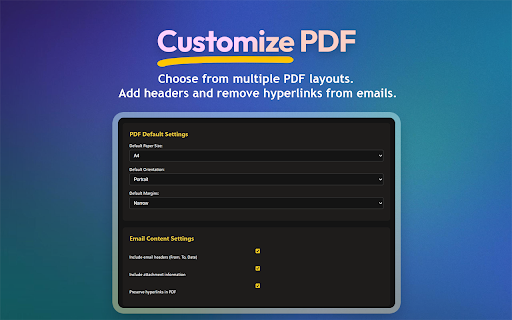
• Customizable PDFs - Control layouts, headers, and link behavior.


Perfect for:

• Professionals archiving and backing up important emails.
• Freelancers managing client communication.
• Legal & finance users needing records.
• Anyone who wants to backup Gmail emails as PDF.


Privacy First:

M2PDF is built with a strict privacy-first approach.
Your Gmail data never leaves your device. Everything runs locally in your browser.


How It Works:

1. Install the extension.
2. Open Gmail and connect M2pdf.
3. Search, filter, or select emails.
4. Click “Save as PDF”.
5. Download your PDFs with attachments instantly.


Free Plan Includes:

•  20 email conversions.
•  All core features included.
•  Lifetime updates.
Download, export, and save your Gmail emails as PDF files effortlessly. M2pdf is the ultimate, privacy-first solution for backing up important emails and attachments directly from your browser.

Unlike other extensions that upload your sensitive emails to remote servers, M2pdf processes everything locally on your device. Your data remains strictly confidential, making it the perfect secure alternative for legal, financial, and HR professionals.

Top Features:

One-Click Export: Download any Gmail email as a high-quality PDF instantly.

Batch Download: Export up to 100 emails at once from any label, sender, or search result.

Keep Attachments: Automatically save all email attachments alongside your PDF files.

100% Local and Private: Zero server uploads. Your emails never leave your computer.

Smart Organization: Keep your backups clean with automatic file naming and folder structures.

Customizable Output: Adjust layouts, headers, and link settings to fit your exact needs.

Perfect For:

Legal Professionals: Securely archive client communications and e-discovery files without breaching confidentiality.

Accountants and Finance: Batch download invoices, receipts, and tax records for easy offline storage.

Freelancers and Agencies: Back up project approvals, contracts, and client requests.

HR Departments: Save employee records, interview feedback, and confidential internal communications securely.

How It Works:

Install the M2pdf extension.

Open Gmail and select or search for the emails you want to export.

Click the M2pdf "Save as PDF" button.

Download your PDFs and attachments instantly to your local drive.

Free Tier Included:
Start with 20 free email conversions. All core features are included alongside lifetime updates. Upgrade only when you need unlimited batch processing.
- Apr 22, 2026short_description
Save Gmail emails as PDF with attachments. Export and backup emails by label, sender, or search. 100% private, runs locally.
Export and download Gmail emails to PDF with attachments. 100% private, local processing. Your data stays securely in your browser.
- Apr 22, 2026name
M2PDF: Save Gmail as PDF (With Attachments & Batch Export)
M2pdf: Save, Export & Download Gmail to PDF
- Apr 22, 2026permissions
tabs, scripting, identity, debugger, downloads, storage
tabs, scripting, identity, debugger, downloads, storage, alarms
- Apr 17, 2026description
M2pdf is a powerful Chrome extension that lets you save Gmail™ emails as PDFs with just one click! Save your important emails to editable PDF documents with all the attachments.

Key Features:

🎯 One-Click Conversion - Convert any Gmail email to PDF instantly
🔒 100% Private & Secure - All conversions happen locally in your browser
📎 Keep Attachments - Automatically saves email attachments alongside your PDFs
📚 Batch Conversion - Convert up to 100 emails at once
📁 Smart Organization - Automatic file naming and folder structure
⚙️ Customizable PDFs - Choose layouts, headers, and link settings


Perfect for:

👔 Professionals who need to archive important emails
🤝 Teams managing client communications
💾 Anyone who wants to keep offline copies of emails
📤 Users who need to share emails in PDF format


Privacy First:

Your email data never leaves your browser. All conversions happen locally on your computer, ensuring maximum privacy and security!


Getting Started:

📥 Install the extension
📧 Open Gmail and connect M2pdf
☑️ Select any email
🖱️ Click the "Save as Pdf" icon
⚡ Get your PDF and all the attachments instantly!


Free Plan Includes:

📊 20 email conversions
⭐ All core features
🔄 Lifetime updates
Save and backup Gmail emails as PDF with attachments, instantly and privately.

M2pdf is a powerful Chrome extension that lets you save Gmail emails into clean, high-quality PDF files in one click.
Export single emails or batch export entire conversations, labels, or search results, all without leaving Gmail.

M2PDF works entirely inside your browser. Your emails are never uploaded or stored anywhere, ensuring complete privacy and security.

Key Features:

• One-Click Conversion - Convert any Gmail email to PDF instantly.

• 100% Private & Secure - All conversions happen locally in your browser.

• Export Attachments - Automatically download all attachments along with your email PDFs.

• Batch Conversion - Convert up to 100 emails at once.

• Export & Backup Filtered Emails - Search in Gmail by sender, label, or date, export and backup everything.

• Smart File Naming & Organization - Automatically organize files with clean names and folder structure.

• Customizable PDFs - Control layouts, headers, and link behavior.


Perfect for:

• Professionals archiving and backing up important emails.
• Freelancers managing client communication.
• Legal & finance users needing records.
• Anyone who wants to backup Gmail emails as PDF.


Privacy First:

M2PDF is built with a strict privacy-first approach.
Your Gmail data never leaves your device. Everything runs locally in your browser.


How It Works:

1. Install the extension.
2. Open Gmail and connect M2pdf.
3. Search, filter, or select emails.
4. Click “Save as PDF”.
5. Download your PDFs with attachments instantly.


Free Plan Includes:

•  20 email conversions.
•  All core features included.
•  Lifetime updates.
- Apr 17, 2026short_description
Save emails as PDF with attachments locally and securely. Batch export your emails as PDFs with one click.
Save Gmail emails as PDF with attachments. Export and backup emails by label, sender, or search. 100% private, runs locally.
- Apr 17, 2026name
M2PDF: Save Emails as PDF Locally
M2PDF: Save Gmail as PDF (With Attachments & Batch Export)
Permissions & access
- Permissions
- tabsscriptingidentitydebuggerdownloadsstoragealarms
- Host access
- https://mail.google.com/, https://www.googleapis.com/, https://*.googleusercontent.com/
Screenshots


About
Download, export, and save your Gmail emails as PDF files effortlessly. M2pdf is the ultimate, privacy-first solution for backing up important emails and attachments directly from your browser.

Unlike other extensions that upload your sensitive emails to remote servers, M2pdf processes everything locally on your device. Your data remains strictly confidential, making it the perfect secure alternative for legal, financial, and HR professionals.

Top Features:

One-Click Export: Download any Gmail email as a high-quality PDF instantly.

Batch Download: Export up to 100 emails at once from any label, sender, or search result.

Keep Attachments: Automatically save all email attachments alongside your PDF files.

100% Local and Private: Zero server uploads. Your emails never leave your computer.

Smart Organization: Keep your backups clean with automatic file naming and folder structures.

Customizable Output: Adjust layouts, headers, and link settings to fit your exact needs.

Perfect For:

Legal Professionals: Securely archive client communications and e-discovery files without breaching confidentiality.

Accountants and Finance: Batch download invoices, receipts, and tax records for easy offline storage.

Freelancers and Agencies: Back up project approvals, contracts, and client requests.

HR Departments: Save employee records, interview feedback, and confidential internal communications securely.

How It Works:

Install the M2pdf extension.

Open Gmail and select or search for the emails you want to export.

Click the M2pdf "Save as PDF" button.

Download your PDFs and attachments instantly to your local drive.

Free Tier Included:
Start with 20 free email conversions. All core features are included alongside lifetime updates. Upgrade only when you need unlimited batch processing.
Technical
- Version
- 1.2.8
- Manifest
- V3
- Size
- 1.72MiB
- Min Chrome
- 88
- Languages
- 1
- Featured
- No
Metadata
- ID
- ogbejidkbpdlngcpffeaifjemknohdae
- Developer ID
- u27006dac05b2bbfa0460931034e8be18
- Developer Email
- [email protected]
- Created
- Jan 9, 2025
- Last Updated (Store)
- May 5, 2026
- Last Scraped
- Jun 9, 2026
- Website
- m2pdf.com
- Support URL
- https://m2pdf.com/contact/
- Privacy Policy
- https://m2pdf.com/privacy/
Similar extensions
Alternatives to M2pdf: Save, Export & Download Gmail to PDF, ranked by description similarity.

Save Emails from Gmail as PDF
Convert and save Gmail emails as PDF files with one click. Download your emails locally for secure and private message backup.
7.0K
★ 4.6

Save Emails as PDF by cloudHQ
Export, convert and save Gmail™ emails as a PDF document
100.0K
★ 4.3

Convert Email to PDF
Batch convert email to PDF. Save Gmail emails as PDF online. Fast email to PDF converter. No printing needed.
359
★ 3.7

Bulk Gmail to PDF Exporter
Export single or multiple Gmail conversations to PDF
292
★ 4.2

Go2Mail: Save Links & Articles to Email
Save ad-free articles and links you find on the web directly to your Gmail inbox.
181
★ 5.0

MSG to PDF
Use MSG to PDF Chrome Extension to quickly convert msg file to pdf. You can easily convert outlook email to pdf in a few clicks.
188
★ 5.0
PDF4me - Edit, Merge, Compress & Convert PDF
Convert and Manage your documents quickly from your browser
2.0K
★ 4.9

Mokapen CRM for Gmail
Create contacts, tasks, deals, tickets and more from Gmail to Mokapen CRM.
33
★ 5.0
Data sourced from the Chrome Web Store · last verified Jun 9, 2026.