
PIPElement
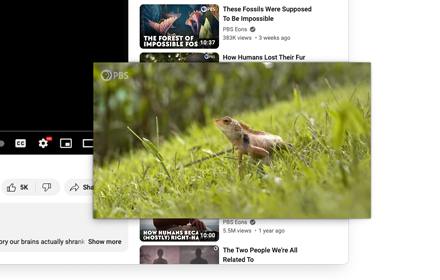
View highligthed elements (or page) Picture-In-Picture
As of May 2026, PIPElement has 43 users and a 5.00/5 rating from 2 reviews in the Functionality & UI category.
Usersup 2.4 percent+2.4%
43
43
Ratingno change0%
5.00
2 reviews
Reviewsno change0%
2
Version
0.2.5
Manifest V3
History
3 snapshotsTracking since Apr 1, 2026.
View as table
| Date | Users | Rating | Reviews | Version |
|---|---|---|---|---|
| Apr 1, 2026 | 42 | 5.00 | 2 | 0.2.5 |
| Apr 30, 2026 | 39 | 5.00 | 2 | 0.2.5 |
| May 27, 2026 | 38 | 5.00 | 2 | 0.2.5 |
| Now | 43 | 5.00 | 2 | 0.2.5 |
Permissions & access
- Permissions
- activeTabcontextMenus
- Host access
- None declared
Screenshots

About
View any element (or the whole page) Picture-In-Picture.
Not only videos or images, it works on any element.

Hold SHIFT to add the highligthed element to the PIP Window, or press ESC (or right-click) to quit the picker.
Use Q/A keys to expand/reduce the highligthed selection, then press SPACE to add it to the PIP Window.

You can also use Alt+P to activate the picker (or configure an alternate shortcut key in the extension settings).

TIP: Fine-tuning your selection using Q/A keys, and choosing a VIDEO element will ensure that the target video will be opened as PIP.

I'm using this all the time to isolate html elements (especially images ;), and to trigger Picture-In-Picture for videos on sites that don't expose the feature.

**NOTE**: Although the extension tries to keep the elements stylized as in the original page,
the underlying technology ([DocumentPictureInPicture](https://developer.chrome.com/docs/web-platform/document-picture-in-picture)) cannot ensure the same styles are applied consistently
(either because the DOM layout is different in the PIP Window vs the original page - so CSS doesn't work in the intended way - or JS is used to style the page).

Also note that DocumentPictureInPicture doesn't allow navigation, so clicking on links in the PIP Window will close it and restore elements to the original page.

For more info about the DocumentPictureInPicture API see also here: https://developer.mozilla.org/en-US/docs/Web/API/Document_Picture-in-Picture_API


REPO: https://github.com/azrafe7/PIPElement

Please report bugs/feature requests at https://github.com/azrafe7/PIPElement/issues

CHANGELOG: https://github.com/azrafe7/PIPElement/blob/main/CHANGELOG.md
Technical
- Version
- 0.2.5
- Manifest
- V3
- Size
- 17.39KiB
- Min Chrome
- 116
- Languages
- 1
- Featured
- No
Metadata
- ID
- onogpdnplalgnnnmlgaaodkeiijgmhmf
- Developer ID
- u19a7f73408ecd170a8d05ad5fcd10e52
- Developer Email
- [email protected]
- Created
- Dec 21, 2023
- Last Updated (Store)
- Feb 13, 2024
- Last Scraped
- May 27, 2026
- Website
- —
- Support URL
- https://github.com/azrafe7/PIPElement/issues
- Privacy Policy
- —
Similar extensions
Alternatives to PIPElement, ranked by description similarity.

PiP Anywhere
Picture-in-Picture mode for any website with full interactivity — scroll, click, type, and navigate in an always-on-top window.
52
★ 1.0

PiP: Seamless Picture-in-Picture
Transform your video watching experience with PiP! The effortless way to enable Picture-in-Picture mode on any website. A one-click…
13

PiP Button
Toggle Picture-in-Picture for any video. Set your shortcut in chrome://extensions/shortcuts (e.g., Alt+P) after installing.
51
★ 5.0
Picture-in-Picture Shortcut
Switch videos to Picture-in-Picture mode with a keyboard shortcut or toolbar button.
10.0K
★ 4.7

BetterPiP (Picture-in-Picture)
Unlock PiP on any site, enabling floating video windows, even on restricted elements.
231
★ 5.0

PiPlet
Toggle Picture-in-Picture on YouTube with a toolbar button or in-page pill.
4
★ 5.0

YouTube Picture in Picture
Watch videos using the YouTube Picture in Picture feature. It allows to use picture-in-picture mode on YouTube or other websites.
10.0K
★ 4.2

Picture in Picture
Picture in Picture for video on any site.
23
Data sourced from the Chrome Web Store · last verified May 27, 2026.