
Picture in Picture
Picture in Picture for video on any site.
As of May 2026, Picture in Picture has 23 users in the Functionality & UI category.
Usersdown 4.2 percent−4.2%
23
23
Ratingno change0%
—
— reviews
Reviewsno change0%
—
Version
1.1.1
Manifest V3
History
2 snapshotsTracking since Apr 29, 2026.
View as table
| Date | Users | Rating | Reviews | Version |
|---|---|---|---|---|
| Apr 29, 2026 | 24 | — | — | 1.1.1 |
| May 26, 2026 | 28 | — | — | 1.1.1 |
| Now | 23 | — | — | 1.1.1 |
Permissions & access
- Permissions
- contextMenusscripting
- Host access
- http://*/*, https://*/*
Screenshots
About
Continue watching your videos on Picture-in-Picture mode while doing something else.
What is the Picture-in-Picture (PiP) mode and how it will be useful for you?
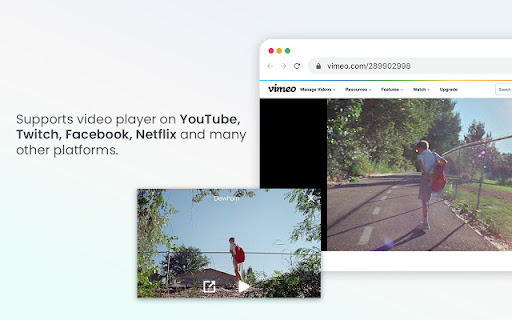
This mode lets you play any video in Picture-in-Picture (PiP) mode, and it works on all platforms. PiP is a popped-out, always-on-top video player that floats on top of other windows.

You can also reposition it along the screen border while you continue to surf the internet.

Picture-in-Picture - allows you to watch videos in a floating window (always on top of other windows) so you can keep track of what you are watching when interacting with other sites or applications.

Just click on the extension icon or run keyboard shortcut: Ctrl + M (Control + M on macOS) to display the video player on YouTube or any other websites on the Web. This window will play the video on all pages of the browser on which there is a video resource.
Technical
- Version
- 1.1.1
- Manifest
- V3
- Size
- 17.1KiB
- Min Chrome
- 88
- Languages
- 1
- Featured
- Yes
Metadata
- ID
- jimmojgkhijnamnpmkibfjkenianckjj
- Developer ID
- u3c487b0bf92d713a0c1d9fbf0ae83438
- Developer Email
- [email protected]
- Created
- Apr 7, 2024
- Last Updated (Store)
- Apr 7, 2024
- Last Scraped
- May 26, 2026
- Support URL
- —
- Privacy Policy
- https://miaplacidus-extensions.vercel.app/
Similar extensions
Alternatives to Picture in Picture, ranked by description similarity.

Media player classic
Watch videos using Picture-in-Picture mode (Floating Video Player).
1.0K
★ 4.6

PiP: Seamless Picture-in-Picture
Transform your video watching experience with PiP! The effortless way to enable Picture-in-Picture mode on any website. A one-click…
13

YouTube Picture in Picture
Watch videos using the YouTube Picture in Picture feature. It allows to use picture-in-picture mode on YouTube or other websites.
10.0K
★ 4.2

PiPlet
Toggle Picture-in-Picture on YouTube with a toolbar button or in-page pill.
4
★ 5.0

EnhanceTube: Sound, Themes & Bookmarks
Enhance YouTube: Picture-in-Picture, Smart Mini Player, Shorts Blocker, Volume Booster, Bookmarks, and Customization.
10

Hulu Picture in Picture
Take Full Control of Your Streams with Pluto TV Speeder
30
★ 1.0

One Click PiP
Click once to Picture-in-Picture and enjoy tracker-free, ad-free viewing with no data collected.
6

PiP Anywhere
Picture-in-Picture mode for any website with full interactivity — scroll, click, type, and navigate in an always-on-top window.
52
★ 1.0
Data sourced from the Chrome Web Store · last verified May 26, 2026.