
Blur It
Instantly blur sensitive data on any page. Perfect for screen sharing, demos, and tutorials. Hide text, images, or draw blur boxes.
As of June 2026, Blur It has 427 users and a 4.07/5 rating from 15 reviews in the Workflow & Planning category.
Usersup 27.1 percent+27.1%
427
427
Ratingno change0%
4.07
15 reviews
Reviewsno change0%
15
Version
10.1
Manifest V3
90-day change · In the last 90 days this extension 2 version updates.
History
10 snapshotsTracking since Apr 2, 2026.
View as table
| Date | Users | Rating | Reviews | Version |
|---|---|---|---|---|
| Apr 2, 2026 | 336 | 4.07 | 15 | 9.99 |
| Apr 17, 2026 | 346 | 4.07 | 15 | 9.99 |
| Apr 24, 2026 | 376 | 4.07 | 15 | 9.99 |
| May 1, 2026 | 384 | 4.07 | 15 | 9.99 |
| May 8, 2026 | 383 | 4.07 | 15 | 9.99 |
| May 13, 2026 | 401 | 4.07 | 15 | 9.99 |
| May 19, 2026 | 404 | 4.07 | 15 | 9.99 |
| May 25, 2026 | 401 | 4.07 | 15 | 10.0 |
| Jun 1, 2026 | 419 | 4.07 | 15 | 10.1 |
| Jun 7, 2026 | 412 | 4.07 | 15 | 10.1 |
| Now | 427 | 4.07 | 15 | 10.1 |
Changelog
- May 19, 2026description
Blur sensitive data during screen shares and recordings. One-click redaction for emails, finances, and more. Works on any website.

Share your screen confidently. Blur sensitive data in one click.

Blur It is the go-to privacy tool for professionals, creators, and teams who share their screen without sharing everything. Whether you're recording a product demo, presenting financial dashboards, or live streaming, Blur It keeps your private data private.

STOP EDITING VIDEOS IN POST
Don't waste hours blurring sensitive data after recording. Redact it live in the browser, before you hit record.

KEY FEATURES

➤ Precision Manual Redaction
- Click to Blur: Hover any element and click to redact it instantly.
- Draw Blur Area: Drag a custom box over any section of the page.
- Adjust Intensity: Choose between a subtle blur or a solid block.

➤ Smart Auto-Detection
Save time with intelligent filters that automatically find and blur sensitive data.
- Emails: Hide all email addresses on the page.
- Money: Obscure financial figures, prices, and salaries.
- Numbers: Mask phone numbers and ID strings.

➤ Remember Your Blurs
Tired of re-blurring every time the page loads? Toggle "Remember Blurs" and your redactions persist across refreshes and sessions. Come back later and your sensitive data stays hidden.

WORKS ON ANY WEBSITE
Gmail, Slack, Salesforce, dashboards, internal tools. If it runs in Chrome, you can blur it.

PERFECT FOR
- Sales & Customer Success: Demo your product using real accounts without exposing client data.
- HR & Recruiters: Share candidate profiles and salary data without risking exposure.
- Content Creators & Streamers: Prevent accidental leaks of your email, API keys, or personal info during live streams.
- Teachers & Trainers: Create clean, distraction-free educational materials.

PRIVACY BY DESIGN
Your data stays on your device. Blur It operates 100% locally within your browser. Nothing is collected, stored, or transmitted.

$49 one-time · Lifetime access · 30-day money-back guarantee

Questions? Contact [email protected]
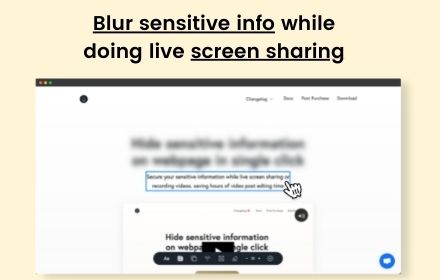
Blur sensitive data on any web page before you screen share or record. One click and it's gone. Try 10 free blurs, no credit card required.

STOP EDITING VIDEOS IN POST

Blurring sensitive data after a recording wastes hours. Blur it live in your browser, before you hit record. What you see is what your audience sees.

HOW IT WORKS

→ Click to Blur: Hover any element on the page and click. Done.
→ Draw Box: Drag a custom rectangle over anything you want hidden.
→ Smart Blur: Auto-detect and blur emails, financial figures, or numbers across the entire page in one tap.
→ Adjustable Intensity: Soft blur for context, solid block for total cover.
→ Remember Blurs: Toggle on and your redactions persist across page reloads. Come back tomorrow, your data is still hidden.

WORKS ON ANY SITE

Gmail, Slack, Salesforce, Stripe, Notion, your internal admin tools. If it loads in Chrome, you can blur it.

WHO IT'S FOR

→ Sales and CS teams running demos with real customer accounts.
→ Recruiters sharing candidate profiles and salary data.
→ Content creators and streamers protecting their inbox, API keys, and personal info on camera.
→ Teachers and trainers building clean educational walkthroughs.

PRIVATE BY DESIGN

Everything happens locally in your browser. Blur It does not collect, store, or transmit your data. Ever.

START WITH 10 FREE BLURS

Sign up and start blurring. No credit card. Once you hit your limit, unlock unlimited blurs:

Lifetime: $49.99 one-time

Use code BLURIT39 at checkout for $10 off lifetime.

Questions? [email protected]
Permissions & access
- Permissions
- activeTabscriptingstoragealarms
- Host access
- https://*.supabase.co/*
Screenshots


About
Blur sensitive data on any web page before you screen share or record. One click and it's gone. Try 10 free blurs, no credit card required.

STOP EDITING VIDEOS IN POST

Blurring sensitive data after a recording wastes hours. Blur it live in your browser, before you hit record. What you see is what your audience sees.

HOW IT WORKS

→ Click to Blur: Hover any element on the page and click. Done.
→ Draw Box: Drag a custom rectangle over anything you want hidden.
→ Smart Blur: Auto-detect and blur emails, financial figures, or numbers across the entire page in one tap.
→ Adjustable Intensity: Soft blur for context, solid block for total cover.
→ Remember Blurs: Toggle on and your redactions persist across page reloads. Come back tomorrow, your data is still hidden.

WORKS ON ANY SITE

Gmail, Slack, Salesforce, Stripe, Notion, your internal admin tools. If it loads in Chrome, you can blur it.

WHO IT'S FOR

→ Sales and CS teams running demos with real customer accounts.
→ Recruiters sharing candidate profiles and salary data.
→ Content creators and streamers protecting their inbox, API keys, and personal info on camera.
→ Teachers and trainers building clean educational walkthroughs.

PRIVATE BY DESIGN

Everything happens locally in your browser. Blur It does not collect, store, or transmit your data. Ever.

START WITH 10 FREE BLURS

Sign up and start blurring. No credit card. Once you hit your limit, unlock unlimited blurs:

Lifetime: $49.99 one-time

Use code BLURIT39 at checkout for $10 off lifetime.

Questions? [email protected]
Technical
- Version
- 10.1
- Manifest
- V3
- Size
- 20.03MiB
- Min Chrome
- 88
- Languages
- 1
- Featured
- No
Metadata
- ID
- lhiefljkimmkabhjepmkofflmadgbomm
- Developer ID
- ucb5abe9b6eb7ff6ab6b758633d274cde
- Developer Email
- [email protected]
- Created
- Jul 20, 2024
- Last Updated (Store)
- May 19, 2026
- Last Scraped
- Jun 7, 2026
- Website
- blur-it.app
- Support URL
- —
- Privacy Policy
- https://blur-it.app/privacy
Similar extensions
Alternatives to Blur It, ranked by description similarity.

Blur Screen - Sensitive Data Protection
Instantly blur sensitive data, text, images on any website. Perfect for screen sharing, demos, recordings & privacy protection.
57
★ 5.0

Page Blur - Hide Sensitive Info for Screen Sharing
Blur sensitive information and hide private data when screen sharing.
212
★ 5.0
blurweb.app
Blur any element text, image, input or paragraphs with single click.
10.0K
★ 4.4

ZeroBlur
Blur any sensitive information from any website or web app. Keep data safe when delivering demos or recording videos!
20.0K
★ 4.5

ScreenShield — Blur Sensitive Info for Screen Sharing
Instantly blur any text, image or area on any webpage. Perfect for screen recording, live demos & presentations.
26
★ 1.0

RedactWeb
Blur, protect and hide sensitive content on any website. Premium license required after 7-day trial.
23
★ 5.0

Screen Blur Pro
Focus your audience’s attention by blurring distractions during screen sharing and presentations.
175
★ 4.0

ScreenSafe Blur
Instantly hide sensitive information on your screen with one click.
2
Data sourced from the Chrome Web Store · last verified Jun 7, 2026.