
Text to Speech Free
Right click and convert text to speech. Read Aloud using the browsers SpeechSynthesis engine.
As of May 2026, Text to Speech Free has 153 users in the Productivity category.
Usersup 28.6 percent+28.6%
153
153
Ratingno change0%
—
— reviews
Reviewsno change0%
—
Version
0.2.3
Manifest V3
History
5 snapshotsTracking since Apr 1, 2026.
View as table
| Date | Users | Rating | Reviews | Version |
|---|---|---|---|---|
| Apr 1, 2026 | 119 | — | — | 0.2.3 |
| Apr 21, 2026 | 124 | — | — | 0.2.3 |
| May 6, 2026 | 141 | — | — | 0.2.3 |
| May 17, 2026 | 146 | — | — | 0.2.3 |
| May 31, 2026 | 155 | — | — | 0.2.3 |
| Now | 153 | — | — | 0.2.3 |
Permissions & access
- Permissions
- contextMenusscripting
- Host access
- <all_urls>
Screenshots
About
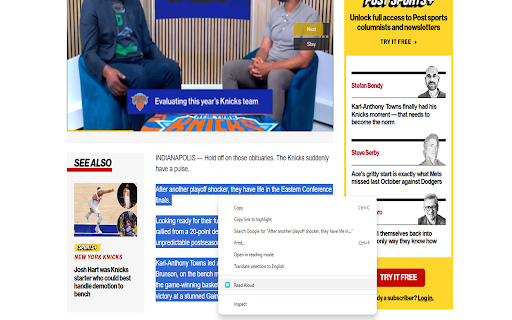
Use the context menu to turn any article into text to speech.

This extension is free to use. Simply highlight the text you want read out aloud and then right click, to get it to work.

A text-to-speech (TTS) browser extension turns any web page, email, or PDF into spoken audio on demand. With one click—or even a keyboard shortcut—you can have a synthetic yet natural voice read the content aloud while you drive, cook, or simply rest your eyes. What sounds like a small convenience ripples outward into time savings, better comprehension, and genuine inclusion. Below are some concrete benefits that make a TTS extension one of the most useful add-ons you can install.

1. Accessibility for readers with visual or cognitive barriers For millions of people with low vision, dyslexia, or other learning differences, reading long passages can be exhausting or outright impossible. TTS provides an instant accommodation: the page is parsed, queued, and spoken clearly at a controllable speed. Because the voice output is generated locally, users retain privacy while gaining the autonomy to browse any site—from scientific journals to social media—without waiting for authors to add screen-reader markup. This democratizes information access and satisfies the spirit (and, increasingly, the legal requirements) of inclusive design.

2. Reduced eye strain and screen fatigue Even for sighted users, staring at bright rectangles all day leads to dry eyes, headaches, and disrupted sleep. Switching a portion of your reading load to audio gives your vision—and the rest of your posture—a break. You can lean back, close your eyes, and absorb the same material without sacrificing productivity. Over weeks and months, small reductions in screen-time compound into meaningful relief from digital eye strain, especially for professionals who already spend eight hours in front of a monitor.

3. Productivity through multitasking and mobility Reading is a single-threaded activity; listening is not. With text-to-speech you can turn a 3 000-word industry report into a podcast-style experience while commuting, jogging, or tidying the house. This reclaiming of otherwise “dead” time means you finish articles and white papers you would have bookmarked and forgotten. Knowledge workers often cite an extra two to three hours of productive intake per week once they adopt a TTS workflow—a silent yet powerful advantage.

4. Enhanced comprehension and retention Cognitive-science studies show that pairing visual and auditory channels (“dual encoding”) improves memory. Even if you keep the screen visible, hearing the words synchronously can sharpen focus and reinforce complex vocabulary or technical terminology. Many people find they catch nuances—tone, irony, numbered lists—that their skimming eyes might miss. For language learners, listening to native-quality pronunciation while following along in text accelerates vocabulary acquisition and accent mimicry.
Technical
- Version
- 0.2.3
- Manifest
- V3
- Size
- 63.4KiB
- Min Chrome
- 88
- Languages
- 40
- Featured
- No
Metadata
- ID
- kjjbgjlgheapeklccilpahkjaejlmfkf
- Developer ID
- u7d6f4928c1672f3dc6733f990bdff9c7
- Developer Email
- [email protected]
- Created
- May 30, 2025
- Last Updated (Store)
- May 30, 2025
- Last Scraped
- May 31, 2026
- Website
- —
- Support URL
- —
- Privacy Policy
- —
Similar extensions
Alternatives to Text to Speech Free, ranked by description similarity.

Text to Voice Converter
Activate this extension and convert any selected text into voice with a simple right-click.
12

TtsZone
Enhance your web browsing experience with our text-to-speech (TTS) extension. Easily convert selected text on any webpage into…
—

IReadAll - Web Reading Aloud & Natural Text to Speech
Transform Web Text into Natural-Sounding Speech and Listen Instantly.
19
★ 5.0

Readerify
Read web pages aloud with advanced TTS.
712
★ 4.7

Reading Text - Simple Text to Speech
A simple, lightweight text-to-speech extension that reads selected text aloud.
4
★ 5.0
SKDOSS Text to Voice (TTS API)
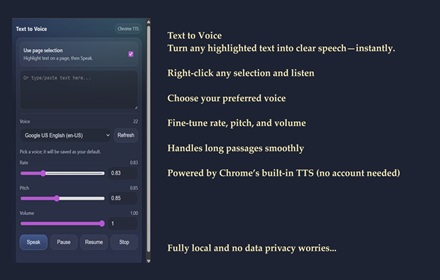
Speak selected or typed text using Chrome TTS voices.
63

Drag Listening
This is a tool that instantly reads aloud any text you highlight.
9
★ 5.0

Text-to-Speech Reader
Reads selected text aloud using your system's Text-to-Speech.
—
Data sourced from the Chrome Web Store · last verified May 31, 2026.