
Text to Voice Converter
Activate this extension and convert any selected text into voice with a simple right-click.
As of May 2026, Text to Voice Converter has 12 users in the Productivity category.
Usersup 20.0 percent+20.0%
12
12
Ratingno change0%
—
— reviews
Reviewsno change0%
—
Version
1.0
Manifest V3
History
3 snapshotsTracking since Apr 19, 2026.
View as table
| Date | Users | Rating | Reviews | Version |
|---|---|---|---|---|
| Apr 19, 2026 | 10 | — | — | 1.0 |
| May 4, 2026 | 12 | — | — | 1.0 |
| May 13, 2026 | 11 | — | — | 1.0 |
| Now | 12 | — | — | 1.0 |
Permissions & access
- Permissions
- storagecontextMenusnotifications
- Host access
- <all_urls>
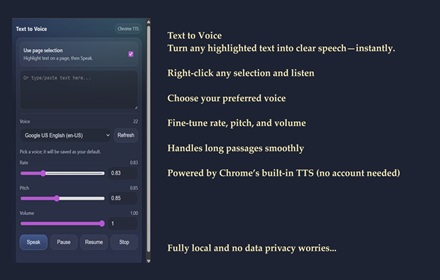
Screenshots

About
Looking for a simple way to listen to written text instead of reading it? The Text to Voice Converter extension is the perfect tool for turning any selected text into speech with just a right-click. Whether you're multitasking, visually impaired, or simply prefer audio, this tool helps you convert written words into clear, natural-sounding voice instantly.

No more copying text into separate software this extension works right in your browser, making text-to-speech fast, easy, and accessible.


Key Features

One-Click Voice Playback -Just highlight the text and right-click to hear it instantly.

Natural-Sounding Voice -Enjoy smooth, human-like speech that’s easy to listen to.

Works on Any Website -Whether you're reading an article, email, or online document, this extension works everywhere.

Lightweight & Fast-Designed for quick performance without slowing down your browser.


How to Use In Simple Steps

Install the Extension - Download and install the Text to Voice Converter extension from the Chrome Web Store.

Select Any Text - Highlight the text you want to convert into voice.

Right-Click and Choose 'Convert to Voice' - Once you've selected the text, right-click and choose the ‘Convert to Voice’ option from the menu—playback controls like Pause and Stop will also appear for easy manage

Listen Instantly - The selected text will be read out loud immediately using your device’s speakers.


Why It Is Useful

The Text to Voice Converter is incredibly useful for turning reading into a listening experience. It helps users who may struggle with reading on screens for long periods and is especially helpful for those with learning or visual difficulties. It also benefits busy individuals who want to absorb content while doing other tasks.


To Whom It Is Useful

This extension is perfect for students, professionals, researchers, content consumers, and individuals with visual impairments or reading challenges. Whether you're reviewing articles, listening to study notes, or consuming news hands-free, this tool makes digital content more accessible and flexible for everyone.
Technical
- Version
- 1.0
- Manifest
- V3
- Size
- 27.13KiB
- Min Chrome
- 88
- Languages
- 1
- Featured
- No
Metadata
- ID
- ngioggdnahikmgkdfcilhnilooldnpkk
- Developer ID
- ud70488d4cbaf063709b1aa51c4a6b867
- Developer Email
- [email protected]
- Created
- May 15, 2025
- Last Updated (Store)
- May 15, 2025
- Last Scraped
- May 26, 2026
- Website
- —
- Support URL
- —
Similar extensions
Alternatives to Text to Voice Converter, ranked by description similarity.

LuvVoice - Text to Speech
Convert any text to natural speech with 300+ AI voices. Free online text-to-speech tool powered by AI.
64

Text-to-Speech Reader
Reads selected text aloud using your system's Text-to-Speech.
—
SKDOSS Text to Voice (TTS API)
Speak selected or typed text using Chrome TTS voices.
63

Text to Speech TTS AI | Readvox
Read aloud Web articles, Google Docs, Kindle, PDF with natural, lifelike voices. Beautiful text to speech AI TTS.
40.0K
★ 4.2

Text to Speech Free
Right click and convert text to speech. Read Aloud using the browsers SpeechSynthesis engine.
153

Reading Text - Simple Text to Speech
A simple, lightweight text-to-speech extension that reads selected text aloud.
4
★ 5.0

Read text out loud
Read text out loud is a Chrome extension that converts written text into clear and natural-sounding speech.
2.0K
★ 4.2

TtsZone
Enhance your web browsing experience with our text-to-speech (TTS) extension. Easily convert selected text on any webpage into…
—
Data sourced from the Chrome Web Store · last verified May 26, 2026.