
NflxMultiSubs 2021 (Netflix Multi. Subtitles)
Bilingual Subtitles for Netflix (fixed)
As of May 2026, NflxMultiSubs 2021 (Netflix Multi. Subtitles) has 50,000 users and a 4.69/5 rating from 133 reviews in the Accessibility category.
Usersno change0%
50.0K
50,000
Ratingno change0%
4.69
133 reviews
Reviewsno change0%
133
Version
3.0.2
Manifest V3
History
2 snapshotsTracking since Apr 20, 2026.
View as table
| Date | Users | Rating | Reviews | Version |
|---|---|---|---|---|
| Apr 20, 2026 | 50.0K | 4.69 | 133 | 3.0.2 |
| May 6, 2026 | 50.0K | 4.69 | 133 | 3.0.2 |
| Now | 50.0K | 4.69 | 133 | 3.0.2 |
Permissions & access
- Permissions
- storage
- Host access
- https://www.netflix.com/watch/*, https://assets.nflxext.com/*
Screenshots


About
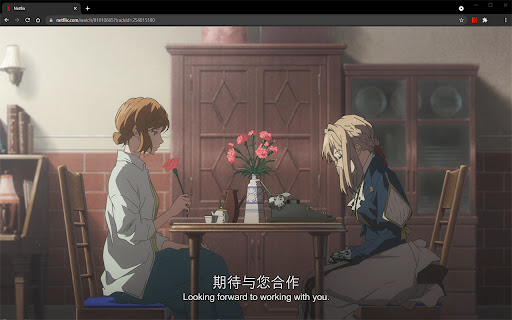
Best ever Chrome/Firefox extension to unleash bilingual subtitles on Netflix!

This is a fixed and updated re-release of the original NflxMultiSubs. This version contains a fix for the 2021 Netflix redesign that broke the original, and has various other bugfixes and improvements.

Click on the extension button to access the extension settings.
Note: this extension will only show the subtitle languages that are available in your country.

Features:
- Enable secondary subtitles in the available languages (incl. image-based subtitles like Japanese, Chinese, Russian, …)
- Smart selection on secondary subtitles. Choose between 3 subtitle activation modes: disabled; automatically match subtitle language to audio language; or remember the last selected language.
- Seamless integration with native Netflix player UI -- switch languages in place
- Adjust playback speed with a hotkey ( [ and ] )
- Free and open source!

Report bugs by creating an issue on Github (https://github.com/gmertes/NflxMultiSubs) or send me an email (click "contact the publisher" on the right of this page).

---------------------
Changelog:
---------------------
v3.0.2:
- Fix subtitle download failing in some cases

v3.0.1:
- Fix settings not persisting
- Fix playback rate controller on Turkish keyboard

v3.0.0:
- Fix Chrome version with experimental manifest v3 support

v2.3.6:
- Fix: don't trigger playback rate controller if modifier key is pressed

v2.3.5:
- NEW: improved font size settings. This should make font size better adaptable to various monitor sizes and resolutions.
- Fix a crash in the candidate subtitle server selection.

v2.3.4:
- NEW: Extra out of region languages can now be used as secondary subtitles. To do so, activate the wanted language as a primary subtitle first. The language will then show up in the secondary subtitle list ready to be used. After selecting the wanted language as secondary sub, the primary language can be switched back. For now you have to do this for every new playback.
- Fix the subtitle color picker on Firefox
- Fix key binds for the playback rate controller (now [ and ] for all keyboard layouts)

v2.3.3:
- Small fix to make download url parsing more robust

v2.3.2:
- Fix crash in subtitle download url parser
- NEW: Add keybind to toggle subtitles (v)

v2.3.1:
- Fix line breaks not showing up in secondary subs

v2.3.0:
- Fix critical bug in subtitle builder
- NEW: You can now change the color of text-based subs from the settings page.

v2.2.10:
- Fix primary sub scaling
- Improve secondary sub scaling for 4K displays
- Show vertical scrollbar when subtitle list overflows

v2.2.9:
- Fix fatal crash in image subs builder

v2.2.8:
- Fix selected sub icon style

v2.2.7:
- Improve subtitle visibility
- Also try to match captioning type when activating last used language

v2.2.6:
- Fix another instance of image-based subtitle overlap
- Fix default audio language selection
- Fix playback rate controller

v2.2.5:
- NEW: Show last used language in settings menu
- Fix icon desaturation when video player is closed
- Fix subtitle menu style

v2.2.4:
- Fix last used language not always saving

v2.2.3:
- NEW: Add secondary language options (disabled, audio, last used)
- Fix subtitles overlapping in certain cases
- Fix image-based subtitle scaling
- Fix image-based subs sometimes falling outside of top screen edge

v2.2.2:
- Improve subtitles activating on the first try without requiring a refresh

v2.2.1:
- Fix subs not loading without player refresh

v2.2.0 (first release):
- Fix for the September 2021 Netflix redesign that broke the original extension
Technical
- Version
- 3.0.2
- Manifest
- V3
- Size
- 117KiB
- Min Chrome
- 88
- Languages
- 1
- Featured
- No
Metadata
- ID
- jepfhfjlkgobooomdgpcjikalfpcldmm
- Developer ID
- u493edfd9c10c1a235383158967169ee7
- Developer Email
- [email protected]
- Created
- Oct 26, 2021
- Last Updated (Store)
- Jun 10, 2025
- Last Scraped
- May 30, 2026
- Website
- —
- Support URL
- —
- Privacy Policy
- —
Similar extensions
Alternatives to NflxMultiSubs 2021 (Netflix Multi. Subtitles), ranked by description similarity.

Netflix Bilingual Subtitles
Bilingual Subtitles for Netflix
80.0K
★ 2.9

Substital: Add subtitles to videos and movies
Add captions to any video or movie on Netflix, Youtube or other platforms.
400.0K
★ 4.3

Netflix Subtitles+
Overlay external subtitles on Netflix with auto-sync, SPA navigation support, and friendly UX.
71

SubEase
Adding subtitles to any platform that offers streaming services.
22
★ 5.0

OTT Subtitle Assistant
Provides custom subtitle layouts to enhance the viewing experience for low-vision users.
2
Netflix Keyboard Shortcuts Plus
for 3 secs forward/backward
410
★ 4.6

SubPlus - Multiple Subtitles for YouTube
Display multiple subtitle tracks simultaneously on YouTube videos and customize them for the ideal viewing experience.
281
★ 4.5

Subtitle Overlay
Search, download, and overlay subtitles on any video with customizable appearance and timing controls
760
★ 5.0
Data sourced from the Chrome Web Store · last verified May 30, 2026.