
Substital: Add subtitles to videos and movies
Add captions to any video or movie on Netflix, Youtube or other platforms.
As of June 2026, Substital: Add subtitles to videos and movies has 400,000 users and a 4.34/5 rating from 3,148 reviews in the Accessibility category.
Usersup 33.3 percent+33.3%
400.0K
400,000
Ratingup 0.2 percent+0.2%
4.34
3.1K reviews
Reviewsup 1.7 percent+1.7%
3.1K
Version
2.10.5
Manifest V3
90-day change · In the last 90 days this extension gained 100.0K users, 1 version update.
History
12 snapshotsTracking since Apr 1, 2026.
View as table
| Date | Users | Rating | Reviews | Version |
|---|---|---|---|---|
| Apr 1, 2026 | 300.0K | 4.33 | 3.1K | 2.10.3 |
| Apr 18, 2026 | 300.0K | 4.33 | 3.1K | 2.10.3 |
| Apr 28, 2026 | 300.0K | 4.33 | 3.1K | 2.10.3 |
| May 5, 2026 | 300.0K | 4.33 | 3.1K | 2.10.5 |
| May 10, 2026 | 300.0K | 4.34 | 3.1K | 2.10.5 |
| May 12, 2026 | 300.0K | 4.34 | 3.1K | 2.10.5 |
| May 14, 2026 | 300.0K | 4.34 | 3.1K | 2.10.5 |
| May 16, 2026 | 300.0K | 4.34 | 3.1K | 2.10.5 |
| May 21, 2026 | 300.0K | 4.34 | 3.1K | 2.10.5 |
| May 31, 2026 | 300.0K | 4.34 | 3.1K | 2.10.5 |
| Jun 5, 2026 | 300.0K | 4.34 | 3.1K | 2.10.5 |
| Jun 16, 2026 | 300.0K | 4.34 | 3.1K | 2.10.5 |
| Now | 400.0K | 4.34 | 3.1K | 2.10.5 |
Changelog
- Apr 28, 2026description
Be it on Netflix, Disney+, Youtube or any other online streaming website - Our mission is to fill any language gap that exists whether for entertainment, language learning or to make videos accessible to the Deaf and Hard-of-Hearing.

RECENT UPDATES:
- 01.09.25 Fix issues with HBO Max, Netflix, and Disney+. Mubi is now officially supported!
- 03.05.25 Fix issues with Amazon Prime Video and Dailymotion.
- 22.12.24 Update to ManifestV3. Fixes issues with Disney+ and ok.ru.
- 21.01.24 Use the new OpenSubtitles API and fix an issue with downloading subtitles
- 12.11.22 Fix issues with HBOMax
- 12.07.22 Fix issues with Amazon prime videos
- 11.03.22 Add support for HBOMax + Layout bug fix for big font size
- 15.02.22 New Design for the popover of the extension
- 15.02.22 Fix bug on mobile Kiwi browser (permission denied)
- 07.12.21 Added support for Disney+
- 07.12.21 Fixed the bug with Netflix new video player. Runs again on Netflix!

FEATURES:
- Supports Netflix, HBOMax, Disney+, Amazon Prime Video, YouTube, and many other video platforms.
- Can be used on android mobile devices with the Kiwi browser
- Search for subtitles with the built-in-search feature.
- Add your own subtitles with drag and drop (supported format: SubRip (.SRT) or ZIP archive containing a .SRT).
- Manually synchronize the subtitles, if they are out of sync.
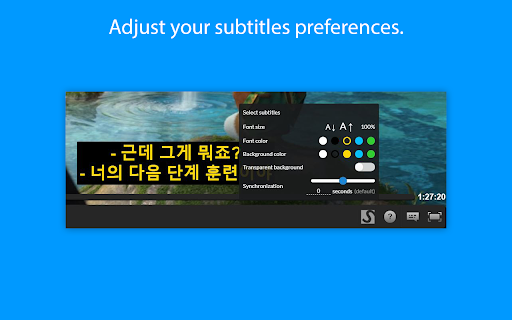
- Change the subtitles font size, text colour and background color.
- Supports special characters for languages like Greek or Arabic.
- Substital is passive by default and won't inject anything in the pages you visit. Only YOU decide when to add subtitles to a video.

HOW TO USE:
- Add the extension to your browser.
- Pin it, so you can find it easily (Highly recommended).
- Navigate to a website containing a video.
- Click on the Substital extension at the top right of your browser. It will open a pop-over.
- Select the detected video.
- Add subtitles by searching or drop your own file.

Enjoy watching and if you like our product, please leave a review or let us know how we can make Substital even better!

🌞 Happy customers 🌞
“I've tried 9 different desktop media players but none of them display subtitles as accurately on time and precise as Substital”

“This is an awesome extension for watching things on third party sites, would hundred percent recommend it.”

“Very useful for non native english speakers such as me to watch movies and series in english”

CONTACT:
To report a bug or suggestion: [email protected]
Twitter: @substital

Substital is proud to support the Hearing Health Foundation, a nonprofit that promotes hearing health for everyone.  We invite you to help our mission when you are shopping at partner stores, at no cost to you.  Support is always optional, and can be permanently disabled at any time. Substital may get paid commissions directly from companies and/or via affiliate programs on sites visited and/or products purchased while using this browser extension.  These commissions/affiliate-payments become the donations that go to your selected charity.

Aside from these paid commissions, Substital is completely free, without any ads and no hidden costs. Therefore donations are very appreciated to help me to maintain the extension. Rating and reviewing helps a lot as well.
You can donate here: https://substital.com/donations
or bitcoins here: https://substital.com/donations/btc
Be it on Netflix, Disney+, Youtube or any other online streaming website - Our mission is to fill any language gap that exists whether for entertainment, language learning or to make videos accessible to the Deaf and Hard-of-Hearing.

RECENTLY UPDATED & ACTIVELY MAINTAINED:
- April 2026: Fixes for Amazon Prime Video. Expanded video detection for more websites.
- September 2025: Fixes for HBO Max, Netflix, and Disney+. Mubi now officially supported.
- May 2025: Fixes for Amazon Prime Video and Dailymotion.
- December 2024: Migrated to Manifest V3. Fixes for Disney+ and ok.ru.

FEATURES:
- Supports Netflix, HBOMax, Disney+, Amazon Prime Video, YouTube, and many other video platforms.
- Search for subtitles with the built-in-search feature.
- Add your own subtitles with drag and drop (supported format: SubRip (.SRT) or ZIP archive containing a .SRT).
- Manually synchronize the subtitles, if they are out of sync.
- Change the subtitles font size, text colour and background color.
- Supports special characters for languages like Greek or Arabic.
- Can be used on android mobile devices with the Kiwi browser
- Substital is passive by default and won't be automatically injected in the pages you visit. Only YOU decide when to add subtitles to a video.

HOW TO USE:
- Add the extension to your browser.
- Pin it, so you can find it easily (Highly recommended).
- Navigate to a website containing a video.
- Click on the Substital extension at the top right of your browser. It will open a pop-over.
- Select the detected video.
- Add subtitles by searching or drop your own file.

Enjoy watching and if you like our product, please leave a review or let us know how we can make Substital even better!

🌞 Happy customers 🌞
“I've tried 9 different desktop media players but none of them display subtitles as accurately on time and precise as Substital”

“This is an awesome extension for watching things on third party sites, would hundred percent recommend it.”

“Very useful for non native english speakers such as me to watch movies and series in english”

CONTACT:
To report a bug or suggestion: [email protected]
Twitter: @substital

Substital is proud to support the Hearing Health Foundation, a nonprofit that promotes hearing health for everyone.  We invite you to help our mission when you are shopping at partner stores, at no cost to you.  Support is always optional, and can be permanently disabled at any time. Substital may get paid commissions directly from companies and/or via affiliate programs on sites visited and/or products purchased while using this browser extension.  These commissions/affiliate-payments become the donations that go to your selected charity.

Aside from these paid commissions, Substital is completely free, without any ads and no hidden costs. Therefore donations are very appreciated to help me to maintain the extension. Rating and reviewing helps a lot as well.
You can donate here: https://substital.com/donations
or bitcoins here: https://substital.com/donations/btc
Permissions & access
- Permissions
- activeTabstoragescriptingwebRequest
- Host access
- <all_urls>
Screenshots


About
Be it on Netflix, Disney+, Youtube or any other online streaming website - Our mission is to fill any language gap that exists whether for entertainment, language learning or to make videos accessible to the Deaf and Hard-of-Hearing.

RECENTLY UPDATED & ACTIVELY MAINTAINED:
- April 2026: Fixes for Amazon Prime Video. Expanded video detection for more websites.
- September 2025: Fixes for HBO Max, Netflix, and Disney+. Mubi now officially supported.
- May 2025: Fixes for Amazon Prime Video and Dailymotion.
- December 2024: Migrated to Manifest V3. Fixes for Disney+ and ok.ru.

FEATURES:
- Supports Netflix, HBOMax, Disney+, Amazon Prime Video, YouTube, and many other video platforms.
- Search for subtitles with the built-in-search feature.
- Add your own subtitles with drag and drop (supported format: SubRip (.SRT) or ZIP archive containing a .SRT).
- Manually synchronize the subtitles, if they are out of sync.
- Change the subtitles font size, text colour and background color.
- Supports special characters for languages like Greek or Arabic.
- Can be used on android mobile devices with the Kiwi browser
- Substital is passive by default and won't be automatically injected in the pages you visit. Only YOU decide when to add subtitles to a video.

HOW TO USE:
- Add the extension to your browser.
- Pin it, so you can find it easily (Highly recommended).
- Navigate to a website containing a video.
- Click on the Substital extension at the top right of your browser. It will open a pop-over.
- Select the detected video.
- Add subtitles by searching or drop your own file.

Enjoy watching and if you like our product, please leave a review or let us know how we can make Substital even better!

🌞 Happy customers 🌞
“I've tried 9 different desktop media players but none of them display subtitles as accurately on time and precise as Substital”

“This is an awesome extension for watching things on third party sites, would hundred percent recommend it.”

“Very useful for non native english speakers such as me to watch movies and series in english”

CONTACT:
To report a bug or suggestion: [email protected]
Twitter: @substital

Substital is proud to support the Hearing Health Foundation, a nonprofit that promotes hearing health for everyone.  We invite you to help our mission when you are shopping at partner stores, at no cost to you.  Support is always optional, and can be permanently disabled at any time. Substital may get paid commissions directly from companies and/or via affiliate programs on sites visited and/or products purchased while using this browser extension.  These commissions/affiliate-payments become the donations that go to your selected charity.

Aside from these paid commissions, Substital is completely free, without any ads and no hidden costs. Therefore donations are very appreciated to help me to maintain the extension. Rating and reviewing helps a lot as well.
You can donate here: https://substital.com/donations
or bitcoins here: https://substital.com/donations/btc
Technical
- Version
- 2.10.5
- Manifest
- V3
- Size
- 1.55MiB
- Min Chrome
- 88
- Languages
- 3
- Featured
- Yes
Metadata
- ID
- kkkbiiikppgjdiebcabomlbidfodipjg
- Developer ID
- ucbd21e3ccaccfaca31adc613a1add2fc
- Developer Email
- [email protected]
- Created
- Apr 17, 2016
- Last Updated (Store)
- Apr 20, 2026
- Last Scraped
- Jun 16, 2026
- Website
- https://substital.com/
- Support URL
- —
- Privacy Policy
- —
Similar extensions
Alternatives to Substital: Add subtitles to videos and movies, ranked by description similarity.

SubEase
Adding subtitles to any platform that offers streaming services.
22
★ 5.0

Netflix Bilingual Subtitles
Bilingual Subtitles for Netflix
80.0K
★ 2.9

Subtitle Overlay
Search, download, and overlay subtitles on any video with customizable appearance and timing controls
760
★ 5.0

SubPlus - Multiple Subtitles for YouTube
Display multiple subtitle tracks simultaneously on YouTube videos and customize them for the ideal viewing experience.
281
★ 4.5

NflxMultiSubs 2021 (Netflix Multi. Subtitles)
Bilingual Subtitles for Netflix (fixed)
50.0K
★ 4.7

closed caption - dual subtitle viewer
Extension for viewing another language subtitles and existing subtitles together
2.0K
★ 3.6

Dual Subtitle Overlay
Add 2 SRT subtitles to any webpage with timing controls. Perfect for language learning & watching content with bilingual subtitles.
454
★ 4.3

Subtitle Anything!
Add AI generated subtitles to any video or audio playing in your browser.
3.0K
★ 3.3
Data sourced from the Chrome Web Store · last verified Jun 16, 2026.