
ExportGPT: Export ChatGPT Conversation
All-in-one ChatGPT conversation export plugin, copy or export ChatGPT web page content, support multiple formats
As of June 2026, ExportGPT: Export ChatGPT Conversation has 20,000 users and a 3.33/5 rating from 55 reviews in the Productivity category.
Usersup 100.0 percent+100.0%
20.0K
20,000
Ratingdown 3.2 percent−3.2%
3.33
55 reviews
Reviewsup 22.2 percent+22.2%
55
Version
1.65
Manifest V3
90-day change · In the last 90 days this extension gained 10.0K users, 8 version updates.
History
14 snapshotsTracking since Apr 5, 2026.
View as table
| Date | Users | Rating | Reviews | Version |
|---|---|---|---|---|
| Apr 5, 2026 | 10.0K | 3.44 | 45 | 1.54 |
| Apr 16, 2026 | 20.0K | 3.43 | 47 | 1.54 |
| Apr 26, 2026 | 10.0K | 3.35 | 49 | 1.55 |
| May 7, 2026 | 10.0K | 3.38 | 50 | 1.55 |
| May 14, 2026 | 10.0K | 3.33 | 51 | 1.55 |
| May 23, 2026 | 10.0K | 3.33 | 52 | 1.56 |
| May 28, 2026 | 20.0K | 3.34 | 53 | 1.59 |
| May 31, 2026 | 20.0K | 3.34 | 53 | 1.60 |
| Jun 3, 2026 | 20.0K | 3.34 | 53 | 1.61 |
| Jun 6, 2026 | 30.0K | 3.34 | 53 | 1.61 |
| Jun 8, 2026 | 30.0K | 3.37 | 54 | 1.62 |
| Jun 11, 2026 | 30.0K | 3.37 | 54 | 1.63 |
| Jun 15, 2026 | 30.0K | 3.37 | 54 | 1.64 |
| Jun 22, 2026 | 20.0K | 3.37 | 54 | 1.65 |
| Now | 20.0K | 3.33 | 55 | 1.65 |
Permissions & access
- Permissions
- storageidentitywebNavigationwebRequestactiveTabalarms
- Host access
- http://*/*, https://*/*, http://*/*, https://*/*
Screenshots

About
📙 Feature

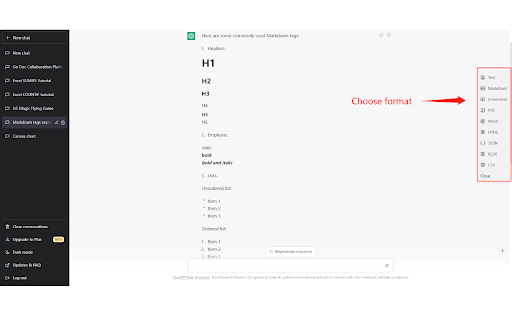
Quickly copy or export ChatGPT conversations from the sidebar button to download and save chat history in one click.

📋 Supported formats

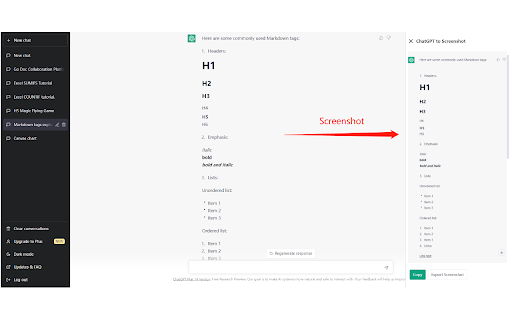
Export ChatGPT to Markdown,  Screenshot, PDF, HTML, Excel, etc.
Go to the home page to see all supported formats
https://chatopenai.pro/exportgpt/

How to upgrade to ExportGPT Pro
https://chatopenai.pro/exportgpt-pro/

⚙️ Supported features

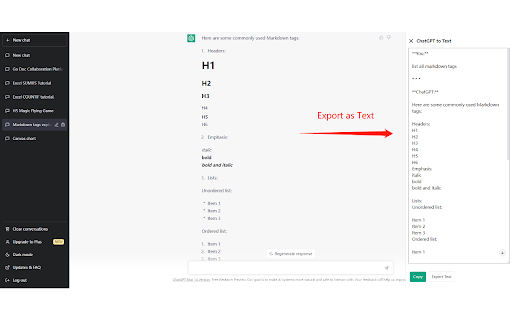
- Preview, modify, copy, download target format files
- Export settings: Customize the export button that needs to be displayed
- Export settings: File name insert chat update time
- Export settings: Hide sidebar during initialization
- Support exporting ChatGPT shared links
- Support image content
- Support custom export dialogue content, select all, inverse select, only select the answer

⚒️ Tips for use

1. Open ChatGPT, chat with ChatGPT
     https://chat.openai.com
2. The ExportGPT plugin will place a column of sidebar buttons on the right side of the page, click the format you want to export
3. In the pop-up panel, you can preview, modify, copy or download the content to be exported

🔗 Links

- Export any web content to Markdown format: https://chatopenai.pro/web2markdown/

🙋 Feedback

Any questions or BUG submissions, please leave a message at https://chatopenai.pro/exportgpt/
or contact [email protected]
Technical
- Version
- 1.65
- Manifest
- V3
- Size
- 500KiB
- Min Chrome
- 88
- Languages
- 55
- Featured
- No
Metadata
- ID
- jamcijfplmgbngnppdhmbbogjebgfimn
- Developer ID
- u7afdea4a70d79da3daaa9f5d6c6bfb28
- Developer Email
- [email protected]
- Created
- Mar 25, 2023
- Last Updated (Store)
- Jun 14, 2026
- Last Scraped
- Jun 22, 2026
- Website
- exportgpt.pro
- Support URL
- https://exportgpt.pro/
- Privacy Policy
- https://exportgpt.pro/privacy
Similar extensions
Alternatives to ExportGPT: Export ChatGPT Conversation, ranked by description similarity.

ChatExport – Export ChatGPT to PDF, TXT, Markdown & HTML
Export ChatGPT chats to PDF, TXT, Markdown & HTML in one click. Custom fonts, dark mode & instant downloads. Save AI chats.
32

ChatGPT to Markdown
Export ChatGPT conversations to Markdown format
20
★ 5.0

ChatGPT Elegant Exporter - Save ChatGPT to PDF, HTML, Markdown, or Text
Export ChatGPT conversations as beautifully styled PDF, HTML, Markdown, or Text files with code highlighting and dark mode support.
211
★ 4.7
ChatGPT Exporter
Export ChatGPT conversations to PDF, Word, Markdown, and Text.
194
★ 1.0

ChatGPT Conversation Exporter
Export ChatGPT conversations to Markdown or plain text. Supports copy to clipboard and download as .md file.
—

ChatGPT Exporter: PDF & HTML
Export ChatGPT conversations as polished PDFs or clean HTML pages. Fast, private, and easy to use.
22

ChatGPT Exporter — Export Chat to PDF, Markdown, JSON & CSV
Export ChatGPT conversations to PDF, Markdown, Text, CSV, JSON. Download and save any chat. Free, open-source, 100% local.
489
★ 4.2

AI Chat Export to Markdown
A Chrome extension that exports Claude chat history as Markdown text
378
★ 2.5
Data sourced from the Chrome Web Store · last verified Jun 22, 2026.