
ChatExport – Export ChatGPT to PDF, TXT, Markdown & HTML
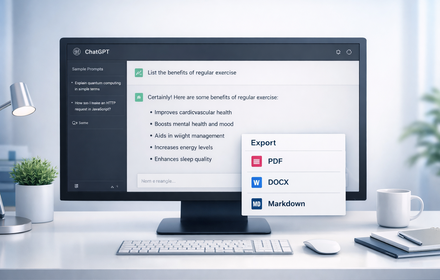
Export ChatGPT chats to PDF, TXT, Markdown & HTML in one click. Custom fonts, dark mode & instant downloads. Save AI chats.
As of June 2026, ChatExport – Export ChatGPT to PDF, TXT, Markdown & HTML has 32 users in the Productivity category.
Usersup 700.0 percent+700.0%
32
32
Ratingno change0%
—
— reviews
Reviewsno change0%
—
Version
1.1.1
Manifest V3
90-day change · In the last 90 days this extension 1 version update.
History
10 snapshotsTracking since Apr 10, 2026.
View as table
| Date | Users | Rating | Reviews | Version |
|---|---|---|---|---|
| Apr 10, 2026 | 4 | — | — | 1.1.0 |
| Apr 20, 2026 | 8 | — | — | 1.1.0 |
| Apr 26, 2026 | 11 | — | — | 1.1.1 |
| May 4, 2026 | 13 | — | — | 1.1.1 |
| May 9, 2026 | 15 | — | — | 1.1.1 |
| May 14, 2026 | 18 | — | — | 1.1.1 |
| May 21, 2026 | 20 | — | — | 1.1.1 |
| May 27, 2026 | 23 | — | — | 1.1.1 |
| Jun 3, 2026 | 27 | — | — | 1.1.1 |
| Jun 9, 2026 | 31 | — | — | 1.1.1 |
| Now | 32 | — | — | 1.1.1 |
Changelog
- Apr 20, 2026short_description
Export ChatGPT chats to PDF, TXT, Markdown & HTML in one click. Custom fonts & dark mode. Save and archive your AI chats.
Export ChatGPT chats to PDF, TXT, Markdown & HTML in one click. Custom fonts, dark mode & instant downloads. Save AI chats.
- Apr 20, 2026name
ChatExport – PDF, TXT, Markdown & HTML
ChatExport – Export ChatGPT to PDF, TXT, Markdown & HTML
Permissions & access
- Permissions
- storageactiveTabscripting
- Host access
- https://chat.openai.com/*, https://chatgpt.com/*
Screenshots


About
📄 ChatExport — Export & Save ChatGPT Conversations Instantly

Tired of losing important ChatGPT conversations? ChatExport adds a floating export button directly inside ChatGPT — download any chat in one click. No copy-paste. No hassle.

── EXPORT FORMATS ──────────────────────────

✅ PDF — Clean, printable document via Chrome's built-in Save as PDF
✅ TXT — Plain text file, perfect for notes and offline archives
✅ Markdown (.md) — Ideal for Notion, Obsidian, GitHub & developers
✅ HTML — Styled standalone webpage, shareable anywhere

── FEATURES ────────────────────────────────

⚡ One-click export from any ChatGPT conversation
🎨 6 Font choices: Inter, Roboto, Poppins, Lato, Open Sans, Source Sans Pro
🔤 3 Font sizes: Small, Medium, Large
🌙 Full dark mode support — easy on the eyes
🔘 Toggle the floating button on/off anytime
💾 All settings saved automatically

── HOW TO USE ──────────────────────────────

1️⃣ Open any conversation on chatgpt.com
2️⃣ Click the "ChatExport" floating button (top-right)
3️⃣ Select your font, size, and format
4️⃣ Hit Export Now — file downloads instantly
5️⃣ For PDF: Chrome print dialog opens → Save as PDF

── PRIVACY & SECURITY ──────────────────────

🔒 100% local processing — nothing leaves your browser
🚫 Zero data collection — no analytics, no tracking
🛡️ No account needed — works instantly after install
📵 No external servers — completely offline export

── WORKS ON ────────────────────────────────

- chatgpt.com
- chat.openai.com

── WHY CHATEXPORT? ─────────────────────────

ChatExport is the fastest, cleanest way to save your AI conversations. Whether you're a developer exporting to Markdown, a student saving notes as PDF, or a professional archiving research, ChatExport handles it all in one click.

✔ Works on new chats AND existing conversations
✔ Lightweight — zero impact on ChatGPT performance
✔ Beautiful minimal design — fits naturally into ChatGPT UI
✔ Completely free, no subscription required
Technical
- Version
- 1.1.1
- Manifest
- V3
- Size
- 38.95KiB
- Min Chrome
- 88
- Languages
- 1
- Featured
- No
Metadata
- ID
- eoedljfaajjfdhialkbeajhoodnnpnag
- Developer ID
- ue97d28d6e1b40292368a4bbaeda1b4b7
- Developer Email
- [email protected]
- Created
- Mar 16, 2026
- Last Updated (Store)
- Apr 20, 2026
- Last Scraped
- Jun 9, 2026
- Website
- —
- Privacy Policy
- https://chatgpttopdf.blogspot.com/p/privacy-policy.html
Similar extensions
Alternatives to ChatExport – Export ChatGPT to PDF, TXT, Markdown & HTML, ranked by description similarity.
ChatGPT Exporter
Export ChatGPT conversations to PDF, Word, Markdown, and Text.
194
★ 1.0

ChatGPT Exporter — Export Chat to PDF, Markdown, JSON & CSV
Export ChatGPT conversations to PDF, Markdown, Text, CSV, JSON. Download and save any chat. Free, open-source, 100% local.
489
★ 4.2

ChatGPT to PDF – ChatXporter
One-click ChatGPT to PDF conversion. Select chats, retain code & math, export as PDF, Markdown, or PNG — 100% local processing.
68
★ 1.0

ChatGPT PDF Exporter – Download ChatGPT History
Easily save your ChatGPT chats as PDF, Markdown, or other formats—every detail preserved flawlessly.
260
★ 4.4

ChatGPT to PDF
Use ChatGPT to PDF to save chats as PDF, print conversations, and export ChatGPT chats instantly.
599
★ 4.0

AI Chat Exporter - ChatGPT, Claude, Gemini & DeepSeek to PDF
Export ChatGPT, Claude, Gemini, DeepSeek, Grok to PDF. Batch save chats with code, math & images. Export your AI history.
1.0K
★ 4.5

ChatGPT Export
Export ChatGPT conversations to PDF, Markdown, or DOCX with beautiful styling
3

ChatGPT Simple PDF Exporter
Simply save ChatGPT conversations as PDF
13
★ 3.0
Data sourced from the Chrome Web Store · last verified Jun 9, 2026.