
ChatGPT Exporter — Export Chat to PDF, Markdown, JSON & CSV
Export ChatGPT conversations to PDF, Markdown, Text, CSV, JSON. Download and save any chat. Free, open-source, 100% local.
As of June 2026, ChatGPT Exporter — Export Chat to PDF, Markdown, JSON & CSV has 489 users and a 4.20/5 rating from 5 reviews in the Productivity category.
Usersup 822.6 percent+822.6%
489
489
Ratingdown 16.0 percent−16.0%
4.20
5 reviews
Reviewsup 66.7 percent+66.7%
5
Version
1.0.1
Manifest V3
History
10 snapshotsTracking since Apr 6, 2026.
View as table
| Date | Users | Rating | Reviews | Version |
|---|---|---|---|---|
| Apr 6, 2026 | 53 | 5.00 | 3 | 1.0.1 |
| Apr 18, 2026 | 82 | 5.00 | 3 | 1.0.1 |
| Apr 25, 2026 | 158 | 5.00 | 4 | 1.0.1 |
| May 3, 2026 | 185 | 5.00 | 4 | 1.0.1 |
| May 9, 2026 | 228 | 5.00 | 4 | 1.0.1 |
| May 14, 2026 | 281 | 5.00 | 4 | 1.0.1 |
| May 20, 2026 | 321 | 5.00 | 4 | 1.0.1 |
| May 26, 2026 | 432 | 5.00 | 4 | 1.0.1 |
| Jun 2, 2026 | 482 | 4.20 | 5 | 1.0.1 |
| Jun 8, 2026 | 440 | 4.20 | 5 | 1.0.1 |
| Now | 489 | 4.20 | 5 | 1.0.1 |
Permissions & access
- Permissions
- activeTabscriptingtabs
- Host access
- https://chatgpt.com/*, https://chat.openai.com/*
Screenshots


About
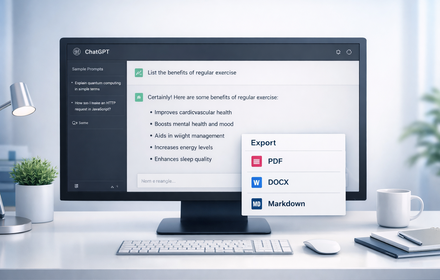
Export ChatGPT conversations to PDF, Markdown, and 4 more formats — completely free, open-source, and 100% local.

ChatGPT Exporter is a Chrome extension that lets you export, download, and save any ChatGPT conversation in one click. No subscriptions, no external servers, no data collection.

HOW TO EXPORT CHATGPT CHAT TO PDF:
1. Install the extension
2. Open any ChatGPT conversation on chatgpt.com
3. Click the export button in the conversation header
4. Select "PDF" — a clean, professional PDF opens in the browser print dialog
5. Save as PDF — done

EXPORT FORMATS:
• PDF — professional print-ready document, clean typography, perfect for sharing
• Markdown (.md) — ideal for notes, Notion, Obsidian, and documentation
• Plain Text (.txt) — simple, universal text file
• JSON (.json) — full structured data with roles, timestamps, and metadata
• CSV (.csv) — spreadsheet-ready, opens in Excel and Google Sheets
• ZIP (.zip) — batch export multiple conversations from a ChatGPT project

KEY FEATURES:
• Export entire conversation — one click, instant download
• Select specific messages — pick individual messages with checkboxes, export only what you need
• Export ChatGPT project — select conversations within a project, download as a single ZIP archive
• Deep Research support — captures search queries, web results, and synthesis
• Canvas & Text Docs — includes attached documents and canvas content
• ChatGPT data export — alternative to the official export, per-conversation

WORKS WITH:
• chatgpt.com (new domain)
• chat.openai.com (legacy domain)
• All ChatGPT plans: Free, Plus, Team, Enterprise
• ChatGPT Deep Research conversations
• ChatGPT Projects with multiple conversations

PRIVACY & SECURITY:
• 100% local processing — nothing leaves your browser
• Zero data collection — no analytics, no telemetry, no tracking
• Open-source — full code on GitHub, verify everything yourself
• No API keys needed — uses your existing ChatGPT session

FREQUENTLY ASKED QUESTIONS:

Q: How do I export ChatGPT conversations?
A: Install ChatGPT Exporter, open any conversation, click the export button in the header, choose your format. The file downloads instantly.

Q: Can I export ChatGPT chat to PDF?
A: Yes. Select "PDF" from the export menu. A beautifully formatted document opens in your browser's print dialog. Choose "Save as PDF" to download.

Q: Can I export specific messages from a conversation?
A: Yes. Click "Select messages" to enter selection mode. Check the messages you want, then choose your export format from the toolbar.

Q: How do I download all conversations from a ChatGPT project?
A: Navigate to the project page, click the export button, select "Select conversations…", pick which ones to include, and download as ZIP.

Q: Is ChatGPT Exporter free?
A: Completely free and open-source. No subscription, no hidden fees, no premium tier.

Q: Is my data safe?
A: Everything is processed locally in your browser. No data is ever sent to external servers. You can review the source code on GitHub.

Q: Does it work on browsers other than Chrome?
A: Yes. It works on all Chromium-based browsers: Chrome, Brave, Edge, Arc, Opera.

Website: http://vmste.org/chatgpt-exporter
Source code: https://github.com/VMSTE/chatgpt-exporter
Report issues: https://github.com/VMSTE/chatgpt-exporter/issues
Technical
- Version
- 1.0.1
- Manifest
- V3
- Size
- 25.6KiB
- Min Chrome
- 88
- Languages
- 1
- Featured
- No
Metadata
- ID
- kagppdkdkbbddehcgonlnlblclcihpcg
- Developer ID
- u2ce57589e0cdf94981b7a618ac5d2ee9
- Developer Email
- [email protected]
- Created
- Mar 5, 2026
- Last Updated (Store)
- Mar 5, 2026
- Last Scraped
- Jun 8, 2026
- Privacy Policy
- https://github.com/VMSTE/chatgpt-exporter
Similar extensions
Alternatives to ChatGPT Exporter — Export Chat to PDF, Markdown, JSON & CSV, ranked by description similarity.

ChatGPT PDF Exporter – Download ChatGPT History
Easily save your ChatGPT chats as PDF, Markdown, or other formats—every detail preserved flawlessly.
260
★ 4.4

ChatGPT Conversations Mover
Export ChatGPT conversations from personal and Team workspaces. All processing happens locally in your browser.
39

Chatgpt chat to pdf,docx,html,markdown,json and etc. Free Forever
Export ChatGPT conversations to multiple formats: PDF, HTML, Markdown, DOCX, Text and more- Free Forever
162
★ 5.0

ChatExport – Export ChatGPT to PDF, TXT, Markdown & HTML
Export ChatGPT chats to PDF, TXT, Markdown & HTML in one click. Custom fonts, dark mode & instant downloads. Save AI chats.
32

Chat Conversation Exporter
Export chat conversations from various LLM platforms (Markdown, PDF, HTML, JSON)
124
★ 3.5

ExportChat – Export AI Chats
Export AI chat conversations to Markdown, PDF, HTML, TXT or JSON.
243
★ 5.0
ChatGPT Exporter
Export ChatGPT conversations to PDF, Word, Markdown, and Text.
194
★ 1.0

GPT Session Exporter
Export ChatGPT conversations from the current page as a Markdown file.
7
Data sourced from the Chrome Web Store · last verified Jun 8, 2026.