
Ctrl+Tab MRU
Switch between tabs in the most recently used order, can be configured to use Ctrl+Tab as a shortcut
As of May 2026, Ctrl+Tab MRU has 2,000 users and a 3.37/5 rating from 120 reviews in the Workflow & Planning category.
Usersno change0%
2.0K
2,000
Ratingdown 0.9 percent−0.9%
3.37
120 reviews
Reviewsup 1.7 percent+1.7%
120
Version
0.9
Manifest V3
History
2 snapshotsTracking since Apr 1, 2026.
View as table
| Date | Users | Rating | Reviews | Version |
|---|---|---|---|---|
| Apr 1, 2026 | 2.0K | 3.40 | 118 | 0.9 |
| Apr 30, 2026 | 2.0K | 3.39 | 119 | 0.9 |
| Now | 2.0K | 3.37 | 120 | 0.9 |
Permissions & access
- Permissions
- tabsscriptingstorage
- Host access
- <all_urls>
Screenshots

About
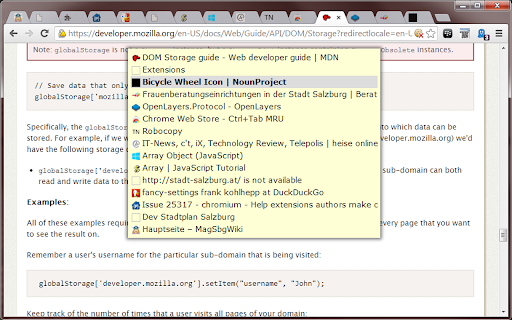
'Ctrl+Tab MRU' allows switching through tabs in the order they were visited before. By default this happens by pressing Ctrl+Y for going back in time and Ctrl+Shift+Y for the other way round.

*** IMPORTANT TO KNOW ***
Unfortunately Chrome doesn't drectly allow users to set Ctr+Tab as shortcut keys. So I suggest using the following trick to circumvent this: https://superuser.com/a/1326712.
*** *** ***

Tab switching also works on special pages (like chrome://), Chrome Web Store URLs, PDFs, XMLs or when the address bar is focused. In this case a temporary tab is opened to show the menu.
To directly jump to a tab listed on the switcher menu, click on its title or icon.

Drawbacks:
- At the moment I don't have an idea how to avoid the temporary tab. It's required because I otherwise could not detect the release of the ctrl key (=end of the switching action) on special pages.
- If you release the ctrl key too fast while the temporary tab is loaded I am unable to detect the key-up event, therefore the menu gets stuck. Please hit the ctrl key again to finish switching.
- Recent tab order is not preserved when closing and restoring a window.

Permissions:
- 'Access your data on all websites': required to draw the tab list on top of the websites' content and to detect PDFs and XMLs.
- 'Access your tabs and browsing activity': required to record tab order, open the temporary tab and to switch to the selected tab.

Updates:
- 0.9
-- switch to Manifest V3 to be future proof
- 0.6
-- tab titles on the switcher popup are now clickable to directly jump to a tab
-- no more need to reload the tabs after initial install
-- added xml viewer support (menu is shown on temporary tab)

- 0.5
-- added frameset support (menu is shown on temporary tab)

- 0.4.2
-- added support for ftp and file:// pages
-- added incognito support

- 0.3.1
-- corrected tab order for tabs opened in the background
-- refined stylesheet
Technical
- Version
- 0.9
- Manifest
- V3
- Size
- 15.2KiB
- Min Chrome
- 88
- Languages
- 2
- Featured
- Yes
Metadata
- ID
- ialfjajikhdldpgcfglgndennidgkhik
- Developer ID
- u0d735713b51bda8d970f0f34f1abc502
- Developer Email
- [email protected]
- Created
- Oct 15, 2013
- Last Updated (Store)
- Oct 12, 2023
- Last Scraped
- May 27, 2026
- Website
- —
- Support URL
- —
- Privacy Policy
- —
Similar extensions
Alternatives to Ctrl+Tab MRU, ranked by description similarity.

CLUT: Cycle Last Used Tabs
Cycle through last used Chrome tabs using keyboard shortcut.
20.0K
★ 4.6

Quick Tab Switch
Quickly switch between tabs using custom keyboard shortcuts. Assign keys to tabs for fast navigation and seamless tab management.
19
★ 5.0

Most Recent Used Tab Stack
MRU Tab Stack — auto-move your most recently used tab to the front or back; works with pinned tabs and tab groups.
317
★ 4.9
Tabhunter
Wade through all your tabs fast
455
★ 5.0

shimtab
Group the tabs of your visiting sites with auto keywords
—

Simple Tabs
Press Alt+Q to show a center overlay with tab previews
1

Tabkey
Assign number keys to open tabs and jump between them instantly.
—

Where Is My Tab
Quickly search and switch between open tabs with Ctrl+Shift+F
—
Data sourced from the Chrome Web Store · last verified May 27, 2026.