
Quick Tab Switch
Quickly switch between tabs using custom keyboard shortcuts. Assign keys to tabs for fast navigation and seamless tab management.
As of May 2026, Quick Tab Switch has 19 users and a 5.00/5 rating from 2 reviews in the Workflow & Planning category.
Usersno change0%
19
19
Ratingno change0%
5.00
2 reviews
Reviewsno change0%
2
Version
1.0
Manifest V3
History
2 snapshotsTracking since Apr 29, 2026.
View as table
| Date | Users | Rating | Reviews | Version |
|---|---|---|---|---|
| Apr 29, 2026 | 19 | 5.00 | 2 | 1.0 |
| May 26, 2026 | 25 | 5.00 | 2 | 1.0 |
| Now | 19 | 5.00 | 2 | 1.0 |
Permissions & access
- Permissions
- storagescripting
- Host access
- http://*/*, https://*/*
Screenshots


About
Quick Tab Switcher User Guide

🚀 Getting Started
Quick Tab Switcher helps you navigate between browser tabs efficiently using simple keyboard shortcuts. No more endless tab hunting!
Core Commands
Custom Key + Tab: Index a tab
Custom Key + Shift: Switch to indexed tab

🎯 How It Works
Indexing Your First Tab
Navigate to a tab you frequently use.
Press your chosen Custom Key (e.g., 'J') + Tab.
The tab is now indexed and will appear in the Quick Tab Switcher panel.
Quick Switching
Once you've indexed a tab, instantly jump to it by pressing your Custom Key + Shift.
Managing Indexed Tabs
Update an index: Simply use the same Custom Key on a different tab.
Remove an index: Click the Delete button next to any indexed tab.
View all indexes: Open the Quick Tab Switcher panel.
Customizing Per Window
Each browser window manages its own key bindings, allowing you to set unique shortcuts in separate windows. This flexibility helps you organize tasks across different browser instances.

💡 Pro Tips
Choose Memorable Keys
Numbers (1-9) for numbered tabs
Letters that match website names (e.g., G for Gmail)
Function keys (F1-F12) for special tabs

⚠️ Limitations
Does not work on Chrome's protected URLs (like the New Tab page).
Limited to one Custom Key per tab.
All key bindings will be lost after the browser is closed.

⌨️ Keyboard Shortcut Examples
Action
Windows/Linux
Mac
Index Gmail tab
G + Tab
G + Tab
Switch to Gmail
G + Shift
G + Shift


🔧 Troubleshooting
If something isn't working:
Verify Key Combinations
Make sure you're pressing the keys simultaneously.
Check if your Custom Key conflicts with other extensions.
Chrome Protected URLs
Does not work on Chrome's protected URLs (like the New Tab page).
Switch to a regular webpage to use the extension.
Reset the Extension
Go to chrome://extensions/
Find Quick Tab Switcher.
Click the refresh icon.

🤝 Need Help?
We're here to make tab management easier! If you have questions or suggestions, please reach out to support at [email protected].
Thank you for choosing Quick Tab Switcher! Happy browsing! 🎉
Technical
- Version
- 1.0
- Manifest
- V3
- Size
- 40.0KiB
- Min Chrome
- 88
- Languages
- 1
- Featured
- No
Metadata
- ID
- hdpbmldonkjhhlpmbppahhgjjkemejfa
- Developer ID
- u88f7dd70f1f9074b10ef50a3dfa52276
- Developer Email
- [email protected]
- Created
- Nov 27, 2024
- Last Updated (Store)
- Nov 27, 2024
- Last Scraped
- May 26, 2026
- Website
- —
- Support URL
- —
- Privacy Policy
- —
Similar extensions
Alternatives to Quick Tab Switch, ranked by description similarity.

CLUT: Cycle Last Used Tabs
Cycle through last used Chrome tabs using keyboard shortcut.
20.0K
★ 4.6

Tabkey
Assign number keys to open tabs and jump between them instantly.
—

Quick Tab Search
Quickly search and switch between open tabs
209
★ 5.0

QuickSwitch
Speed dial for chrome
8

Launchtab
Keyboard-driven tabless browsing with a Quick Switcher modal.
7
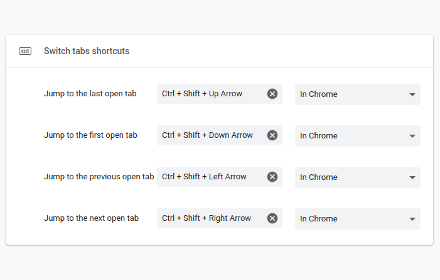
Switch tabs shortcuts
Adds custom shortcuts for switching tabs.
707
★ 4.7

GroupTab
Group tab is a keyboard driven tab manager to allow you to manage multi page workflows with ease.
13
★ 5.0

Chrome Tab Switcher
Switches tabs in the order you used them (use Ctrl+Q or Ctrl+Shift+Q to swith backward or forward in tab history)
96
Data sourced from the Chrome Web Store · last verified May 26, 2026.