
Tabhunter
Wade through all your tabs fast
As of June 2026, Tabhunter has 455 users and a 5.00/5 rating from 7 reviews in the Workflow & Planning category.
Usersup 1.3 percent+1.3%
455
455
Ratingno change0%
5.00
7 reviews
Reviewsup 16.7 percent+16.7%
7
Version
3.6.9
Manifest V3
History
5 snapshotsTracking since Apr 1, 2026.
View as table
| Date | Users | Rating | Reviews | Version |
|---|---|---|---|---|
| Apr 1, 2026 | 449 | 5.00 | 6 | 3.6.9 |
| Apr 21, 2026 | 448 | 5.00 | 6 | 3.6.9 |
| May 7, 2026 | 469 | 5.00 | 7 | 3.6.9 |
| May 18, 2026 | 451 | 5.00 | 7 | 3.6.9 |
| Jun 1, 2026 | 441 | 5.00 | 7 | 3.6.9 |
| Now | 455 | 5.00 | 7 | 3.6.9 |
Permissions & access
- Permissions
- activeTabclipboardWritestoragescriptingtabs
- Host access
- <all_urls>
Screenshots
About
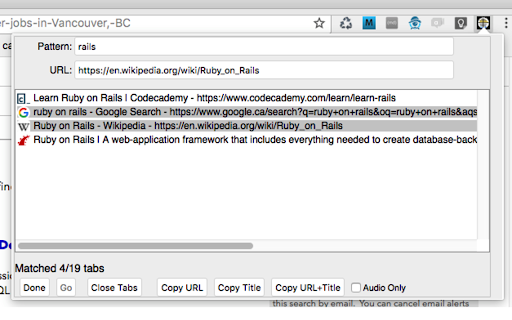
This extension lets browser power-users easily juggle dozens of tabs at any time. Enter a search string (could be a standard JavaScript regex), highlight the URL you want to bring up, and press return, double-click it, or press the "Go" button. Tabhunter will even find and bring up minimized windows containing the target tab.

Tabhunter also lets you easily bulk-close large numbers of tabs. Let's say you have a bunch of github pages all related to a project we'll call "inconsolable-toucan". Enter a pattern like 'github.com/example-user/inconsolable-toucan', click on the first hit in the list, shift-click the last hit, and press the "Close Tabs" button. No-longer-needed tabs gone like that.

Bring up Tabhunter by either pressing the hunter's scope icon, or using the command-key Ctrl-Shift-T on macos, Alt-Shift-T on Linux and Windows.

Drowning in a sea of tabs? Stay afloat with Tabhunter. Users of that other browser have been happily using it since 2008. Now you Chrome folks can use it too.

Under no circumstances should this software be confused with Tab Hunter, an actor best known for his work in the mid-20th century.

Updates:
2.1.6 - support moving a group of tabs to a selected window

2.1.7 - support selecting windows in the pattern field:
* putting `{w:N}` at the start of a pattern shows only tabs in window N
* putting `{w:N:T1-T2}` at the start of a pattern shows only tabs T1 through T2 in window N
* putting `{w:N:T}` shows tabs T through the end in window N
* putting `{w:N:-T}` shows tabs 1 through T in window N

2.2.0 - prefs are now available in the main window via the "More..." button and no longer change only when the "Submit" button is pressed.

2.2.2 - Support for drag+drop when tabs are sorted by window/tab position.

3.0.1 - Reinstate support for searching *inside* the tabs, including by regex or xpath

3.1.0 - Support for "Select All" (Ctrl-A , Cmd-A on macos)

3.2.4 - Rearchitected to deal with very large numbers of tabs (like 1000 or more) gracefully

3.3.0 - Leave maximized and fullscreen windows at that size.

3.4.0 - Migrate the add-on to use the Chrome Manifest V3 version

3.5.0 - Press Backspace or Delete to close selected tabs

3.5.2 - Undo change in 3.5.0.  Backspace/Delete now works only on input fields.

3.6.0 - Show the current window number when sorting by windows+tab position (oldest window is no. 1)

3.6.7 - Put `{!:}` at the start of the pattern to negate it.

3.6.9 - Search for URLs in non-latin1-based languages
Technical
- Version
- 3.6.9
- Manifest
- V3
- Size
- 90.5KiB
- Min Chrome
- 88
- Languages
- 1
- Featured
- Yes
Metadata
- ID
- kdbjnnjfgmbhoaggihfgnlfnfhhadmbn
- Developer ID
- u1c1c38cf37ba3a7337166c19f3860c7a
- Developer Email
- [email protected]
- Created
- Oct 16, 2017
- Last Updated (Store)
- Sep 25, 2025
- Last Scraped
- Jun 1, 2026
- Website
- —
Similar extensions
Alternatives to Tabhunter, ranked by description similarity.

Tab Manager v2
Search, group, move, and clean up tabs across browser windows with a keyboard-first workflow
3.0K
★ 4.0

tabtiles
Control your tabs with tiles - useful for large monitors and full screen (F11) browsing.
10.0K
★ 3.7

Tab Ahead
Tab Ahead lets you type ahead to quickly find open tabs by title and URL.
1.0K
★ 4.7

YATM (Yet Another Tab Manager) 3.0
Preview, Rename, Reorder and Search for your tabs from a central location
117
★ 3.8

Quick Tab Search
Quickly search and switch between open tabs
209
★ 5.0

Tabbie Updated
The missing tab manager for Chrome, updated for the latest Chrome version.
217
★ 5.0

Lightweight Tab Search
Quick way to navigate through tabs!
504
★ 4.8

Tabs Manager
Quickly view, search, and manage all your open tabs with thumbnails and grouping across windows.
2.0K
★ 3.5
Data sourced from the Chrome Web Store · last verified Jun 1, 2026.