Snap - Smart Text Snippet Manager
Highlight and save text snippets with professional note-taking capabilities. Privacy-first, local storage.
As of June 2026, Snap - Smart Text Snippet Manager has 14 users in the Productivity category.
Usersup 55.6 percent+55.6%
14
14
Ratingno change0%
—
— reviews
Reviewsno change0%
—
Version
0.0.0.2
Manifest V3
90-day change · In the last 90 days this extension 1 version update.
History
6 snapshotsTracking since Apr 18, 2026.
View as table
| Date | Users | Rating | Reviews | Version |
|---|---|---|---|---|
| Apr 18, 2026 | 9 | — | — | 0.0.0.1 |
| May 3, 2026 | 18 | — | — | 0.0.0.1 |
| May 12, 2026 | 12 | — | — | 0.0.0.1 |
| May 24, 2026 | 17 | — | — | 0.0.0.1 |
| May 29, 2026 | 19 | — | — | 0.0.0.2 |
| Jun 13, 2026 | 17 | — | — | 0.0.0.2 |
| Now | 14 | — | — | 0.0.0.2 |
Permissions & access
- Permissions
- activeTabstorageunlimitedStoragecontextMenustabssidePanelidentity
- Host access
- https://api.stripe.com/*, https://checkout.stripe.com/*, https://lab3142.com/*
Screenshots


About
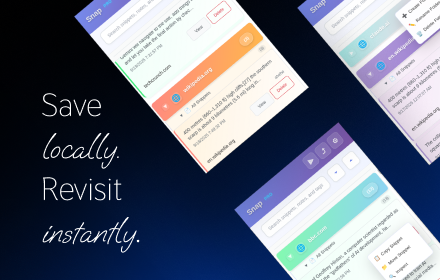
Transform how you capture and organize web content with Snap - your intelligent research companion.
Snap revolutionizes online research by letting you highlight, annotate, and organize text from any website with professional-grade tools. Perfect for students, researchers, professionals, and anyone who values knowledge management.

Key Features:

Smart Text Capture
- Highlight any text with 8 beautiful, customizable colors
- One-click saving preserves content with full context
- Works seamlessly across all websites
- Right-click integration for instant access

Professional Note-Taking
- Rich text editor with formatting tools (bold, italic, lists)
- Add detailed notes and thoughts to any snippet
- Smart tagging system for perfect organization
- Template support for consistent formatting

Intelligent Organization
- Create custom folders and categories
- Smart snippet management
- Advanced search and filtering capabilities
- Tag-based organization system

Privacy-First Design
- 100% local storage - your data stays on your device
- No cloud sync
- Zero data collection or tracking
- GDPR compliant by design

Unique Return-to-Source Feature
- Click any saved snippet to instantly navigate back to the original highlighted text
- Maintains connection between research and sources
- Perfect for citation and reference management

Export & Sharing
- Export snippets in multiple formats (Markdown, HTML, TXT)
- Professional formatting for presentations and reports
- Bulk export capabilities for large research projects

Perfect for:

- Academic research and study notes
- Professional knowledge management
- Content creation and journalism
- Legal research and documentation
- Technical documentation and code snippets

Why Choose Snap?
Unlike other extensions that collect your data or require cloud accounts, Snap keeps everything private and local while providing powerful organization tools that grow with your research needs.

Free Version: 100 snippets, essential features
Pro Version: Unlimited snippets, advanced formatting, premium export options

Install Snap today and never lose important web content again.
Technical
- Version
- 0.0.0.2
- Manifest
- V3
- Size
- 444KiB
- Min Chrome
- 88
- Languages
- 1
- Featured
- Yes
Metadata
- ID
- ddhlodkmclbcnakdkcmjbhkckhbobaaj
- Developer ID
- ud9eccd4717bea8bbf973660e487896d2
- Developer Email
- [email protected]
- Created
- Sep 29, 2025
- Last Updated (Store)
- May 17, 2026
- Last Scraped
- Jun 13, 2026
- Website
- snap.lab3142.com
- Support URL
- —
- Privacy Policy
- https://snap.lab3142.com/privacy
Similar extensions
Alternatives to Snap - Smart Text Snippet Manager, ranked by description similarity.

SnapExport, Web Page Content Exporter
Export page content, images, and media with advanced features
11

SnipSnap
Save copied text & screenshots. Auto-organized by domain and date so you never lose track. Lightweight, private, and always on
6
★ 5.0

Snipets
Adds a context menu for selected text and stores it in your Snipets account.
1

SnapEdit
Capture and edit screenshots with a powerful built-in editor
5

SnapClipper
Capture, organize, and retrieve contextual web clips with one click.
10
★ 5.0

Snap Text
Select any text, get an instant AI explanation, and save it to your personal knowledge base — without leaving the page.
35
★ 5.0

Highlight & Save Text
Save web highlights and export them as a text file.
5

ContextClip
Research-grade text capture with context extractionand highlighting, metadata, projects, versioning, and academic export formats.
4
Data sourced from the Chrome Web Store · last verified Jun 13, 2026.