
Highlight & Save Text
Save web highlights and export them as a text file.
As of June 2026, Highlight & Save Text has 5 users in the Productivity category.
Usersup 66.7 percent+66.7%
5
5
Ratingno change0%
—
— reviews
Reviewsno change0%
—
Version
1.1
Manifest V3
History
5 snapshotsTracking since Apr 9, 2026.
View as table
| Date | Users | Rating | Reviews | Version |
|---|---|---|---|---|
| Apr 9, 2026 | 3 | — | — | 1.1 |
| Apr 20, 2026 | 5 | — | — | 1.1 |
| May 9, 2026 | 4 | — | — | 1.1 |
| May 14, 2026 | 3 | — | — | 1.1 |
| May 23, 2026 | 4 | — | — | 1.1 |
| Now | 5 | — | — | 1.1 |
Permissions & access
- Permissions
- contextMenusstorage
- Host access
- None declared
Screenshots

About
Highlight & Save Text: Your Simple Web Researcher

Tired of losing track of important quotes, facts, and snippets while browsing? Highlight & Save Text is a lightweight, privacy-focused tool designed for students, researchers, and readers who need a friction-free way to collect information. No accounts, no subscriptions, and no complicated tagging systems—just highlight, save, and export.

CORE FEATURES:

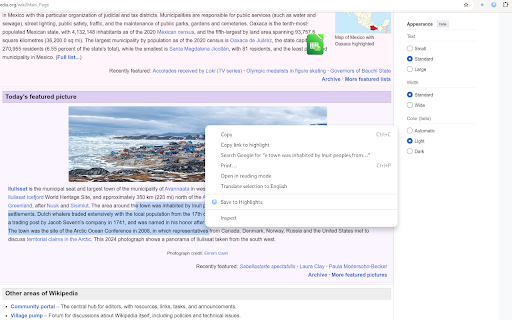
- One-Click Saving: Simply highlight any text on a webpage, right-click, and select "Save Highlight."
- Automatic Metadata: Every highlight is saved with the page title, URL, and a timestamp so you never lose your source.
- Clean List View: View all your saved snippets in a minimal, easy-to-read popup.
- Instant Export: Download your entire collection as a clean .txt file with one click. Perfect for moving your research into Notion, Obsidian, or Word.
- Local Privacy: Your data never leaves your computer. We don't use cloud syncing or tracking, ensuring your research stays yours.

HOW TO USE:

- Select any text on a website.
- Right-click and choose "Save Highlight."
- Click the extension icon in your toolbar to view your list.
- Click "Export .txt" to download your findings.

PERFECT FOR:

- Students: Gathering quotes for essays and citations.
- Developers: Saving code snippets or documentation notes.
- Writers: Collecting inspiration and references from the web.

Minimalists: A tool that does one thing perfectly without the bloat.

PRIVACY GUARANTEE:

- No Accounts: No sign-up required.
- No Tracking: We do not track your browsing history or collect personal data.
- 100% Local: All highlights are stored on your device only.

Keep your research organized and your browser light. Install Highlight & Save Text today!
Technical
- Version
- 1.1
- Manifest
- V3
- Size
- 31.79KiB
- Min Chrome
- 88
- Languages
- 1
- Featured
- No
Metadata
- ID
- appgnmiomfigcaepegakdmfgnghcjioc
- Developer ID
- ubdc0473827060fc21e0f619a7b052e22
- Developer Email
- [email protected]
- Created
- Feb 12, 2026
- Last Updated (Store)
- Feb 12, 2026
- Last Scraped
- Jun 3, 2026
- Website
- sercib.dev
- Privacy Policy
- https://extensions.sercib.dev/highlightcopy/privacy.html
Similar extensions
Alternatives to Highlight & Save Text, ranked by description similarity.

Text Highlighter
Highlight selected text on any webpage
—

Highlight Saver
Allows users to save highlighted text from a webpage.
5

Text Marker – Powerful Webpage Text Highlighter
Highlight text with different colors and save selections, restore after page reload
17

ClipLink
Capture text highlights from any webpage, organize them with tags, and export as Markdown
2

ContextClip
Research-grade text capture with context extractionand highlighting, metadata, projects, versioning, and academic export formats.
4

Highlightly
Highlight, save, and keep notes locally in a friendly side panel.
28
★ 5.0

Web highlighter
Web Highlighter is a light-weight and simple Chrome extension designed to help you capture and organize essential information from…
21

ZenMarker
Save text snippets from any website with optional notes and tags.
1
Data sourced from the Chrome Web Store · last verified Jun 3, 2026.