
Search by Image
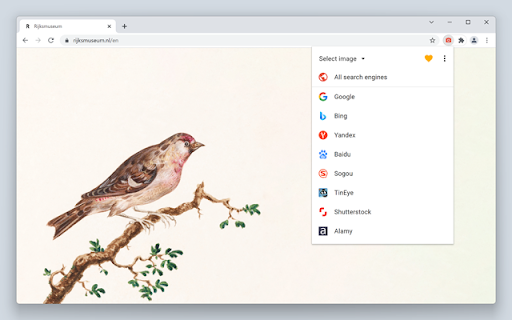
A powerful reverse image search tool, with support for various search engines, such as Google, Bing, Yandex, Baidu and TinEye.
As of June 2026, Search by Image has 400,000 users and a 4.06/5 rating from 535 reviews in the Productivity category.
Usersup 33.3 percent+33.3%
400.0K
400,000
Ratingno change0%
4.06
535 reviews
Reviewsup 0.8 percent+0.8%
535
Version
8.5.4
Manifest V3
90-day change · In the last 90 days this extension gained 100.0K users, 4 version updates.
History
9 snapshotsTracking since Apr 1, 2026.
View as table
| Date | Users | Rating | Reviews | Version |
|---|---|---|---|---|
| Apr 1, 2026 | 300.0K | 4.06 | 531 | 8.5.0 |
| Apr 5, 2026 | 400.0K | 4.06 | 531 | 8.5.0 |
| Apr 14, 2026 | 300.0K | 4.06 | 532 | 8.5.1 |
| Apr 19, 2026 | 400.0K | 4.06 | 532 | 8.5.1 |
| Apr 22, 2026 | 400.0K | 4.06 | 533 | 8.5.1 |
| May 5, 2026 | 400.0K | 4.06 | 533 | 8.5.2 |
| Jun 3, 2026 | 400.0K | 4.06 | 534 | 8.5.2 |
| Jun 7, 2026 | 400.0K | 4.06 | 535 | 8.5.2 |
| Jun 19, 2026 | 400.0K | 4.06 | 535 | 8.5.3 |
| Now | 400.0K | 4.06 | 535 | 8.5.4 |
Changelog
- Jun 7, 2026description
Search by Image is a browser extension that makes effortless reverse image searches possible, and comes with support for more than 30 search engines.

Search by Image is an open source project made possible thanks to a community of awesome supporters. If you'd like to support the continued development of the extension, please check out https://armin.dev/go/patreon

The extension helps journalists and researchers verify the authenticity of images, and assists in the identification of false information on social media. Search by Image is also popular among photographers, helping artists explore how their work is shared on the web, while shoppers find it valuable for discovering similar products at discounted prices.

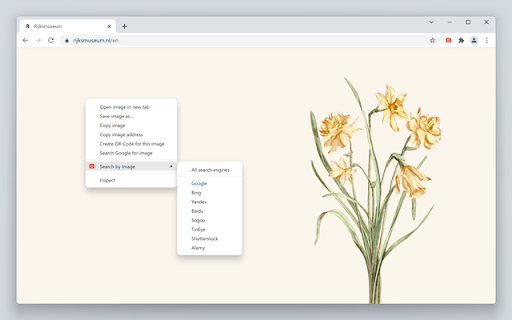
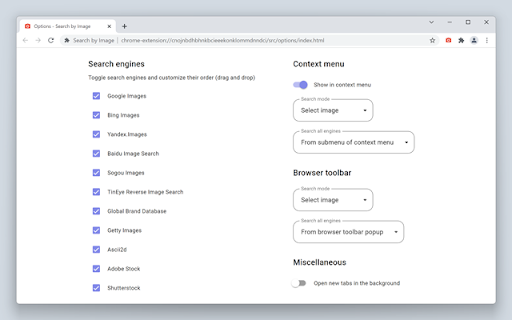
The extension enables you to search for images from the context menu and the browser toolbar with the help of a diverse set of reverse image search engines, which can be toggled and reordered from the extension's options. Visit the wiki for the full list of supported search engines.

https://github.com/dessant/search-by-image/wiki/Search-engines

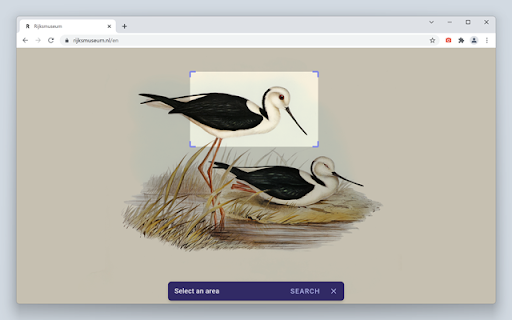
Images positioned at the selected area are detected regardless of how they were embedded in the page. The extension also supports searching with images from your device, images from private sites, and captured areas of the page.

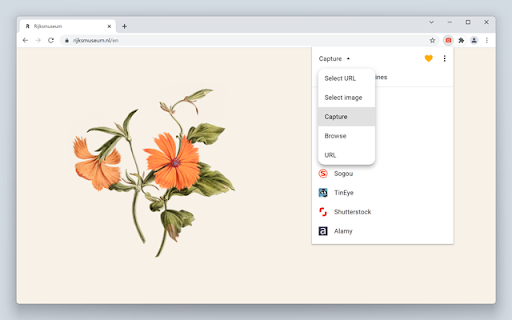
A handful of search modes are offered that serve different use cases. The search mode can be set independently for the context menu and the browser toolbar from the extension's options.

Search modes:
  • Select URL: select an image on the page and search with the image URL. This is the default search mode.
  • Select image: select an image on the page and search with the image file. This search mode is preferred for sites which do not allow the direct linking of images, such as private sites.
  • Capture: search with a captured area of the page.
  • Browse: search with an image from your device. Pasting images from the clipboard is also supported.
  • URL: search with an image URL.

The "Allow access to file URLs" option must be enabled to search with local images opened in a tab. Visit the chrome://extensions page and open the extension's details to find the option.

The image you select during a search is sent to the requested service, visit the extension's privacy policy for more information.

The extension is also available for Edge and Safari: https://github.com/dessant/search-by-image#readme

Reviews are not monitored for bug reports, please use GitHub for issues and feature requests.

https://github.com/dessant/search-by-image
Search by Image is a browser extension that makes effortless reverse image searches possible, and comes with support for more than 30 search engines.

Search by Image is an open source project made possible thanks to a community of awesome supporters. If you'd like to support the continued development of the extension, please check out https://armin.dev/go/patreon.

The extension helps journalists and researchers verify the authenticity of images, and assists in the identification of false information on social media. Search by Image is also popular among photographers, helping artists explore how their work is shared on the web, while shoppers find it valuable for discovering similar products at discounted prices.

The extension enables you to search for images from the context menu and the browser toolbar with the help of a diverse set of reverse image search engines, which can be toggled and reordered from the extension's options. Visit the wiki for the full list of supported search engines.

https://github.com/dessant/search-by-image/wiki/Search-engines

Images positioned at the selected area are detected regardless of how they were embedded in the page. The extension also supports searching with images from your device, images from private sites, and captured areas of the page.

A handful of search modes are offered that serve different use cases. The search mode can be set independently for the context menu and the browser toolbar from the extension's options.

Search modes:
  • Select URL: select an image on the page and search with the image URL. This is the default search mode.
  • Select image: select an image on the page and search with the image file. This search mode is preferred for sites which do not allow the direct linking of images, such as private sites.
  • Capture: search with a captured area of the page.
  • Browse: search with an image from your device. Pasting images from the clipboard is also supported.
  • URL: search with an image URL.

The "Allow access to file URLs" option must be enabled to search with local images opened in a tab. Visit the chrome://extensions page and open the extension's details to find the option.

The extension is also available for Edge and Safari: https://github.com/dessant/search-by-image#readme

The image you select during a search is sent to the requested service, visit the extension's privacy policy for more information.

Reviews are not monitored for bug reports, please use GitHub for issues and feature requests.

https://github.com/dessant/search-by-image
Permissions & access
- Permissions
- alarmscontextMenusstorageunlimitedStoragetabsactiveTabnotificationswebRequestdeclarativeNetRequestscripting
- Host access
- <all_urls>
Screenshots
About
Search by Image is a browser extension that makes effortless reverse image searches possible, and comes with support for more than 30 search engines.

Search by Image is an open source project made possible thanks to a community of awesome supporters. If you'd like to support the continued development of the extension, please check out https://armin.dev/go/patreon.

The extension helps journalists and researchers verify the authenticity of images, and assists in the identification of false information on social media. Search by Image is also popular among photographers, helping artists explore how their work is shared on the web, while shoppers find it valuable for discovering similar products at discounted prices.

The extension enables you to search for images from the context menu and the browser toolbar with the help of a diverse set of reverse image search engines, which can be toggled and reordered from the extension's options. Visit the wiki for the full list of supported search engines.

https://github.com/dessant/search-by-image/wiki/Search-engines

Images positioned at the selected area are detected regardless of how they were embedded in the page. The extension also supports searching with images from your device, images from private sites, and captured areas of the page.

A handful of search modes are offered that serve different use cases. The search mode can be set independently for the context menu and the browser toolbar from the extension's options.

Search modes:
  • Select URL: select an image on the page and search with the image URL. This is the default search mode.
  • Select image: select an image on the page and search with the image file. This search mode is preferred for sites which do not allow the direct linking of images, such as private sites.
  • Capture: search with a captured area of the page.
  • Browse: search with an image from your device. Pasting images from the clipboard is also supported.
  • URL: search with an image URL.

The "Allow access to file URLs" option must be enabled to search with local images opened in a tab. Visit the chrome://extensions page and open the extension's details to find the option.

The extension is also available for Edge and Safari: https://github.com/dessant/search-by-image#readme

The image you select during a search is sent to the requested service, visit the extension's privacy policy for more information.

Reviews are not monitored for bug reports, please use GitHub for issues and feature requests.

https://github.com/dessant/search-by-image
Technical
- Version
- 8.5.4
- Manifest
- V3
- Size
- 865KiB
- Min Chrome
- 123.0
- Languages
- 1
- Featured
- Yes
Metadata
- ID
- cnojnbdhbhnkbcieeekonklommdnndci
- Developer ID
- uffe0be7d28562c67a7ecc39c743b6e71
- Developer Email
- [email protected]
- Created
- Sep 1, 2017
- Last Updated (Store)
- Jun 16, 2026
- Last Scraped
- Jun 19, 2026
- Website
- armin.dev
Similar extensions
Alternatives to Search by Image, ranked by description similarity.

Reverse Image Search Tool
Search by image using Google, Bing, Yandex, and Lenso.ai. Upload, paste a URL, or right-click any image to search instantly.
546
★ 4.6
Reverse Image Search
a powerful capturing reverse image search tool built on top of TinEye/Google Images engines
5.0K
★ 3.3

Select & Search - Capture Screen and Search Instantly
Select any area on screen and instantly search it across 40+ engines.
90
★ 5.0

Reverse Image Search Tools
Instantly search by image using all major reverse image search tools — Google, Bing, Yandex & TinEye.
1.0K
★ 4.2

Quick Image Search
Right click an image or some selected text and use that for a secure search using Google Images.
30.0K
★ 4.0

Fast Image Research
Right click any image to instantly get reverse image search results from Google, TinEye, Yandex, Bing, or a combination.
8.0K
★ 4.4

RevEye Reverse Image Search
Perform a search by image. Choose between the image search engines Google, Bing, Yandex, TinEye, or user-defined engines.
100.0K
★ 4.1
Screenshot Search
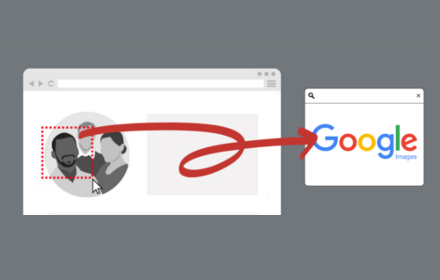
select and capture any area on a web page, then effortlessly perform reverse image searches on Google Images
3.0K
★ 3.7
Data sourced from the Chrome Web Store · last verified Jun 19, 2026.