
Select & Search - Capture Screen and Search Instantly
Select any area on screen and instantly search it across 40+ engines.
As of June 2026, Select & Search - Capture Screen and Search Instantly has 90 users and a 5.00/5 rating from 4 reviews in the Productivity category.
Usersup 36.4 percent+36.4%
90
90
Ratingno change0%
5.00
4 reviews
Reviewsup 33.3 percent+33.3%
4
Version
1.1.0 (Visual Intelligence Upgrade)
Manifest V3
90-day change · In the last 90 days this extension 1 version update, changed permissions.
History
13 snapshotsTracking since Apr 1, 2026.
View as table
| Date | Users | Rating | Reviews | Version |
|---|---|---|---|---|
| Apr 1, 2026 | 66 | 5.00 | 3 | 1.0.0 (Visual Screen Search) |
| Apr 9, 2026 | 70 | 5.00 | 3 | 1.0.0 (Visual Screen Search) |
| Apr 20, 2026 | 72 | 5.00 | 3 | 1.1.0 (Visual Intelligence Upgrade) |
| Apr 25, 2026 | 70 | 5.00 | 3 | 1.1.0 (Visual Intelligence Upgrade) |
| Apr 30, 2026 | 75 | 5.00 | 3 | 1.1.0 (Visual Intelligence Upgrade) |
| May 5, 2026 | 79 | 5.00 | 3 | 1.1.0 (Visual Intelligence Upgrade) |
| May 9, 2026 | 78 | 5.00 | 3 | 1.1.0 (Visual Intelligence Upgrade) |
| May 12, 2026 | 75 | 5.00 | 3 | 1.1.0 (Visual Intelligence Upgrade) |
| May 16, 2026 | 78 | 5.00 | 3 | 1.1.0 (Visual Intelligence Upgrade) |
| May 21, 2026 | 82 | 5.00 | 3 | 1.1.0 (Visual Intelligence Upgrade) |
| May 25, 2026 | 79 | 5.00 | 3 | 1.1.0 (Visual Intelligence Upgrade) |
| Jun 4, 2026 | 74 | 5.00 | 3 | 1.1.0 (Visual Intelligence Upgrade) |
| Jun 15, 2026 | 83 | 5.00 | 4 | 1.1.0 (Visual Intelligence Upgrade) |
| Now | 90 | 5.00 | 4 | 1.1.0 (Visual Intelligence Upgrade) |
Changelog
- Apr 9, 2026host_permissions
*://*.google.com/*, *://*.google.co.in/*, *://*.google.co.uk/*, *://*.google.ca/*, *://*.google.com.au/*, *://*.bing.com/*, *://*.yandex.com/*, *://*.microsoft.com/*, *://*.tineye.com/*, *://*.sogou.com/*, *://*.iqdb.org/*, *://*.ascii2d.net/*, *://*.lenso.ai/*, *://*.kagi.com/*, *://*.gettyimages.com/*, *://*.gettyimages.in/*, *://*.gettyimages.co.uk/*, *://*.gettyimages.ca/*, *://*.gettyimages.com.au/*, *://*.gettyimages.de/*, *://*.gettyimages.es/*, *://*.gettyimages.fr/*, *://*.gettyimages.it/*, *://*.gettyimages.nl/*, *://*.gettyimages.pt/*, *://*.gettyimages.se/*, *://*.istockphoto.com/*, *://*.shutterstock.com/*, *://*.stock.adobe.com/*, *://*.depositphotos.com/*, *://*.pinterest.com/*, *://api.pinterest.com/*, *://*.so.com/*, *://*.taobao.com/*, *://*.1688.com/*, *://*.dreamstime.com/*, *://*.alamy.com/*, *://*.123rf.com/*, *://*.euipo.europa.eu/*, *://*.tmdn.org/*, *://*.wipo.int/*, *://*.ipaustralia.gov.au/*, *://*.iponz.govt.nz/*, *://*.inpit.go.jp/*, *://*.pimeyes.com/*, *://*.stocksy.com/*, *://*.pond5.com/*, *://*.pixtastock.com/*, *://*.ikea.com/*, *://*.shein.com/*, *://*.lykdat.com/*, *://*.wildberries.ru/*, *://*.lexica.art/*, *://*.freepik.com/*, *://*.icons8.com/*, *://*.unsplash.com/*, *://*.vcg.com/*
*://*.google.com/*, *://*.google.co.in/*, *://*.google.co.uk/*, *://*.google.ca/*, *://*.google.com.au/*, *://*.bing.com/*, *://*.yandex.com/*, *://*.microsoft.com/*, *://*.tineye.com/*, *://*.sogou.com/*, *://*.iqdb.org/*, *://*.ascii2d.net/*, *://*.lenso.ai/*, *://*.kagi.com/*, *://*.gettyimages.com/*, *://*.gettyimages.in/*, *://*.gettyimages.co.uk/*, *://*.gettyimages.ca/*, *://*.gettyimages.com.au/*, *://*.gettyimages.de/*, *://*.gettyimages.es/*, *://*.gettyimages.fr/*, *://*.gettyimages.it/*, *://*.gettyimages.nl/*, *://*.gettyimages.pt/*, *://*.gettyimages.se/*, *://*.istockphoto.com/*, *://*.shutterstock.com/*, *://*.stock.adobe.com/*, *://*.depositphotos.com/*, *://*.pinterest.com/*, *://api.pinterest.com/*, *://*.so.com/*, *://*.taobao.com/*, *://*.1688.com/*, *://*.dreamstime.com/*, *://*.alamy.com/*, *://*.123rf.com/*, *://*.euipo.europa.eu/*, *://*.tmdn.org/*, *://*.wipo.int/*, *://*.ipaustralia.gov.au/*, *://*.iponz.govt.nz/*, *://*.inpit.go.jp/*, *://*.pimeyes.com/*, *://*.stocksy.com/*, *://*.pond5.com/*, *://*.pixtastock.com/*, *://*.ikea.com/*, *://*.shein.com/*, *://*.lykdat.com/*, *://*.wildberries.ru/*, *://*.lexica.art/*, *://*.freepik.com/*, *://*.icons8.com/*, *://*.unsplash.com/*, *://*.vcg.com/*, *://*.duckduckgo.com/*, *://*.duckduckgo.com/?q=DuckDuckGo+AI+Chat&ia=chat&duckai=1, *://duck.ai/*, *://chatgpt.com/*, *://*.baidu.com/*, *://cloud.google.com/*, *://*.gstatic.com/*, *://saucenao.com/*, *://*.saucenao.com/*, *://*.amazon.in/*, *://*.amazon.com/*, *://copyseeker.net/*, *://*.google.de/*, *://*.google.fr/*, *://*.google.co.jp/*, *://*.google.com.br/*, *://*.google.it/*, *://*.google.es/*, *://*.google.ru/*, *://*.google.com.mx/*, *://*.google.co.id/*, *://*.google.com.tr/*, *://*.google.com.sa/*, *://*.google.ae/*, *://*.google.pl/*, *://*.google.com.pk/*, *://*.google.com.eg/*, *://*.google.nl/*, *://*.bing.de/*, *://*.bing.fr/*, *://*.bing.co.uk/*, *://*.bing.it/*, *://*.bing.es/*, *://*.bing.cn/*, *://*.amazon.co.uk/*, *://*.amazon.de/*, *://*.amazon.co.jp/*, *://*.amazon.fr/*, *://*.amazon.it/*, *://*.amazon.ca/*, *://*.amazon.es/*, *://*.amazon.com.br/*, *://*.amazon.com.mx/*, *://*.amazon.com.au/*, *://*.amazon.nl/*, *://*.amazon.ae/*, *://*.amazon.sa/*, *://*.amazon.sg/*, *://*.amazon.se/*, *://*.amazon.pl/*, *://*.amazon.com.tr/*, *://*.amazon.com.be/*, *://*.amazon.eg/*, *://*.yandex.ru/*, *://*.yandex.com.tr/*, *://*.yandex.kz/*, *://*.yandex.by/*, *://*.yandex.uz/*
- Apr 9, 2026permissions
activeTab, contextMenus, storage, tabs, clipboardWrite, scripting, unlimitedStorage, declarativeNetRequest
activeTab, contextMenus, storage, tabs, desktopCapture, clipboardWrite, scripting, unlimitedStorage, declarativeNetRequest, declarativeNetRequestWithHostAccess
Permissions & access
- Permissions
- activeTabcontextMenusstoragetabsdesktopCaptureclipboardWritescriptingunlimitedStoragedeclarativeNetRequestdeclarativeNetRequestWithHostAccess
- Host access
- *://*.google.com/*, *://*.google.co.in/*, *://*.google.co.uk/*, *://*.google.ca/*, *://*.google.com.au/*, *://*.bing.com/*, *://*.yandex.com/*, *://*.microsoft.com/*, *://*.tineye.com/*, *://*.sogou.com/*, *://*.iqdb.org/*, *://*.ascii2d.net/*, *://*.lenso.ai/*, *://*.kagi.com/*, *://*.gettyimages.com/*, *://*.gettyimages.in/*, *://*.gettyimages.co.uk/*, *://*.gettyimages.ca/*, *://*.gettyimages.com.au/*, *://*.gettyimages.de/*, *://*.gettyimages.es/*, *://*.gettyimages.fr/*, *://*.gettyimages.it/*, *://*.gettyimages.nl/*, *://*.gettyimages.pt/*, *://*.gettyimages.se/*, *://*.istockphoto.com/*, *://*.shutterstock.com/*, *://*.stock.adobe.com/*, *://*.depositphotos.com/*, *://*.pinterest.com/*, *://api.pinterest.com/*, *://*.so.com/*, *://*.taobao.com/*, *://*.1688.com/*, *://*.dreamstime.com/*, *://*.alamy.com/*, *://*.123rf.com/*, *://*.euipo.europa.eu/*, *://*.tmdn.org/*, *://*.wipo.int/*, *://*.ipaustralia.gov.au/*, *://*.iponz.govt.nz/*, *://*.inpit.go.jp/*, *://*.pimeyes.com/*, *://*.stocksy.com/*, *://*.pond5.com/*, *://*.pixtastock.com/*, *://*.ikea.com/*, *://*.shein.com/*, *://*.lykdat.com/*, *://*.wildberries.ru/*, *://*.lexica.art/*, *://*.freepik.com/*, *://*.icons8.com/*, *://*.unsplash.com/*, *://*.vcg.com/*, *://*.duckduckgo.com/*, *://*.duckduckgo.com/?q=DuckDuckGo+AI+Chat&ia=chat&duckai=1, *://duck.ai/*, *://chatgpt.com/*, *://*.baidu.com/*, *://cloud.google.com/*, *://*.gstatic.com/*, *://saucenao.com/*, *://*.saucenao.com/*, *://*.amazon.in/*, *://*.amazon.com/*, *://copyseeker.net/*, *://*.google.de/*, *://*.google.fr/*, *://*.google.co.jp/*, *://*.google.com.br/*, *://*.google.it/*, *://*.google.es/*, *://*.google.ru/*, *://*.google.com.mx/*, *://*.google.co.id/*, *://*.google.com.tr/*, *://*.google.com.sa/*, *://*.google.ae/*, *://*.google.pl/*, *://*.google.com.pk/*, *://*.google.com.eg/*, *://*.google.nl/*, *://*.bing.de/*, *://*.bing.fr/*, *://*.bing.co.uk/*, *://*.bing.it/*, *://*.bing.es/*, *://*.bing.cn/*, *://*.amazon.co.uk/*, *://*.amazon.de/*, *://*.amazon.co.jp/*, *://*.amazon.fr/*, *://*.amazon.it/*, *://*.amazon.ca/*, *://*.amazon.es/*, *://*.amazon.com.br/*, *://*.amazon.com.mx/*, *://*.amazon.com.au/*, *://*.amazon.nl/*, *://*.amazon.ae/*, *://*.amazon.sa/*, *://*.amazon.sg/*, *://*.amazon.se/*, *://*.amazon.pl/*, *://*.amazon.com.tr/*, *://*.amazon.com.be/*, *://*.amazon.eg/*, *://*.yandex.ru/*, *://*.yandex.com.tr/*, *://*.yandex.kz/*, *://*.yandex.by/*, *://*.yandex.uz/*
Screenshots


About
Select & Search – The Ultimate Visual Search Tool

🔍 Search what you see. Instantly. 🤌🏻

Ever spotted a product in a video, a logo in a presentation, a pattern in a design, or a detail inside a locked-down image and wished you could search for it right away?

Traditional reverse-image search only works on standalone, clickable images. It breaks the moment you want to search inside a YouTube frame, a Zoom call, a PDF, a Figma canvas, or a protected image.

Select & Search fixes that by turning your cursor into a visual search superpower.

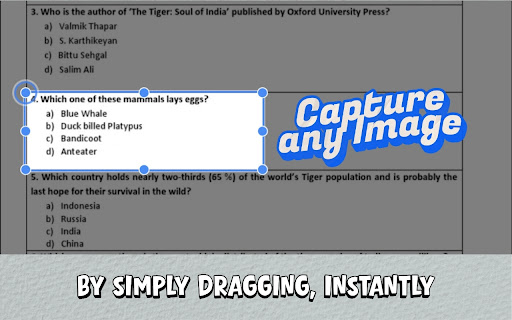
With a quick drag over any area of your screen, Select & Search captures exactly what you’re looking at and sends it straight to the search engine of your choice, no screenshots, no saving files, no manual uploads.

➽ What Select & Search Can Do

» Search anything you can see If it’s visible on your screen, you can search it:
video frames, UI elements, infographics, product shots, memes, text inside images, and non-clickable elements on any webpage.

» One gesture, full workflow Click the extension icon or use the shortcut (Ctrl+Shift+S on Windows, Cmd+Shift+S on Mac), drag a box, release, and your results open in a new tab. No extra steps.

» Choose from 40+ search engines Go beyond a single engine. Pick the best tool for the job with an A–Z engine picker, complete with logos and popular engines like Google Lens, Bing Images, Yandex, Shutterstock and many more!

List of all the engines is available at https://select-and-search.vanbanstudios.com.

You’re always one click away from switching engines via a clean, visual engine selection dialog.

» “Search images on this page” picker Don’t want to crop the screen? Open the built-in image picker, browse all images detected on the current page, and search any of them in one click.

» Smart recent history Your last searches are saved locally as thumbnails inside the popup, so you can revisit a result without re-selecting or re-uploading.

» Fits naturally into your browsing Right-click anywhere to start a selection, or right-click directly on an image to search it instantly. Use the popup buttons, keyboard shortcuts, or context menu, whatever feels fastest for you.

➽ Perfect For -

» Online shoppers: Find the exact product (or cheaper alternatives) from videos, feeds, and posts.
» Designers & creatives: Track down stock sources, similar visuals, fonts, or reference material instantly.
» Researchers, journalists & students: Verify sources of viral images, find originals, or locate higher-res copies of charts and diagrams.
» Brand & IP teams: Quickly check trademarks, logos, and designs across multiple official databases in one flow.
» Curious explorers: Identify landmarks, artwork, buildings, or anything you see while browsing.

➽ Privacy First
Your browsing is your business. Select & Search is built with privacy in mind:

» No personal data collection.
» No sale or resale of your browsing data.
» Searches are performed either locally or directly with the engines you choose.
You stay in control of what you search and where it goes.

➽ How to Use
1. Click the extension icon or press Ctrl+Shift+S (Windows) / Cmd+Shift+S (Mac) .
2. Drag to draw a box around whatever you want to search.
3. Release to instantly open results in a new tab using your selected search engine.
4. Optionally, right-click an image or use the “Search images on this page” picker for quick, image-only searches.
Stop just looking at what’s on your screen. Start searching it.

Add Select & Search to Chrome today and experience the web visually.
Technical
- Version
- 1.1.0 (Visual Intelligence Upgrade)
- Manifest
- V3
- Size
- 808KiB
- Min Chrome
- 88
- Languages
- 1
- Featured
- Yes
Metadata
- ID
- dnjjpejnehfmcgefmllccgnfaimpobll
- Developer ID
- u6fdaf55d20d58189c8d0a5687e6a7a4b
- Developer Email
- [email protected]
- Created
- Jan 25, 2026
- Last Updated (Store)
- Apr 9, 2026
- Last Scraped
- Jun 15, 2026
- Website
- vanbanstudios.com
- Support URL
- —
Similar extensions
Alternatives to Select & Search - Capture Screen and Search Instantly, ranked by description similarity.

Select to Search – AI Search for Selected Text (ChatGPT, Claude, Google)
Search highlighted text instantly with ChatGPT, Claude, or Google. No copy-paste, no tab switching.
57
★ 5.0

Screen Search - Search Screen with Google Lens
Search anything on your screen with Google Lens. Instant visual search, translations, and product info at your fingertips.
10.0K
★ 4.6

Swift Selection Search
Automatically display search engine icons on text selection
147
★ 3.7

ScreenScan - Instant Screenshot Search
Instantly capture, search, and explore any image, video or text on the web with a click and discover more with Google Lens.
569
★ 3.8

Search It All
Search across multiple search engines with one click - no retyping needed
936
★ 3.9
Screenshot Search
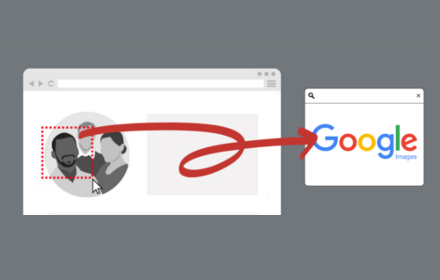
select and capture any area on a web page, then effortlessly perform reverse image searches on Google Images
3.0K
★ 3.7

Smart Search
Smart Search - Chrome extension for smarter searches. Perform a smart page search to quickly find any text on any webpage with ease
72
★ 5.0

Select & Right Click Search
Search selected text with various search engines via right-click menu
75
★ 5.0
Data sourced from the Chrome Web Store · last verified Jun 15, 2026.