
Reverse Image Search
a powerful capturing reverse image search tool built on top of TinEye/Google Images engines
As of May 2026, Reverse Image Search has 5,000 users and a 3.29/5 rating from 14 reviews in the Productivity category.
Usersno change0%
5.0K
5,000
Ratingno change0%
3.29
14 reviews
Reviewsno change0%
14
Version
0.3.0
Manifest V3
History
1 snapshotsTracking since Apr 24, 2026.
View as table
| Date | Users | Rating | Reviews | Version |
|---|---|---|---|---|
| Apr 24, 2026 | 5.0K | 3.29 | 14 | 0.3.0 |
| Now | 5.0K | 3.29 | 14 | 0.3.0 |
Permissions & access
- Permissions
- storageactiveTabscriptingcontextMenus
- Host access
- https://www.google.com/searchbyimage/upload
Screenshots

About
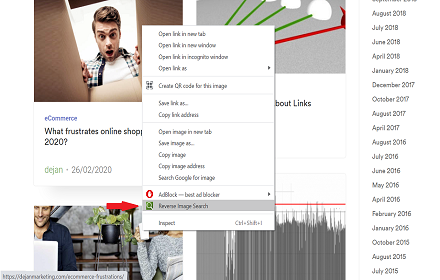
"Reverse Image Search" extension helps you to find similar images or the original image source and its name. This is a useful tool to find for instance the actual image name or detect whether this image is unique or is just a copy or a modified copy of an already existed image on the web.

In most cases, images are embedded in the background page and hence it is not straightforward to find the actual source of them to be passed to a reverse image search engine. Also, the image you are looking for maybe just part of a video stream. This extension solves these problems by providing a capturing tool in the right-click context menu. Simply select the item and capture a portion of the screen. The captured image is automatically sent to either "TinEye" or "Google Images" search engine, and after a successful upload, a new page with the matching results is displayed.

This extension adds three items to the context menu of your browser:
1. Google Images (Image URL)
2. Tineye (Image URL)
3. Google Images (Capture)

The first two items are added to the image context menu, and the third one is added to the page context to activate the capturing tool. Instead of the third option, you can alternatively press the browser action button.

Links:
FAQs Page: https://add0n.com/reverse-image-search.html
GitHub Page: https://github.com/schomery/reverse-image-search/
Technical
- Version
- 0.3.0
- Manifest
- V3
- Size
- 129KiB
- Min Chrome
- 88
- Languages
- 12
- Featured
- Yes
Metadata
- ID
- clijmpalajoikbhdhgmpanldenogllaj
- Developer ID
- u5f4ced533d80f19d9c18dea3723e99b9
- Developer Email
- [email protected]
- Created
- Apr 19, 2015
- Last Updated (Store)
- Aug 10, 2021
- Last Scraped
- May 19, 2026
- Website
- —
- Support URL
- https://add0n.com/reverse-image-search.html
- Privacy Policy
- —
Similar extensions
Alternatives to Reverse Image Search, ranked by description similarity.

Fast Image Research
Right click any image to instantly get reverse image search results from Google, TinEye, Yandex, Bing, or a combination.
8.0K
★ 4.4
Reverse Image Search
Right click on an image and find it's origin in Google image search.
6.0K
★ 4.0

Quick Image Search
Right click an image or some selected text and use that for a secure search using Google Images.
30.0K
★ 4.0

Search by Image
A powerful reverse image search tool, with support for various search engines, such as Google, Bing, Yandex, Baidu and TinEye.
400.0K
★ 4.1

Reverse Image Search
Search similar images in the WEB from context menu
1.0K
★ 3.7

Reverse Image Search - Find Origins
Use Reverse Image Search to discover the origin of any image by searching across Google, Yandex, and Bing.
83
★ 1.0

Find Original Image Source
Find the original source and highest resolution of any image. Right-click any image to analyze instantly.
28

Reverse Image Search Tools
Instantly search by image using all major reverse image search tools — Google, Bing, Yandex & TinEye.
1.0K
★ 4.2
Data sourced from the Chrome Web Store · last verified May 19, 2026.