
RevEye Reverse Image Search
Perform a search by image. Choose between the image search engines Google, Bing, Yandex, TinEye, or user-defined engines.
As of May 2026, RevEye Reverse Image Search has 100,000 users and a 4.11/5 rating from 158 reviews in the Productivity category.
Usersno change0%
100.0K
100,000
Ratingno change0%
4.11
158 reviews
Reviewsup 0.6 percent+0.6%
158
Version
2.0.0
Manifest V3
History
2 snapshotsTracking since Apr 24, 2026.
View as table
| Date | Users | Rating | Reviews | Version |
|---|---|---|---|---|
| Apr 24, 2026 | 100.0K | 4.11 | 157 | 2.0.0 |
| May 20, 2026 | 100.0K | 4.11 | 157 | 2.0.0 |
| Now | 100.0K | 4.11 | 158 | 2.0.0 |
Permissions & access
- Permissions
- contextMenusstorage
- Host access
- None declared
Screenshots


About
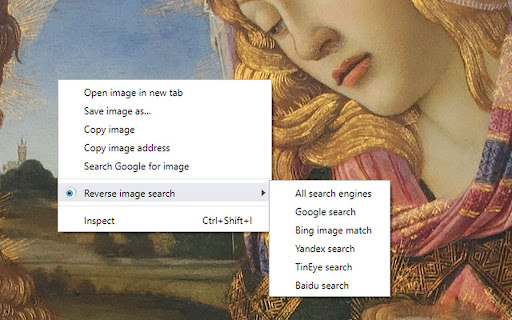
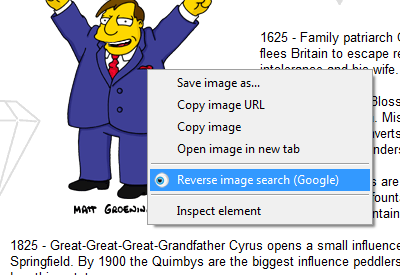
This extension allows to perform an inverse image search by right-clicking onto any image in a web site.

You can configure the context menu to contain either a single button with your default search engine, or a cascaded menu with all included search engines. You can also add custom search engines through the options menu.

RevEye is free and open source software. To minimize its memory footprint in your browser, it is written in pure vanilla JavaScript and it does not use any of the fancy JavaScript frameworks. RevEye does not track any of your data, and it does not include ads.

Source code and more info: https://github.com/steven2358/reveye

Changelog:
- v2.0.0 (2024-08-30): Updated to manifest v3. Added option to add custom search engines. Refactored code.
- v1.5.2 (2022-11-13): Replaced Google Image Search by Google Lens.
- v1.5.1 (2021-01-19): Fixed a bug in upgrade/initialization script.
- v1.5.0 (2021-01-18): Add checkboxes to enable/disable individual search engines. Removed Baidu (for now).
- v1.4.8 (2020-11-24): Fixed Yandex search.
- v1.4.7 (2019-06-14): Removed unnecessary permissions.
- v1.4.6 (2019-06-14): Fixed Yandex search.
- v1.4.5 (2017-07-23): Fixed Baidu search.
- v1.4.4 (2015-05-20): Re-included Yandex and Baidu search.
- v1.4.3 (2015-05-19): Included Bing image match.
- v1.4 (2013-06-28): Performed security changes and updated manifest to v2. Removed Yandex, Baidu, Cydral.
- v1.3 (2011-06-17): Included Google (brand new and kicking), Yandex and Baidu image search engines. Removed GazoPa as they discontinued their B2C service.
- v1.2 (2011-05-30): Name change to comply with Google's branding policies. Added Cydral search engine. Added option to choose between default engine or cascaded submenu.
- v1.1 (2011-03-01): Added option to select between TinEye and GazoPa search engines.
- v1.0 (2010-03-02): Added context menu.
- v0.2 (2009-12-14): Included new logo.
- v0.1 (2009-12-13): Initial version. Performs reverse image search of all images on a page using TinEye.
Technical
- Version
- 2.0.0
- Manifest
- V3
- Size
- 29.25KiB
- Min Chrome
- 88
- Languages
- 1
- Featured
- Yes
Metadata
- ID
- keaaclcjhehbbapnphnmpiklalfhelgf
- Developer ID
- ua2d214625434a85538eca8949cbb058e
- Developer Email
- [email protected]
- Created
- Dec 13, 2009
- Last Updated (Store)
- Sep 3, 2024
- Last Scraped
- May 20, 2026
- Website
- www.squobble.com
- Support URL
- https://github.com/steven2358/reveye/issues
- Privacy Policy
- —
Similar extensions
Alternatives to RevEye Reverse Image Search, ranked by description similarity.

TinEye Reverse Image Search
This is the official TinEye Chrome extension. Find out where an image came from, how it's used, or find higher resolution versions.
400.0K
★ 4.5

Fast Image Research
Right click any image to instantly get reverse image search results from Google, TinEye, Yandex, Bing, or a combination.
8.0K
★ 4.4
Reverse Image Search
a powerful capturing reverse image search tool built on top of TinEye/Google Images engines
5.0K
★ 3.3

Search by Image
A powerful reverse image search tool, with support for various search engines, such as Google, Bing, Yandex, Baidu and TinEye.
400.0K
★ 4.1

Reverse Image Search Tool
Search by image using Google, Bing, Yandex, and Lenso.ai. Upload, paste a URL, or right-click any image to search instantly.
546
★ 4.6

Reverse Image Search
Adds an option to the context menu to reverse search an image on various services
10.0K
★ 4.4

Image Search Optionless
Image Search Optionless adds quick reverse image search options to your right-click menu, supporting multiple engines.
6.0K
★ 4.6

Quick Image Search
Right click an image or some selected text and use that for a secure search using Google Images.
30.0K
★ 4.0
Data sourced from the Chrome Web Store · last verified May 20, 2026.