
Shortcut2Url
Shortcut2Url gives you 4 keyboard shortcuts for your favorite sites
As of June 2026, Shortcut2Url has 82 users and a 5.00/5 rating from 1 reviews in the Workflow & Planning category.
Usersdown 11.8 percent−11.8%
82
82
Ratingno change0%
5.00
1 reviews
Reviewsno change0%
1
Version
3.0.0
Manifest V3
History
5 snapshotsTracking since Apr 20, 2026.
View as table
| Date | Users | Rating | Reviews | Version |
|---|---|---|---|---|
| Apr 20, 2026 | 93 | 5.00 | 1 | 3.0.0 |
| May 4, 2026 | 103 | 5.00 | 1 | 3.0.0 |
| May 14, 2026 | 91 | 5.00 | 1 | 3.0.0 |
| May 27, 2026 | 88 | 5.00 | 1 | 3.0.0 |
| Jun 8, 2026 | 85 | 5.00 | 1 | 3.0.0 |
| Now | 82 | 5.00 | 1 | 3.0.0 |
Permissions & access
- Permissions
- storage
- Host access
- <all_urls>
Screenshots

About
Your favorites are at your fingertips! Upon installation, you'll be presented with Shortcut2Url options page where you can add and edit your shortcut-link pairs.

There are two modes: focusing on the tab that already exists and always opening a new one.

Four shortcuts is limitation set by Chrome. Though it's rather enough for your most frequently used sites.

You can change your keyboard shortcuts by visiting 'chrome://extensions/shortcuts'.
Technical
- Version
- 3.0.0
- Manifest
- V3
- Size
- 128KiB
- Min Chrome
- 88
- Languages
- 1
- Featured
- No
Metadata
- ID
- pjkjdgginnnfpgdlcemmcfeemdfkfdkm
- Developer ID
- ua15f370b24515e90dfcfd216382e33ee
- Developer Email
- [email protected]
- Created
- Jul 21, 2018
- Last Updated (Store)
- Jul 16, 2025
- Last Scraped
- Jun 8, 2026
- Website
- —
- Support URL
- —
- Privacy Policy
- —
Similar extensions
Alternatives to Shortcut2Url, ranked by description similarity.

Quick URL Shortcuts
Assign keyboard shortcuts for your favourite sites
51
★ 4.5
ShortcutKey2URL
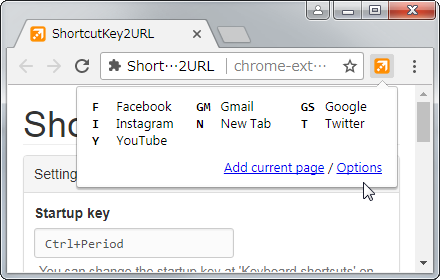
ShortcutKey2URL provide a shortcut key to easily access frequently visit sites.
3.0K
★ 4.6

Bookmark Shortcuts Extension
Add keyboard shortcuts for 10 of your bookmarks.
3.0K
★ 3.3

Custom Chrome Shortcut Manager
To use, type 'go' into the search bar.
1.0K
★ 2.9

Switch Last Tabs
Use the shortcut <Alt + Q> (or define your own) to switch between your two last used tabs. Requires a one-time payment.
4.0K
★ 4.3

Tablyt
Quickly access tabs, bookmarks, history, and context-aware actions through a command-palette.
47
★ 5.0

Shortcut Launcher
Quickly launch your favorite websites with custom keyboard shortcuts.
17
★ 5.0

Lazy Chrome
Toggle pin tab, duplicate tab, mute tab and more in your custom keyboard shortcuts
346
★ 4.3
Data sourced from the Chrome Web Store · last verified Jun 8, 2026.