
Bookmark Shortcuts Extension
Add keyboard shortcuts for 10 of your bookmarks.
As of May 2026, Bookmark Shortcuts Extension has 3,000 users and a 3.26/5 rating from 23 reviews in the Workflow & Planning category.
Usersno change0%
3.0K
3,000
Ratingdown 3.0 percent−3.0%
3.26
23 reviews
Reviewsup 4.5 percent+4.5%
23
Version
1.3.0
Manifest V3
History
1 snapshotsTracking since Apr 25, 2026.
View as table
| Date | Users | Rating | Reviews | Version |
|---|---|---|---|---|
| Apr 25, 2026 | 3.0K | 3.36 | 22 | 1.3.0 |
| Now | 3.0K | 3.26 | 23 | 1.3.0 |
Permissions & access
- Permissions
- bookmarkstabs
- Host access
- None declared
Screenshots
About
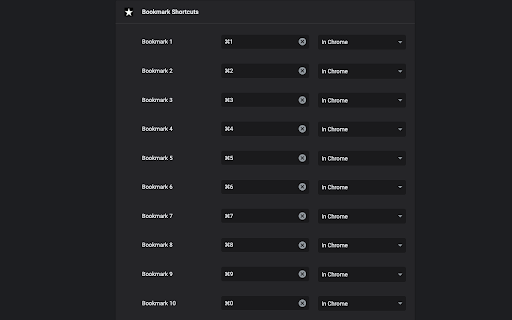
This extension allows you to add 10 keyboard shortcuts for 10 of your bookmarks. When a shortcut is pressed the url for your bookmark (assigned to that shortcut) is opened in your browser. The first 10 bookmarks in your bookmarks list are the bookmarks assigned to the 10 shortcuts you've specified.
Go to chrome://extensions/shortcuts and scroll down to "Bookmark Shortcuts Extension" to choose your shortcut key combinations.

A better explanation of how to use this extension: (originally written by Miguel Garza in a review of this extension, so all credits for this great explanation goes to Miguel)

You get up to 10 bookmarks that you can load by keyboard shortcut. The bookmarks *must* be in your bookmarks bar. The first bookmark in your bookmarks bar is the first bookmark you can assign a keyboard shortcut to, the 2nd bookmark in your bookmarks bar is the 2nd bookmark you can assign a keyboard shortcut to, etc.

To assign the keyboard shortcuts to the bookmarks, depending on your browser, type one or the other of the following web addresses in your browser's address bar--for Chrome, type "chrome://extensions/shortcuts" and press Enter. For Microsoft Edge, type "edge://extensions/shortcuts" and press Enter. Scroll down to "Bookmark Shortcuts Extension." There will be 10 slots there for 10 bookmarks, labeled "Bookmark 1" to "Bookmark 10." Click in the box next to any label, and then press the keyboard shortcut you want that bookmark to have (such as Alt-1 for Bookmark 1, Alt-2 for Bookmark 2, etc.). The combination you typed will be listed in the box.

That's it! Now if you press the keyboard shortcut you assigned to a bookmark (such as Alt-1), that bookmark will be opened in a new tab.
Technical
- Version
- 1.3.0
- Manifest
- V3
- Size
- 10.04KiB
- Min Chrome
- 88
- Languages
- 1
- Featured
- Yes
Metadata
- ID
- fncelbkbpljhacojmfbcajibgdkaegjf
- Developer ID
- u07be51d31d2c00a9561e783e268ccffe
- Developer Email
- [email protected]
- Created
- Oct 18, 2020
- Last Updated (Store)
- Mar 3, 2023
- Last Scraped
- May 22, 2026
- Website
- —
- Support URL
- —
- Privacy Policy
- —
Similar extensions
Alternatives to Bookmark Shortcuts Extension, ranked by description similarity.

Quick URL Shortcuts
Assign keyboard shortcuts for your favourite sites
51
★ 4.5

Bookmark Bar Switcher
Conveniently switch between multiple bookmark bars.
7.0K
★ 2.8

Omnibox Shortcuts
Press ` and then press Tab in the Omnibar to access your shortcuts
124
★ 4.5

Keyboard Shortcuts
Set custom keyboard shortcuts for Chrome: View extension options, or browse to chrome://extensions/shortcuts to set.
40.0K
★ 4.5

Shortcut2Url
Shortcut2Url gives you 4 keyboard shortcuts for your favorite sites
82
★ 5.0

New Tab Unlimited Bookmarks
Add unlimited bookmarks to the Chrome start page. Works with existing bookmarks folders.
67
★ 4.7

Shortcuts for websites
Assign keyboard shortcuts to specific websites.
16
★ 5.0

Keyboard Shortcuts
Map custom keyboard shortcuts to any Chrome browser command
18
Data sourced from the Chrome Web Store · last verified May 22, 2026.