
Jira Ticket Turbo (JTT)
Board Hopper and Ticket Popper - Your Jira Jetpack!
As of May 2026, Jira Ticket Turbo (JTT) has 8 users and a 5.00/5 rating from 1 reviews in the Workflow & Planning category.
Usersdown 33.3 percent−33.3%
8
8
Ratingno change0%
5.00
1 reviews
Reviewsno change0%
1
Version
1.1.0
Manifest V3
History
2 snapshotsTracking since Apr 25, 2026.
View as table
| Date | Users | Rating | Reviews | Version |
|---|---|---|---|---|
| Apr 25, 2026 | 12 | 5.00 | 1 | 1.1.0 |
| May 22, 2026 | 7 | 5.00 | 1 | 1.1.0 |
| Now | 8 | 5.00 | 1 | 1.1.0 |
Permissions & access
- Permissions
- storage
- Host access
- None declared
Screenshots

About
The Jira Ticket Turbo (JTT) is a Chrome extension designed to help developers, project managers, and team members streamline their workflow in Jira. With a focus on simplicity and speed, this extension enables users to swiftly open Jira tickets using their ticket numbers without navigating through multiple boards and projects.

Features

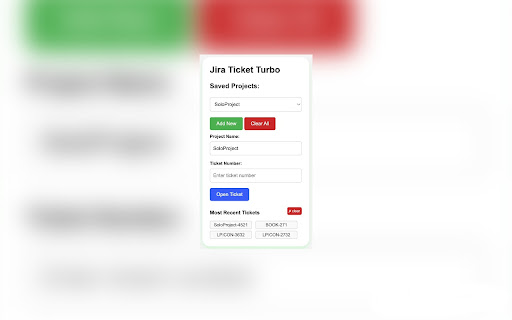
Multiple Project Storage: Keep track of various Jira boards and effortlessly switch between them.

Quick Access to Tickets: Simply enter a ticket number and instantly access the corresponding Jira ticket.

Intuitive Project Selection: When working with multiple Jira boards, choose your active project from a dropdown list.

Memory Feature: The extension automatically remembers the last accessed project for a personalized experience each time.

Most Recent Tickets: The extension will save up to 6 tickets as most recently used. So no need to type recently opened ticket repetitively.

Clean User Interface: A user-friendly interface ensures that both first-time users and experienced developers can efficiently use the extension.

Usage

Initial Setup:
- Click on the extension icon.
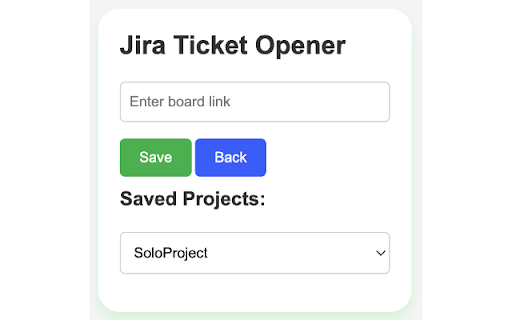
- Click on the "Board" from the left panel of your JIRA project and then copy the link to the Board from the address bar.
- Input your Jira board link into the "Board Link" field.
- Click "Save."

Open a Ticket:
- Select the project from the dropdown list (if multiple).
- Input the ticket number.
- Click "Open Ticket."

Open a Board:
- Select the project from the dropdown list (if multiple).
- Click "Open Board Option"

Manage Projects:
- Use the "Add Another Project" button to add more Jira board links.
- Use the "Clear Saved Project" button to remove all saved projects.

Manage Recent Tickets:
- Click recently used ticket to open
- Click clear button to clear all previously opened ticket


For any feedback contact:

Email: [email protected]
LinkedIn: https://www.linkedin.com/in/fahim152
Github: https://www.github.com/fahim152
Technical
- Version
- 1.1.0
- Manifest
- V3
- Size
- 27.81KiB
- Min Chrome
- 88
- Languages
- 1
- Featured
- No
Metadata
- ID
- pdfedhjjjifnjgogjpfmabpnigmbehal
- Developer ID
- uec3952d918cddea99f59288dbcb3ae92
- Developer Email
- [email protected]
- Created
- Sep 24, 2023
- Last Updated (Store)
- Mar 8, 2024
- Last Scraped
- May 22, 2026
- Website
- —
- Support URL
- —
- Privacy Policy
- —
Similar extensions
Alternatives to Jira Ticket Turbo (JTT), ranked by description similarity.

JIRA Task Open
Open task in JIRA by keyboard shortcut or Omnibox.
14
★ 5.0

Peanut Gallery
The ultimate tool for seamless ticket creation right from any web page
6
★ 5.0

Jira Ticket Opener
Open Jira tickets from selected text
23

Open JIRA Ticket
Open JIRA tickets easily using the toolbar.
773
★ 4.4

Jira Extension in Chrome
The Jira Extension in Chrome is the ultimate solution to connect your Google Apps with Jira.
2.0K
★ 4.2

Fast Track for Jira
Quick search and access to your Jira tickets with enhanced board experience
29

Jira in Chrome
Jira & Chrome Extension: Manage Issues Effortlessly Without Switching to Jira.
1.0K
★ 4.0

Searchira - Smart Jira Ticket Search
Fast and intuitive real-time search for Jira directly in the browser.
5
Data sourced from the Chrome Web Store · last verified May 22, 2026.