
Jira in Chrome
Jira & Chrome Extension: Manage Issues Effortlessly Without Switching to Jira.
As of June 2026, Jira in Chrome has 1,000 users and a 4.00/5 rating from 7 reviews in the Workflow & Planning category.
Usersno change0%
1.0K
1,000
Ratingno change0%
4.00
7 reviews
Reviewsno change0%
7
Version
2.9.9
Manifest V3
History
1 snapshotsTracking since Apr 18, 2026.
View as table
| Date | Users | Rating | Reviews | Version |
|---|---|---|---|---|
| Apr 18, 2026 | 1.0K | 4.00 | 7 | 2.9.9 |
| Now | 1.0K | 4.00 | 7 | 2.9.9 |
Permissions & access
- Permissions
- storagecontextMenuscookies
- Host access
- <all_urls>
Screenshots


About
With this Chrome extension for Jira, you can connect your browser to the Jira instance and fully manage your issues directly from any tab. That way you get less distracted while working in a multitasking environment. Every Jira ticket is created in seconds. The Jira in Chrome extension also arranges a quick and easy way to track the status of Jira issues, view linked attachments and comments, and add comments and updates directly from any tab of your browser.


✔ JIRA QUICK MANAGEMENT

Jira in Chrome extension provides you with full basic functionality to organise your everyday work with Jira issues. So, you can easily:

⏺ Generate a task or subtask from any webpage or directly from your Gmail
⏺ Search for any issue you have in your Jira projects
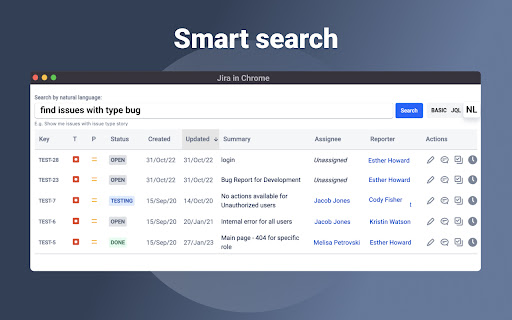
⏺ Smart search option, by transforming natural language to JQL query
⏺ Edit each Jira issue with ease if you need to make quick changes
⏺ Add comments to tickets to improve your team communication
⏺ Log your work time effortlessly whenever you need

You can perform most of the options above by using specially designed hot buttons. Regarding issues search, you can do it with predefined alternatives such as:

⏺ Search by Project
⏺ Search by Issue type
⏺ Search by Status
⏺ Search by Assignee
⏺ Search by Label
⏺ Search by Text
⏺ Search by JQL


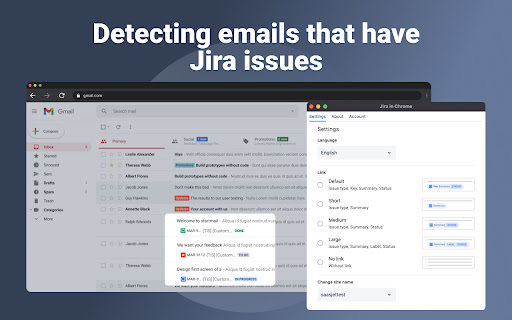
Also, this Chrome extension allows you to detect issues and issue types in every email. As a result, you get one extra Gmail to Jira ability to optimize your workflow and prioritize important assignments.

____________________________________________________________________________

✔ INSTALLATION

1-click installation: extension automatically detects your Jira site and is connected. Just select your site from the list.

That's all. Now, you can quickly manage personal tasks, as well as a team and subordinates Jira tickets. If you need any assistance or want to ask questions, please email us at [email protected].

____________________________________________________________________________

✔ THE SUIT OF JIRA IN CHROME APPLICATIONS

To get even more possibilities for extension functionality, you can download the app from the Atlassian Marketplace. Here is a 30-day trial to check if the app is good for you.

[Atlassian Marketplace]:

https://marketplace.atlassian.com/apps/1228960/email-tasks-jira-cloud-for-gmail?hosting=cloud&tab=overview

Additionally, install the connector application for your Gmail.

[Google Workspace Marketplace]:

https://workspace.google.com/marketplace/app/emailtasks_jira_cloud_for_gmail/561276457140

____________________________________________________________________________

*Email&Tasks: Jira Cloud for Gmail™ app is a plugin that integrates the Jira Cloud project management with the Gmail email platform. The app adds a button to Gmail's interface, allowing users to quickly convert emails into Jira tasks, view and update Jira task information within their email, and stay updated on task progress without leaving their Gmail interface. This integration helps streamline workflows and increase productivity by providing a seamless connection between email communication and project management.

By integrating Gmail to Jira Cloud, you will be able to transform any email to Jira issues. The Email&Tasks application package is based on AI and aims to simplify your everyday work and increase your efficiency.

Try to convert your assignment from Gmail to Jira issue/ticket without extra effort.

*Work with the application suite is absolutely safe and confidential.
Technical
- Version
- 2.9.9
- Manifest
- V3
- Size
- 3.07MiB
- Min Chrome
- 88
- Languages
- 1
- Featured
- Yes
Metadata
- ID
- eepgnffgkekpdkbkooopffobhfpcgnnh
- Developer ID
- u440a3568ab11a139c15edfbd0acd62e7
- Developer Email
- [email protected]
- Created
- Nov 17, 2022
- Last Updated (Store)
- Dec 17, 2025
- Last Scraped
- Jun 2, 2026
- Website
- https://saasjet.com/
- Privacy Policy
- https://saasjet.com/privacy-policy/
Similar extensions
Alternatives to Jira in Chrome, ranked by description similarity.

Jira Extension in Chrome
The Jira Extension in Chrome is the ultimate solution to connect your Google Apps with Jira.
2.0K
★ 4.2

Jira Tracker Plus
Monitor and manage Jira issues across multiple instances directly from Chrome with real-time updates.
6

Jira Ticket Opener
Open Jira tickets from selected text
23

Peanut Gallery
The ultimate tool for seamless ticket creation right from any web page
6
★ 5.0

JIRA Task Open
Open task in JIRA by keyboard shortcut or Omnibox.
14
★ 5.0

Jira Tab Grabber
Aggregate issue IDs from your tabs and load them all in one Jira filter in a new tab.
2

Capture in Chrome for monday.com and Jira (ex. Issue Creator)
💡 Capture tasks directly from your browser. Take screenshots, annotate, and create items with one click — no more switching tabs.
635
★ 4.1

Jira Worklog Helper
This extension allows the user to log the work into Jira easily.
61
★ 5.0
Data sourced from the Chrome Web Store · last verified Jun 2, 2026.