
Open JIRA Ticket
Open JIRA tickets easily using the toolbar.
As of June 2026, Open JIRA Ticket has 773 users and a 4.43/5 rating from 14 reviews in the Workflow & Planning category.
Usersdown 0.3 percent−0.3%
773
773
Ratingup 1.1 percent+1.1%
4.43
14 reviews
Reviewsup 7.7 percent+7.7%
14
Version
3.3.0
Manifest V3
History
5 snapshotsTracking since Apr 20, 2026.
View as table
| Date | Users | Rating | Reviews | Version |
|---|---|---|---|---|
| Apr 20, 2026 | 775 | 4.38 | 13 | 3.3.0 |
| May 5, 2026 | 780 | 4.43 | 14 | 3.3.0 |
| May 16, 2026 | 775 | 4.43 | 14 | 3.3.0 |
| May 29, 2026 | 763 | 4.43 | 14 | 3.3.0 |
| Jun 10, 2026 | 764 | 4.43 | 14 | 3.3.0 |
| Now | 773 | 4.43 | 14 | 3.3.0 |
Permissions & access
- Permissions
- storage
- Host access
- None declared
Screenshots



About
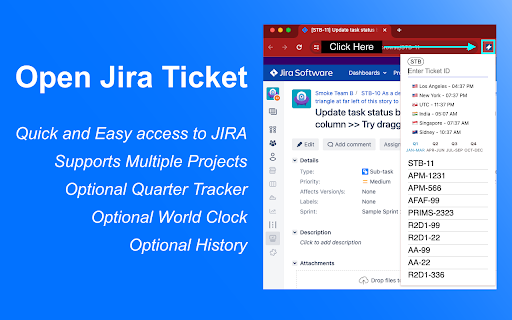
🚀 Open JIRA tickets instantly from your toolbar or address bar!

Tired of manually typing full JIRA URLs? This extension transforms how you access JIRA tickets with lightning-fast shortcuts and smart defaults.

✨ Key Features:
• Quick Access - Open tickets directly from toolbar or address bar
• Smart Defaults - Set your main project once, then just type ticket numbers
• Multi-Project Support - Easily switch between two different JIRA projects
• Search History - Never lose track of previously accessed tickets
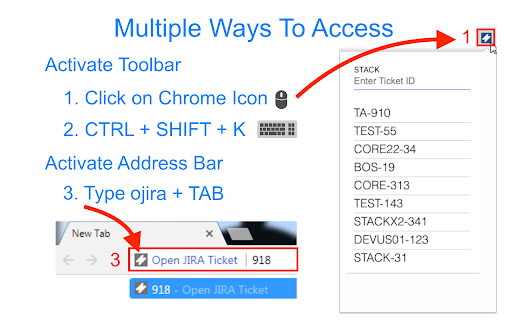
• Address Bar Integration - Type "ojira" + space to search from anywhere
• Underscore Support - Works with complex project IDs like A8SIT2_IRM

🎯 Perfect For:
• Teams that share ticket numbers instead of full URLs
• Developers who frequently access the same JIRA projects
• Anyone who forgets to add dashes between project and ticket numbers
• Users who need to switch between multiple JIRA instances

⚡ How It Works:
1. Set your default project (e.g., "STACK")
2. Type just the ticket number (e.g., "123" → opens STACK-123)
3. Use the toolbar for quick access or "ojira" in address bar
4. Switch projects with one click when needed

🆕 Latest Updates:
• Enhanced multi-project support with easy toggling
• Improved UI with modern design and better user experience
• Support for complex project IDs with underscores
• Streamlined setup process

💡 Pro Tips:
• Use the address bar: Type "ojira" + space + ticket number
• Set up secondary projects for different teams or environments
• Access your search history by clicking the extension icon
• Works with any JIRA instance (Cloud, Server, Data Center)

⚙️ Setup (2 minutes):
1. Enter your JIRA URL (e.g., https://yourcompany.atlassian.net)
2. Set your default project key (e.g., "STACK")
3. Optionally configure a secondary project
4. Start using immediately!

❤️ Why Users Love It:
"Finally, no more copying and pasting JIRA URLs!" - Saves 5+ minutes daily
"Perfect for our multi-project workflow" - Seamless project switching
"Address bar integration is genius" - Faster than bookmarking

---

Perfect for Agile teams, developers, project managers, and anyone who works with JIRA tickets regularly!

---

# Changelog
* 3.3.0
	* Add work hours feature
	* Add options scrollbar arrow
	* Reduce build size
* 3.2.0
	* Add underscore support for projects
	* Revamp options styling
* 3.1.2
	* Prevent bad toggle state
* 3.1.1
	* Minor fix for undefined button click
* 3.1.0
	* Add in secondary jira projects feature
	* Add in less strict filtering for projects with numbers like R2D2
	* We still don't support projects with underscore
	* Move UTC to a better spot
* 3.0.9
	* Remove tabs permission again.
	* Update timezone locations. Remove Arizona and London, replace with Sydney Australia and Los Angeles
* 3.0.8
	* Allow numbers in default project setup
	* Add history display preference for those who prefer a more minimal look
* 3.0.7
	* Fix World Clock
* 3.0.6
	* Add Q to display
	* Add fun feature with ranks on usage
	* Add missing i18n translations
	* Minor options cleanup
* 3.0.5
	* Add simple show me what fiscal quarter of the year I'm in option
* 3.0.4
	* Minor modifications to clock. Disable persistent seconds update (was too slow imo)
	* Remove seconds indicator
* 3.0.3
	* Hotfix permission back. Need it to open toolbar with shortcut. Oops!
* 3.0.2
	* Add World Clock option in toolbar
	* Remove unnecessary tabs permission
* 3.0.1
	* Add in omnibox support using new keyword - 'ojira', short for openjira
	* Avoid conflict with simple search of 'jira' in toolbar
* 3.0
	* Upgrade to manifest v3
	* Update i18n implementation
	* Remove favorites feature
	* Disable omnibox support (unable to get it to work in v3 yet)
	* Add keyboard support for history navigation
	* Add Japanese, Korean and Chinese language support
	* Simplify, update and remove cruft
* 2.1
	* Add favorites feature
	* Fix minor bugs
* 1.1
	* Add localization for English, Spanish, French, German and Russian
* 1.0
	* Full release of Chrome Extension.

---
# Disclaimer
I am not affiliated with Atlassian in any way. This is not an official Atlassian product.
Technical
- Version
- 3.3.0
- Manifest
- V3
- Size
- 53.64KiB
- Min Chrome
- 92
- Languages
- 7
- Featured
- No
Metadata
- ID
- blblhnpjhhjdbgbcgmmldohpalmbedci
- Developer ID
- uc88fd1b8ae1555b92ac74ce4c0f475c4
- Developer Email
- [email protected]
- Created
- Feb 16, 2017
- Last Updated (Store)
- Aug 24, 2025
- Last Scraped
- Jun 10, 2026
- Website
- —
- Support URL
- —
- Privacy Policy
- —
Similar extensions
Alternatives to Open JIRA Ticket, ranked by description similarity.

Jira Ticket Opener
Open Jira tickets from selected text
23

Jira Quick Finder
Search issues very quick from multiple Jira instances by key (e.g., JAG-6660) with one click or by pressing Enter.
2
★ 5.0

JIRA Task Open
Open task in JIRA by keyboard shortcut or Omnibox.
14
★ 5.0

JIRA Issue Tracker
Quickly open JIRA issues and manage your Watch List
—

Chrome text to Jira
Select text from any webpage and use ChatGPT to analyze it, then create a Jira ticket
—

Jira in Chrome
Jira & Chrome Extension: Manage Issues Effortlessly Without Switching to Jira.
1.0K
★ 4.0

timetracking.page: Jira Auto Time Tracker
Auto-track Jira worklog. Export CSV/JSON. Track time spent on Jira tickets. On any Atlassian URL. Local-first Chrome extension.
15
★ 5.0

Jira Extension in Chrome
The Jira Extension in Chrome is the ultimate solution to connect your Google Apps with Jira.
2.0K
★ 4.2
Data sourced from the Chrome Web Store · last verified Jun 10, 2026.