
Peanut Gallery
The ultimate tool for seamless ticket creation right from any web page
As of May 2026, Peanut Gallery has 6 users and a 5.00/5 rating from 2 reviews in the Workflow & Planning category.
Usersup 50.0 percent+50.0%
6
6
Ratingno change0%
5.00
2 reviews
Reviewsno change0%
2
Version
0.2.2
Manifest V3
History
3 snapshotsTracking since Apr 1, 2026.
View as table
| Date | Users | Rating | Reviews | Version |
|---|---|---|---|---|
| Apr 1, 2026 | 4 | 5.00 | 2 | 0.2.2 |
| Apr 29, 2026 | 6 | 5.00 | 2 | 0.2.2 |
| May 26, 2026 | 5 | 5.00 | 2 | 0.2.2 |
| Now | 6 | 5.00 | 2 | 0.2.2 |
Permissions & access
- Permissions
- storagebackgroundactiveTabtabs
- Host access
- None declared
Screenshots
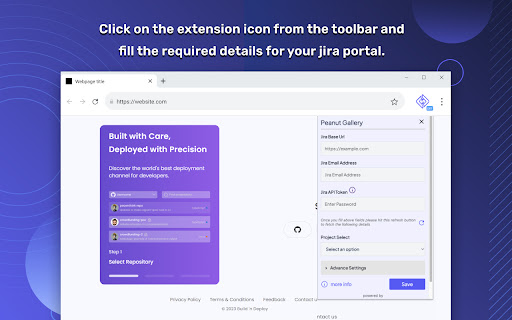
About
Introducing our Chrome Peanut Gallery Extension, the ultimate tool for seamless ticket creation right from any web page. With this extension, you can effortlessly create bug or task tickets directly in your Jira portal (In future we will support more plateform), under your specified project. Say goodbye to wasting time navigating to the Jira portal and manually attaching screenshots - our extension simplifies the process, allowing you to create tickets with speed and efficiency.

Features:

- Instant Ticket Creation: Create bug or task tickets instantly, right from any web page you're currently browsing.
- Streamlined Workflow: Eliminate the need to switch between multiple tabs or applications. Stay focused on your work while effortlessly creating Jira tickets.
- Screenshot Integration: Capture and attach screenshots directly to the ticket. No more manual downloads or uploads - it's all done seamlessly within the extension.
- Ticket Summary: Provide a concise summary of the issue or task, giving your team a clear understanding of the ticket's purpose.
- Ticket Heading: Specify the ticket heading or title for easy identification and organisation within your Jira project.
- Project Selection: Choose the specific project within your Jira portal where the ticket should be created, ensuring it lands in the right place.
- Time-Saving Solution: With our extension, you can create Jira tickets swiftly, without wasting precious time navigating through various portals or attaching screenshots manually.

Experience the convenience and efficiency of our Chrome Jira Extension today. Simplify your ticket creation process and focus on what truly matters - delivering exceptional results to your team.
Technical
- Version
- 0.2.2
- Manifest
- V3
- Size
- 102KiB
- Min Chrome
- 88
- Languages
- 1
- Featured
- No
Metadata
- ID
- elaekhldailkkolpgbkbkjmfclmplcge
- Developer ID
- u68760dbaaceabb1350a7883c92c4092b
- Developer Email
- [email protected]
- Created
- Jul 9, 2023
- Last Updated (Store)
- May 31, 2024
- Last Scraped
- May 26, 2026
- Website
- —
- Support URL
- —
- Privacy Policy
- https://nurdsoft.co/privacy-policy/
Similar extensions
Alternatives to Peanut Gallery, ranked by description similarity.

InstaLog Issues
The fastest way to create Jira issues. Capture bugs, tasks, and stories with screenshots from any webpage.
—

Jira Extension in Chrome
The Jira Extension in Chrome is the ultimate solution to connect your Google Apps with Jira.
2.0K
★ 4.2

Jira in Chrome
Jira & Chrome Extension: Manage Issues Effortlessly Without Switching to Jira.
1.0K
★ 4.0

AI Ticket
Generate well-structured Jira tickets from unstructured input
4

Gorira
A chrome extension to help you screenshot your web pages and create JIRA tickets
219
★ 5.0

Jira Ticket Opener
Open Jira tickets from selected text
23

JIRA Task Open
Open task in JIRA by keyboard shortcut or Omnibox.
14
★ 5.0

Jira Ticket Turbo (JTT)
Board Hopper and Ticket Popper - Your Jira Jetpack!
8
★ 5.0
Data sourced from the Chrome Web Store · last verified May 26, 2026.