
Selection Rectangle Highlighting
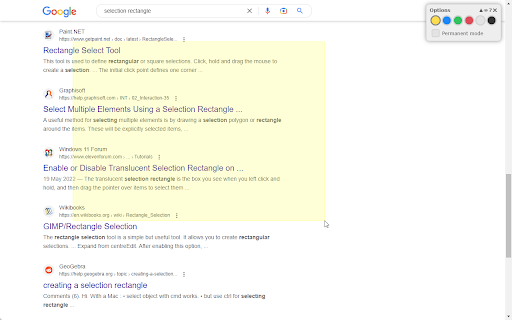
Highlight any part of a page by drawing a selection rectangle like on your desktop.
As of May 2026, Selection Rectangle Highlighting has 552 users and a 3.67/5 rating from 3 reviews in the Accessibility category.
Usersdown 2.3 percent−2.3%
552
552
Ratingno change0%
3.67
3 reviews
Reviewsno change0%
3
Version
2.1
Manifest V3
History
2 snapshotsTracking since Apr 25, 2026.
View as table
| Date | Users | Rating | Reviews | Version |
|---|---|---|---|---|
| Apr 25, 2026 | 565 | 3.67 | 3 | 2.1 |
| May 22, 2026 | 551 | 3.67 | 3 | 2.1 |
| Now | 552 | 3.67 | 3 | 2.1 |
Permissions & access
- Permissions
- activeTabscripting
- Host access
- None declared
Screenshots
About
If you share your browser window during a presentation via Google Meet, Microsoft Teams, Skype or any other virtual meet-up tool, you can use this extension to highlight any area of the page that you show to your audience. This helps you to direct their attention to the points you are currently talking about.

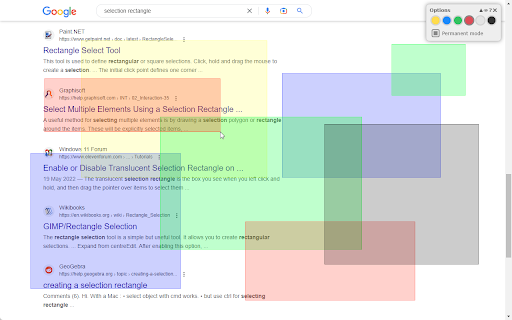
It works like the selection rectangle on your desktop: Press and hold down your mouse button and draw a rectangle. Once you stop holding the mouse button, the rectangle will disappear. If you activate "permanent mode", you can draw multiple rectangles that will remain visible until you remove them.

You can choose from different colors to adapt the selection rectangle and make sure it is clearly visible on the current page.

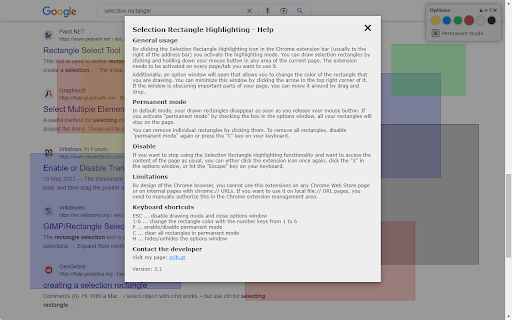
For more details, please have a look at the help screen of the extension.
Technical
- Version
- 2.1
- Manifest
- V3
- Size
- 22.82KiB
- Min Chrome
- 88
- Languages
- 2
- Featured
- Yes
Metadata
- ID
- pdeniodjbhkniaknghlgmgecemeeofae
- Developer ID
- u6894fc190251dc0da188a0ca8e7dddc6
- Developer Email
- [email protected]
- Created
- Nov 21, 2020
- Last Updated (Store)
- Feb 17, 2023
- Last Scraped
- May 22, 2026
- Website
- http://mjh.at/
- Support URL
- —
- Privacy Policy
- —
Similar extensions
Alternatives to Selection Rectangle Highlighting, ranked by description similarity.

Hold and Draw
Hold your favorite button and draw, two modes are available - brush and arrow
19
★ 5.0

HighlightCursor
Makes your highlight big and allows you to change its size.
37

Paint Tool (Updated)
Draw 🎨 anything anywhere in real-time, an MS Paint but in your browser.
410
★ 4.7

iPad Touch Cursor
This cursor is made to match the same cursor animations as the cursor introduced into iPadOS.
384
★ 4.8

Overlay filter
Select an area to show a box over it. Click to remove it, hold 'ctrl' to remove all. Can be used to hide ads or anything else
35
★ 4.0

Individual Fullscreen for Google Meet
This is an unofficial extension that allows You to make any video source fullscreen in a google meeting!
1.0K
★ 5.0

Peter Marker
Draw over any webpage with a smartboard-style pen
8
★ 5.0

Fullscreen Google Meet
View Screenshare in full screen on Google Meet
74
★ 1.0
Data sourced from the Chrome Web Store · last verified May 22, 2026.