
Paint Tool (Updated)
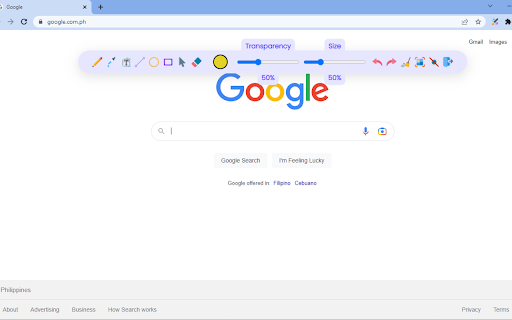
Draw 🎨 anything anywhere in real-time, an MS Paint but in your browser.
As of May 2026, Paint Tool (Updated) has 410 users and a 4.69/5 rating from 16 reviews in the Accessibility category.
Usersdown 56.2 percent−56.2%
410
410
Ratingno change0%
4.69
16 reviews
Reviewsno change0%
16
Version
1.0.5
Manifest V3
History
2 snapshotsTracking since Apr 24, 2026.
View as table
| Date | Users | Rating | Reviews | Version |
|---|---|---|---|---|
| Apr 24, 2026 | 937 | 4.69 | 16 | 1.0.5 |
| May 19, 2026 | 408 | 4.69 | 16 | 1.0.5 |
| Now | 410 | 4.69 | 16 | 1.0.5 |
Permissions & access
- Permissions
- unlimitedStoragestorage
- Host access
- <all_urls>
Screenshots

About
⬇️Easy to set up ⬇️:

1. Install the extension, and reload the page to let the extension work.
2. Click on the extension whenever you need to draw or highlight something. 🖌
3. Drawings are automatically saved.
4. Reload the page to exit the draw mode from the browser.

✨Features ✨

1. Has all the features of MS Paint.
2. Adjustable thickness, transparency, and preset color.
3. Take a screenshot of the page.

Pin this absolutely free extension to draw random things 🖼 while visiting any webpage. 👩
Technical
- Version
- 1.0.5
- Manifest
- V3
- Size
- 40.63KiB
- Min Chrome
- 88
- Languages
- 1
- Featured
- Yes
Metadata
- ID
- lkgfjmlmbhgmkiegoahhnfffnpndicle
- Developer ID
- ue2610dccff63d9240611d4796bb45c60
- Developer Email
- [email protected]
- Created
- Oct 17, 2022
- Last Updated (Store)
- Apr 11, 2023
- Last Scraped
- May 19, 2026
- Website
- —
- Support URL
- —
- Privacy Policy
- —
Similar extensions
Alternatives to Paint Tool (Updated), ranked by description similarity.

Hold and Draw
Hold your favorite button and draw, two modes are available - brush and arrow
19
★ 5.0

Screenshot Tool - Screen Capture & Editor
Innovative screenshot tool lets users screen capture and edit screenshot. Full page screen capture.
1.0M
★ 4.7

Highlight - Little Helper
Highlight text, draw shapes, add sticky notes, and capture screenshots on any webpage.
15

Screen Capture - Screenshot & Save Tool
Take instant screenshots of your current tab. Save, preview, and download images easily with one click or shortcut.
6

HTML to PNG Screenshot
Click the icon, hover any element, then click to save it as a PNG image.
266
★ 1.0

DrawingOnChrome
Function for drawing on Chrome
34

Selection Rectangle Highlighting
Highlight any part of a page by drawing a selection rectangle like on your desktop.
552
★ 3.7

color helper
Assistive extension for people with color vision deficiency
137
★ 5.0
Data sourced from the Chrome Web Store · last verified May 19, 2026.