
Overlay filter
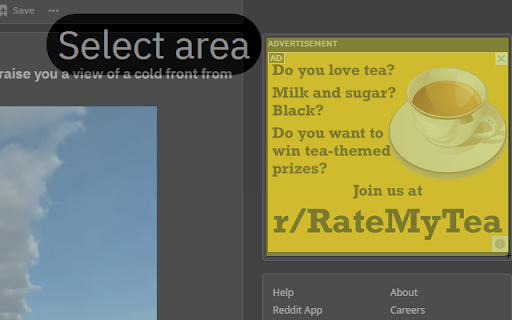
Select an area to show a box over it. Click to remove it, hold 'ctrl' to remove all. Can be used to hide ads or anything else
As of May 2026, Overlay filter has 35 users and a 4.00/5 rating from 1 reviews in the Accessibility category.
Usersdown 23.9 percent−23.9%
35
35
Ratingno change0%
4.00
1 reviews
Reviewsno change0%
1
Version
1.1
Manifest V3
History
2 snapshotsTracking since Apr 29, 2026.
View as table
| Date | Users | Rating | Reviews | Version |
|---|---|---|---|---|
| Apr 29, 2026 | 46 | 4.00 | 1 | 1.1 |
| May 25, 2026 | 41 | 4.00 | 1 | 1.1 |
| Now | 35 | 4.00 | 1 | 1.1 |
Permissions & access
- Permissions
- storageactiveTabscripting
- Host access
- None declared
Screenshots


About
- It's used like a screenshot tool, but instead of taking a screenshot it displays a box over the selected area. It's an intuitive and easy to use single click extension.

- Click it once to remove it, or hold 'ctrl' and click to remove all boxes.

- It uses the background color of the element it blocks, so with the right selection, integration is seamless.

- You can choose between fixed or absolute position (box moves with scroll or not) as well as colors in the settings pane.

- Everything runs locally and it doesn't connect to a server or collect data.

- Limitation: selection must start within body element
Technical
- Version
- 1.1
- Manifest
- V3
- Size
- 13.15KiB
- Min Chrome
- 88
- Languages
- 1
- Featured
- Yes
Metadata
- ID
- igpgciiibldkodahpimabhcdjkjibmej
- Developer ID
- u697f2d87891e01c910400f6bae1cb95e
- Developer Email
- [email protected]
- Created
- Mar 30, 2021
- Last Updated (Store)
- May 2, 2021
- Last Scraped
- May 25, 2026
- Website
- —
- Support URL
- —
- Privacy Policy
- —
Similar extensions
Alternatives to Overlay filter, ranked by description similarity.
Selection Rectangle Highlighting
Highlight any part of a page by drawing a selection rectangle like on your desktop.
552
★ 3.7

Screenshot Tool
Capture screenshots of the visible area, selected area, or the full webpage.
2

Hold and Draw
Hold your favorite button and draw, two modes are available - brush and arrow
19
★ 5.0

iPad Touch Cursor
This cursor is made to match the same cursor animations as the cursor introduced into iPadOS.
384
★ 4.8

Remove that!
Select and automatically remove unwanted elements from any webpage
12

color helper
Assistive extension for people with color vision deficiency
137
★ 5.0

Blinqo
Blur any data on the page, when sharing or recording a screen
436
★ 4.0

Click & Copy
Restores right-click, text selection, and copy/paste on all websites.
5
Data sourced from the Chrome Web Store · last verified May 25, 2026.