
Peter Marker
Draw over any webpage with a smartboard-style pen
As of May 2026, Peter Marker has 8 users and a 5.00/5 rating from 1 reviews in the Accessibility category.
Usersdown 42.9 percent−42.9%
8
8
Ratingno change0%
5.00
1 reviews
Reviewsno change0%
1
Version
1.0
Manifest V3
History
5 snapshotsTracking since Apr 1, 2026.
View as table
| Date | Users | Rating | Reviews | Version |
|---|---|---|---|---|
| Apr 1, 2026 | 14 | 5.00 | 1 | 1.0 |
| Apr 21, 2026 | 12 | 5.00 | 1 | 1.0 |
| May 6, 2026 | 7 | 5.00 | 1 | 1.0 |
| May 18, 2026 | 11 | 5.00 | 1 | 1.0 |
| May 31, 2026 | 10 | 5.00 | 1 | 1.0 |
| Now | 8 | 5.00 | 1 | 1.0 |
Permissions & access
- Permissions
- activeTab
- Host access
- None declared
Screenshots


About
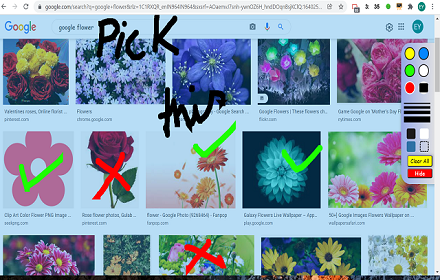
Currently there are many smartboard and touch style screens that offer marker addons for powerpoint or other applications, however if you use Canva, Apple Keynote, or just any web based PDFs or other pages it is difficult to find a consistent and simple way to draw on the slides or pages from a touch board.

Peter Marker offers a simple but functional solution, rendering a pen icon on the bottom right hand of the browser. Tapping the pen activates the drawing and gives you the option to change colour, erase, and clear screen. Clicking "next slide" with a powerpoint clicker will also automatically clear the screen as the slide changes.
Technical
- Version
- 1.0
- Manifest
- V3
- Size
- 378KiB
- Min Chrome
- 88
- Languages
- 1
- Featured
- No
Metadata
- ID
- gfemmbpffocfdbhihdfjlfjjdiodadal
- Developer ID
- u212e1d632c4c7f119d5bb7e143e9c7ab
- Developer Email
- [email protected]
- Created
- Jun 22, 2025
- Last Updated (Store)
- Jun 23, 2025
- Last Scraped
- May 31, 2026
- Website
- —
- Support URL
- —
- Privacy Policy
- —
Similar extensions
Alternatives to Peter Marker, ranked by description similarity.

Selection Rectangle Highlighting
Highlight any part of a page by drawing a selection rectangle like on your desktop.
552
★ 3.7

Highlight - Little Helper
Highlight text, draw shapes, add sticky notes, and capture screenshots on any webpage.
15
Board
This extension allows you to make any website on the web as your writing board
236
★ 2.7

Hold and Draw
Hold your favorite button and draw, two modes are available - brush and arrow
19
★ 5.0

Paint Tool (Updated)
Draw 🎨 anything anywhere in real-time, an MS Paint but in your browser.
410
★ 4.7

Smart Screenshot
Capture, annotate, and share screenshots with ease
7
KeysOnScreen
Allows you to display keystrokes, highly customisable, perfect for improving browser accessibility!
134

Cursor Mirror
Display visible cursor overlay on page. Perfect for Chromecast presentations. By AIO.com.ai
5
Data sourced from the Chrome Web Store · last verified May 31, 2026.