
Screenshot & Screen Recorder w/ Webcam-Droplr
The Easiest All-In-One Screenshot & Screen Recorder
As of May 2026, Screenshot & Screen Recorder w/ Webcam-Droplr has 10,000 users and a 4.01/5 rating from 225 reviews in the Workflow & Planning category.
Usersno change0%
10.0K
10,000
Ratingno change0%
4.01
225 reviews
Reviewsno change0%
225
Version
4.0.4
Manifest V3
History
1 snapshotsTracking since Apr 30, 2026.
View as table
| Date | Users | Rating | Reviews | Version |
|---|---|---|---|---|
| Apr 30, 2026 | 10.0K | 4.01 | 225 | 4.0.4 |
| Now | 10.0K | 4.01 | 225 | 4.0.4 |
Permissions & access
- Permissions
- desktopCaptureactiveTabwebRequesttabsactiveTabscriptingstoragenotificationsclipboardWrite
- Host access
- <all_urls>
Screenshots


About
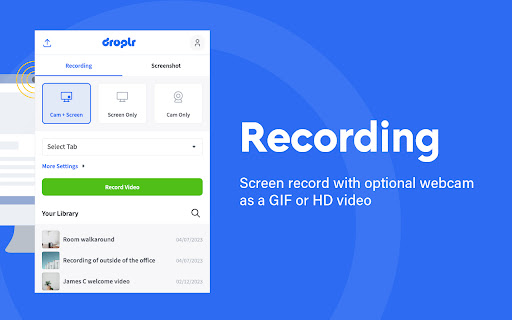
Capture screenshots and screen recordings instantly: it's saved to the cloud with a link you can share with anyone, anywhere.

Simple and easy to use.

Screenshots:
Capture part of your screen, the entire screen, or the full webpage: then mark it up.

Screen recorder:
Screen record with audio and optional webcam as a GIF or HD video.

Features:
* Your screenshot or screen recording automatically saves to the cloud with a link saved to your clipboard.
Paste it and share it with anyone, anywhere like email or Slack.
Or download your screenshot as a PNG or screen recording as a WebM right to your device.

* Annotate by adding text or color highlight.
Use the image editor to add shapes like lines, circles, arrows, and boxes.
Have fun with over 30 emojis to add to your screenshots 😀👌💯🎉

* All your screenshots and screen recording are saved to your personal Droplr cloud account, so you can access them anytime.

Add our top-rated Chrome app; used by 5 million people to share billions of screenshots and screen recordings.
Technical
- Version
- 4.0.4
- Manifest
- V3
- Size
- 15.81MiB
- Min Chrome
- 88
- Languages
- 1
- Featured
- Yes
Metadata
- ID
- oncaapliomaamlbopdmhmdompfemljhm
- Developer ID
- ud61eb90761c48e479b650bd03d910b85
- Developer Email
- [email protected]
- Created
- May 5, 2016
- Last Updated (Store)
- Jul 30, 2024
- Last Scraped
- May 27, 2026
- Website
- https://droplr.com/
- Support URL
- —
- Privacy Policy
- https://droplr.com/privacy/
Similar extensions
Alternatives to Screenshot & Screen Recorder w/ Webcam-Droplr, ranked by description similarity.

Screenshot and screen video recording - Screeny
The #1 screen recorder and screenshot tool! Full capture and video recording of your screen.
80.0K
★ 4.7

ScreenSend - Advanced Screen Recorder & Video Editor
Free unlimited video capture tool to record, edit, share videos instantly.
179
★ 5.0

Screshot - One click screen capture and editor
Capture and edit your screen in one click. Fast, simple, and built for productivity.
20.0K
★ 4.1
Zoho Annotator
The most elegant and efficient annotation tool.
20.0K
★ 4.7

Simple Screen Capture: Full Page Screenshot
Simple Screen Capture is a handy Chrome Extension that allows you to effortlessly capture full page screenshots with just a click.
5.0K
★ 4.3

Awesome Screen Recorder & Screenshot
The best screen recorder and screen capture & screenshot tool to record screen.
3.0M
★ 4.7

brüno - Video Recording & Messaging App
brüno is a video recording and messaging application with quick sharing features.
29
★ 5.0

Jumpshare: Free Screen Recorder & Screenshots
The best screen recorder, screenshot capture and annotation tool
3.0K
★ 3.8
Data sourced from the Chrome Web Store · last verified May 27, 2026.