Zoho Annotator
The most elegant and efficient annotation tool.
As of June 2026, Zoho Annotator has 20,000 users and a 4.70/5 rating from 131 reviews in the Workflow & Planning category.
Usersno change0%
20.0K
20,000
Ratingdown 0.6 percent−0.6%
4.70
131 reviews
Reviewsup 2.3 percent+2.3%
131
Version
2.3.5
Manifest V3
90-day change · In the last 90 days this extension 3 version updates.
History
4 snapshotsTracking since Apr 16, 2026.
View as table
| Date | Users | Rating | Reviews | Version |
|---|---|---|---|---|
| Apr 16, 2026 | 20.0K | 4.73 | 128 | 2.3.2 |
| May 7, 2026 | 20.0K | 4.73 | 128 | 2.3.2 |
| May 26, 2026 | 20.0K | 4.70 | 130 | 2.3.3 |
| Jun 25, 2026 | 20.0K | 4.70 | 130 | 2.3.4 |
| Now | 20.0K | 4.70 | 131 | 2.3.5 |
Permissions & access
- Permissions
- activeTabdownloadstabscontextMenusstoragedesktopCapturetabCapturescriptingoffscreen
- Host access
- http://*/*, https://*/*
Screenshots



About
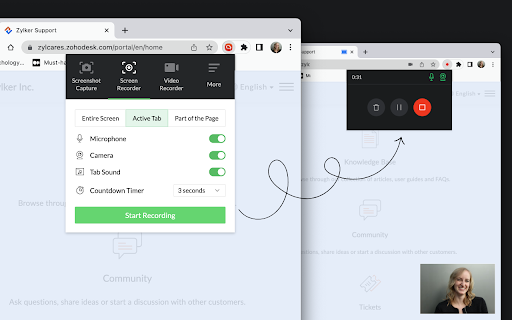
Capture screenshots or recordings of your web page or desktop screen. Add annotations to the captured screenshot of your web pages or images on your desktop, such as design mockups, illustrations, and diagrams, by uploading the respective image. Check out the features below.

SCREENSHOT CAPTURE

- Capture the full page, the visible area of a page, or only part of the page..
- Capture the whole desktop screen or an application window.
- Use delayed capture to screenshot sections that appear only after clicking a link or button within the page.

SCREEN RECORDER

- Record the visible screen of a page or part of the page.
- Record the whole desktop screen or an application window.

VIDEO RECORDER

- Record a video with your webcam to share your knowledge with your target audience.

IMAGE ANNOTATION

- Use square and circle shapes to mark areas to comment.
- The freehand drawing tool enables you to circle portions correctly without disturbing other parts of the document.
- The highlighter pen emphasizes the content that needs attention.
- Add contextual comments to the highlighted areas.
- Use tagging tools to number the places to comment and describe them in any of your communication apps after completion.
- Blur or smudge private or confidential data.

SHARING & UPLOAD TO CLOUD

- Get a shareable link and share it in social media (Facebook, Twitter, and WhatsApp) and other websites/applications.
- Upload the files to your Zoho WorkDrive, Google Drive, OneDrive, and Dropbox accounts.
- Share the files in Zoho Cliq, Zoho Connect, Zoho Projects, and Zoho Sprints.

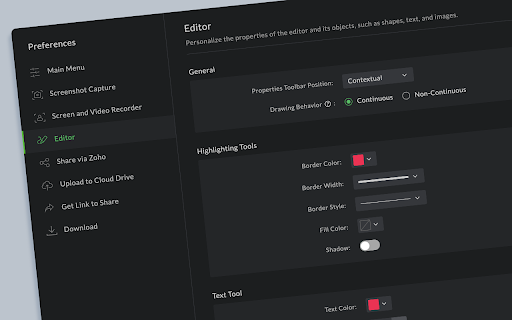
PREFERENCES

Customize the default values, such as Line Color, Font Family, Text Color, etc., as per your preference.

SUPPORT

For any questions or help, send an email to [email protected].
Technical
- Version
- 2.3.5
- Manifest
- V3
- Size
- 22.83MiB
- Min Chrome
- 88
- Languages
- 44
- Featured
- Yes
Metadata
- ID
- dmlmcpcjndojhbflolmdgfpojnjfdlbj
- Developer ID
- u503df942febfd9bc15e4ba9391526472
- Developer Email
- [email protected]
- Created
- Nov 15, 2017
- Last Updated (Store)
- Jun 17, 2026
- Last Scraped
- Jun 25, 2026
- Website
- http://zoho.com/
- Support URL
- https://help.zoho.com/portal/en/newticket?departmentId=4004169712057&layoutId=4004169714341
- Privacy Policy
- https://www.zoho.com/privacy.html
Similar extensions
Alternatives to Zoho Annotator, ranked by description similarity.

Screenshot & Screen Recorder w/ Webcam-Droplr
The Easiest All-In-One Screenshot & Screen Recorder
10.0K
★ 4.0

Screenshot (Capture Page) Tool - WebCapturePro
Capture, edit, and customize webpage screenshots to your liking. Adjust proportions and add watermarks—all for free!
83
★ 5.0

Annotation, Full Page Capture & Snipping Tool
Instacap is a screenshot editor & annotation tool for full page screen capture, pdf annotation & more—for instant visual feedback
7.0K
★ 4.8

Screenshot and screen video recording - Screeny
The #1 screen recorder and screenshot tool! Full capture and video recording of your screen.
80.0K
★ 4.7

Recorder & Screenshot | Sitespedia - Screen Video Recorder & Screenshot
Take screenshots entirely or partially of websites, annotate them, and manage them in a centralized place.
6

Screenshotify
Lightweight Screenshot + Annotate Chrome Extension. Capture, annotate, blur, crop, and zoom screenshots - all offline and private.
11
★ 5.0

Free Snipping Tool
Professional snipping tool with full page, selection, and scrolling capture capabilities
40.0K
★ 3.9

brüno - Video Recording & Messaging App
brüno is a video recording and messaging application with quick sharing features.
29
★ 5.0
Data sourced from the Chrome Web Store · last verified Jun 25, 2026.