
Awesome Screen Recorder & Screenshot
The best screen recorder and screen capture & screenshot tool to record screen.
As of June 2026, Awesome Screen Recorder & Screenshot has 3,000,000 users and a 4.66/5 rating from 29,254 reviews in the Workflow & Planning category.
Usersno change0%
3.0M
3,000,000
Ratingno change0%
4.66
29.3K reviews
Reviewsup 0.5 percent+0.5%
29.3K
Version
4.4.41
Manifest V3
90-day change · In the last 90 days this extension 1 version update.
History
24 snapshotsTracking since Apr 1, 2026.
View as table
| Date | Users | Rating | Reviews | Version |
|---|---|---|---|---|
| Apr 1, 2026 | 3.0M | 4.66 | 29.1K | 4.4.36 |
| Apr 5, 2026 | 4.0M | 4.66 | 29.1K | 4.4.37 |
| Apr 8, 2026 | 3.0M | 4.66 | 29.1K | 4.4.37 |
| Apr 14, 2026 | 3.0M | 4.66 | 29.1K | 4.4.37 |
| Apr 19, 2026 | 4.0M | 4.66 | 29.1K | 4.4.38 |
| Apr 22, 2026 | 4.0M | 4.66 | 29.1K | 4.4.38 |
| Apr 25, 2026 | 4.0M | 4.66 | 29.1K | 4.4.39 |
| Apr 28, 2026 | 4.0M | 4.66 | 29.1K | 4.4.39 |
| May 5, 2026 | 4.0M | 4.66 | 29.1K | 4.4.39 |
| May 8, 2026 | 4.0M | 4.66 | 29.1K | 4.4.39 |
| May 10, 2026 | 4.0M | 4.66 | 29.1K | 4.4.40 |
| May 12, 2026 | 4.0M | 4.66 | 29.2K | 4.4.40 |
| May 14, 2026 | 4.0M | 4.66 | 29.2K | 4.4.40 |
| May 16, 2026 | 4.0M | 4.66 | 29.2K | 4.4.41 |
| May 19, 2026 | 4.0M | 4.66 | 29.2K | 4.4.41 |
| May 21, 2026 | 4.0M | 4.66 | 29.2K | 4.4.41 |
| May 24, 2026 | 4.0M | 4.66 | 29.2K | 4.4.41 |
| May 27, 2026 | 4.0M | 4.66 | 29.2K | 4.4.41 |
| May 30, 2026 | 4.0M | 4.66 | 29.2K | 4.4.41 |
| Jun 2, 2026 | 3.0M | 4.66 | 29.2K | 4.4.41 |
| Jun 5, 2026 | 3.0M | 4.66 | 29.2K | 4.4.41 |
| Jun 7, 2026 | 3.0M | 4.66 | 29.2K | 4.4.41 |
| Jun 10, 2026 | 3.0M | 4.66 | 29.2K | 4.4.41 |
| Jun 13, 2026 | 4.0M | 4.66 | 29.2K | 4.4.41 |
| Now | 3.0M | 4.66 | 29.3K | 4.4.41 |
Permissions & access
- Permissions
- tabspowerstorageunlimitedStoragedesktopCapturetabCapturecookiesactiveTabcontextMenusscriptingoffscreenalarms
- Host access
- *://*.awesomescreenshot.com/, <all_urls>
Screenshots


About
Want to share your screen for cases like reporting technical issues, making product demos or how-to tutorials?  Here are 🔟 reasons to choose Awesome Screen Recorder & Screenshot

1️⃣ Provide stable service for more than 10 years
2️⃣ Loved by more than 3 millions users across different platforms 👍
3️⃣ Local Screen Recorder & Cloud Screen recorder  2 in 1
4️⃣ Screenshot / Screen capture & Screen recorder  2 in 1
5️⃣ Quick Customer support
6️⃣ Powerful features special designed for work and educational scenarios
7️⃣ No ads and respect your privacy
8️⃣ Easy to use
9️⃣ Instant sharing your screenshots and screen recordings
🔟 Most importantly,  your voice matters! 🗣 & Continuous improvements

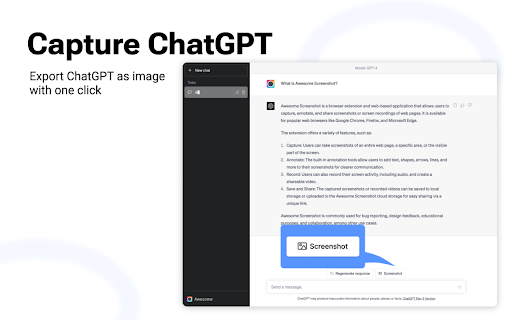
Even more, Awesome Screenshot enables you to capture and share your full chat in ChatGPT effortlessly!

Here are some features for screen recorder and screenshot


🎦🎦🎦 Screen Recorder 🎦🎦🎦

🎥 Record
    ▸ Record your Desktop, current Tab or Camera only
    ▸ Include your voice in recording with Microphone option on
    ▸ Include your face in your video by embedding your webcam
    ▸ Choose video dimensions from 720p, 1080p or 4K

💾 Save
    ▸ Save recordings to local disk
    ▸ Save recordings to your online account
    ▸ Download uploaded videos in WebM or MP4 format

🚀 Share Recordings
    ▸ Instantly get a shareable link of a video after finishing recording
    ▸ Easily share a recording video to Jira, Slack, Trello, Asana, GitHub

🖍 Annotate & Edit
    ▸ Annotate the screen while recording
    ▸ Annotate and edit the video after recording

Prefer to screenshot web pages as images? No problem, you can set the Capture tab as the primary tab.

📸📸📸 Capture Screenshot 📸📸📸


📷 Screen Capture
    ▸ Capture a screenshot of the page you visit, full page, selected area or visible part
    ▸ Capture a screenshot of your entire screen or a specific application window
    ▸ Capture visible part, entire screen or app window after delay


🖍 Annotate Screenshot
    ▸ Resize or crop a screenshot to the size you need
    ▸ Annotate your screenshot with rectangles, circles, arrows, lines, etc.
    ▸ Add text to your screenshot with or without background color, change text font and font size
    ▸ Blur sensitive information on your screenshot
    ▸ Highlight important part on your screenshot
    ▸ Select a local image or paste a copied image from your clipboard to annotate


📥 Save & Share Screenshot
    ▸ Save screenshot as image in PNG or JPG format, or download screenshot as PDF
    ▸ One click to save screenshot to your Awesome Screenshot account and get a shareable link
    ▸ Send a screenshot to a destination in Jira, Slack, Trello, Asana, GitHub
    ▸ Copy a screenshot directly when capturing selected area for quick pasting


📧 Contact us📧
If you have any questions, suggestions or feature requests, feel free to submit a report by clicking the Feedback button in the extension’s popup menu.
 You can also send a message to [email protected] anytime. Let us know your thoughts! Thank you.
Technical
- Version
- 4.4.41
- Manifest
- V3
- Size
- 9.03MiB
- Min Chrome
- 88
- Languages
- 54
- Featured
- Yes
Metadata
- ID
- nlipoenfbbikpbjkfpfillcgkoblgpmj
- Developer ID
- u32f3066ffdc328ce92d31ad657cf0b86
- Developer Email
- [email protected]
- Created
- Jun 16, 2015
- Last Updated (Store)
- May 14, 2026
- Last Scraped
- Jun 13, 2026
- Support URL
- https://www.awesomescreenshot.com/contact_us
- Privacy Policy
- https://www.awesomescreenshot.com/privacy/
Similar extensions
Alternatives to Awesome Screen Recorder & Screenshot, ranked by description similarity.

Scrolling screenshot tool & screen capture
Scrolling Screenshot tool for screen capture and screen sharing
400.0K
★ 4.3

Screen recorder
Elevate your productivity with Screen Recorder tool. Effortlessly capture and share your screen recordings for optimal efficiency.
4.0K
★ 3.6

CaptureNShare: Capture, Record, Edit & Share
Transforms your screen into a canvas—effortlessly record, edit, and share high-quality screenshots and videos like a pro!
38
★ 4.9
Apowersoft Free Screen Recorder
Free & Easy-to-use screen recorder, capture video and audio with just a single click.
100.0K
★ 4.7

Screenshot and screen video recording - Screeny
The #1 screen recorder and screenshot tool! Full capture and video recording of your screen.
80.0K
★ 4.7

Screen & Webcam recorder - Flonnect
Allows Screen Recording from your Webcam and Desktop
100.0K
★ 4.6
Screen capture and recorder - Screenshot Tool
Record screen and camera, take a screenshot, edit, and share via Google Drive
50.0K
★ 4.7

Screen Recorder & Capture Full Page Screenshot
Record screen/Tab with audio, embed webcam & mic, capture full-page/visible/selected screenshots with built-in editor, export in HD
133
★ 5.0
Data sourced from the Chrome Web Store · last verified Jun 13, 2026.