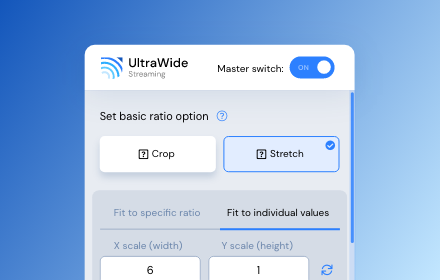
UltraWide Streaming: custom ratios [QVI]
Go fullscreen on your ultrawide monitor. Fit the video to 21:9, 32:9, or custom ratio. Supports most streaming platforms.
As of June 2026, UltraWide Streaming: custom ratios [QVI] has 10,000 users and a 4.16/5 rating from 32 reviews in the Entertainment category.
Usersno change0%
10.0K
10,000
Ratingup 1.5 percent+1.5%
4.16
32 reviews
Reviewsup 6.7 percent+6.7%
32
Version
1.0.76
Manifest V3
90-day change · In the last 90 days this extension 3 version updates.
History
8 snapshotsTracking since Apr 1, 2026.
View as table
| Date | Users | Rating | Reviews | Version |
|---|---|---|---|---|
| Apr 1, 2026 | 10.0K | 4.10 | 30 | 1.0.72 |
| Apr 5, 2026 | 10.0K | 4.10 | 30 | 1.0.73 |
| Apr 16, 2026 | 10.0K | 4.10 | 30 | 1.0.75 |
| Apr 27, 2026 | 10.0K | 4.10 | 30 | 1.0.75 |
| May 23, 2026 | 10.0K | 4.10 | 30 | 1.0.76 |
| May 28, 2026 | 10.0K | 4.13 | 31 | 1.0.76 |
| Jun 10, 2026 | 20.0K | 4.13 | 31 | 1.0.76 |
| Jun 22, 2026 | 20.0K | 4.16 | 32 | 1.0.76 |
| Now | 10.0K | 4.16 | 32 | 1.0.76 |
Permissions & access
- Permissions
- alarmsstorage
- Host access
- *://*.apple.com/*, *://*.disneyplus.com/*, *://*.bamgrid.com/*, *://*.hbomax.com/*, *://*.max.com/*, *://*.hbo.com/*, *://*.hulu.com/*, *://*.netflix.com/*, *://*.paramountplus.com/*, *://*.peacocktv.com/*, *://*.primevideo.com/*, *://*.amazon.com/*, *://*.amazon.co.uk/*, *://*.amazon.de/*, *://*.amazon.co.jp/*
Screenshots
![UltraWide Streaming: custom ratios [QVI] screenshot 2](https://lh3.googleusercontent.com/uf8fLUQUl5Vcy8cpgGPdVp8-FNkZegHVGE-Rbm6anK7EztNV6gYngWv0NfDtkgiv2vycH4R8lznkdijnLjAuDFiu0w)
About
Make the most of your ultrawide monitor and upgrade it to a home cinema!

With UltraWide Streaming, you’ll be able to fit your favorite streaming content to various ultrawide ratios. Get rid of the annoying black bars and go fullscreen wider than average!

🔎How to use UltraWide Streaming?

Follow these simple steps to get the ultrawide fullscreen mode:
1. Add UltraWide Streaming to Chrome.
2. Go to Extensions (a puzzle piece icon in the browser’s top right corner).
3. Find UltraWide Streaming and pin it to your toolbar.
4. Click the UltraWide Streaming icon to open the settings.
5. Set the basic ratio option (Crop or Stretch)
6. Click on Specify button to expand the setting options.
7. Choose one from the defined ratios (21:9, 32:9, or 16:9) or set your custom ratio values.
8. Finally, pick the platforms for which you want to use your new video settings.

✅You’re all set! Enjoy fullscreen movies and TV Shows on your ultrawide monitor.

⭐UltraWide Streaming supports most popular streamin services:

- Netflix
- Prime Video
- Disney+
- Max
- Hulu & many more!

Changelog:

[1.0.34] - 2024-11-14
Various minor bug fixes
[1.0.33] - 2024-10-01
Minor bug fixes
[1.0.32] - 2024-08-03
Bug fixes
[1.0.31] - 2024-07-25
Improved compatibility with newer browser versions
Fixed rare playback issue on PeacockTV
[1.0.30] - 2024-06-20
Minor bug fixes
[1.0.29] - 2024-06-03
Bug fixes
[1.0.28] - 2024-04-15
Support for Max and AppleTV
[1.0.27] - 2024-03-10
Enhanced streaming service detection algorithm
Minor UI inconsistencies in extension settings
[1.0.26] - 2024-02-25
Minor bug fixes
[1.0.25] - 2024-02-10
Support for PeacockTV
Other minor fixes
[1.0.24] - 2024-02-02
Bug fixes
[1.0.23] - 2024-01-15
Resolved playback tracking issue on Hulu
Stability improvements during streaming
[1.0.22] - 2023-12-20
Support for Paramount+
[1.0.21] - 2023-12-15
Minor bug fixes
[1.0.20] - 2023-12-10
Faster loading times for Disney+
Optimized handling of user preferences
[1.0.19] - 2023-12-05
Corrected bugs in subtitle synchronization for Hulu
Minor code optimizations
[1.0.18] - 2023-12-01
Minor bug fixes
[1.0.17] - 2023-11-20
Minor bug fixes
[1.0.16] - 2023-11-18
Bug fixes
[1.0.15] - 2023-11-01
Support for Hulu
[1.0.14] - 2023-10-15
Resolved random crashes reported by some users
Improved error reporting for unsupported services
[1.0.13] - 2023-09-20
Minor bug fixes
[1.0.12] - 2023-09-05
Bug fixes
[1.0.11] - 2023-08-20
Support for Disney+
General bug fixes
[1.0.10] - 2023-07-29
Bug fixes
[1.0.09] - 2023-07-16
Minor bug fixes
[1.0.08] - 2023-07-01
Minor bug fixes
[1.0.07] - 2023-06-01
Optimized performance for larger watchlists
Addressed UI alignment issues on smaller screens
[1.0.06] - 2023-05-20
Minor bug fixes
[1.0.05] - 2023-05-10
Improved login process for Prime Video
Enhanced support for regional Netflix libraries
[1.0.04] - 2023-04-25
Minor bug fixes
[1.0.03] - 2023-04-12
Support for Prime Video
Minor fixes and improvements
[1.0.02] - 2022-12-01
Initial bug fixes and performance improvements post-launch
[1.0.01] - 2022-11-10
Minor bug fixes
[1.0.0] - 2022-10-13
Initial release - Support for Netflix

This extension is part of the Quality Viewership Initiative, a collaborative effort to enhance the understanding of audience engagement. It collects anonymous, aggregated viewing insights to support creators and studios in improving the quality of their content. You can stop sharing your information at any time by switching the toggle on the options page.

Disclaimer: All product and company names are trademarks or registered trademarks of their respective holders. This website & extensions hold no association or affiliation with them or any third-party companies.
Technical
- Version
- 1.0.76
- Manifest
- V3
- Size
- 691KiB
- Min Chrome
- 88
- Languages
- 55
- Featured
- Yes
Metadata
- ID
- ofkcbakkpjefjndcmbkokadbmmaimnlp
- Developer ID
- u3649d9d000d1a9eccc7b5f5c8372754f
- Developer Email
- [email protected]
- Created
- Oct 15, 2022
- Last Updated (Store)
- Apr 23, 2026
- Last Scraped
- Jun 22, 2026
- Website
- —
- Privacy Policy
- https://streamingextensions.com/privacy_policy_qvi/
Similar extensions
Alternatives to UltraWide Streaming: custom ratios [QVI], ranked by description similarity.

Disney Plus Ultrawide Fullscreen Support
Toggle Disney Plus video size to support fullscreen on ultrawide monitors, remove black bars.
20.0K
★ 4.4

Audio Booster for Netflix [QVI]
Quiet audio bothering you? 🚀 Get Audio Booster for Chrome and enjoy better sound! 🎧 Compatible with +15 SVODs 🎬
8.0K
★ 4.8
Streaming enhanced Netflix Disney Prime Video
Skip ads, intros, credits and add adjust speed, etc. on Netflix, Prime video, Disney+, Crunchyroll and HBO max.
40.0K
★ 4.7

Netflix™ Extended [QVI]
Extension for Netflix™ to skip intros, recaps, start next movie/episode in faster pace and many more.
60.0K
★ 4.4

Apple TV Extended: boost your viewing [QVI]
Boost your Apple TV viewing experience: adjust speed, skip intros & recaps, hide spoilers.
1.0K
★ 2.2

AMC+ UltraWide: custom fullscreen ratios
Go fullscreen on your ultrawide monitor. Fit the video to 21:9, 32:9, or custom ratio.
4

Zoom to Fill - Ultrawide Video
Removes videos black bars on Netflix, Amazon Prime, Disney Plus, HBO Max, Youtube by changing to ultrawide video aspect ratio.
200.0K
★ 3.9

SkyShowtime UltraWide: custom fullscreen ratios
Go fullscreen on your ultrawide monitor. Fit the video to 21:9, 32:9, or custom ratio. Supports SkyShowtime platform.
312
★ 5.0
Data sourced from the Chrome Web Store · last verified Jun 22, 2026.