
Disney Plus Ultrawide Fullscreen Support
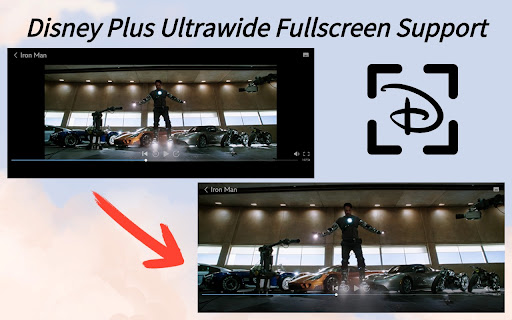
Toggle Disney Plus video size to support fullscreen on ultrawide monitors, remove black bars.
As of June 2026, Disney Plus Ultrawide Fullscreen Support has 20,000 users and a 4.41/5 rating from 69 reviews in the Entertainment category.
Usersup 100.0 percent+100.0%
20.0K
20,000
Ratingup 0.9 percent+0.9%
4.41
69 reviews
Reviewsup 6.2 percent+6.2%
69
Version
1.10.0
Manifest V3
90-day change · In the last 90 days this extension gained 10.0K users.
History
5 snapshotsTracking since Apr 4, 2026.
View as table
| Date | Users | Rating | Reviews | Version |
|---|---|---|---|---|
| Apr 4, 2026 | 10.0K | 4.37 | 65 | 1.10.0 |
| Apr 16, 2026 | 10.0K | 4.38 | 66 | 1.10.0 |
| Apr 22, 2026 | 10.0K | 4.39 | 67 | 1.10.0 |
| May 7, 2026 | 10.0K | 4.40 | 68 | 1.10.0 |
| May 22, 2026 | 20.0K | 4.40 | 68 | 1.10.0 |
| Now | 20.0K | 4.41 | 69 | 1.10.0 |
Permissions & access
- Permissions
- storageactiveTabscripting
- Host access
- None declared
Screenshots
About
Experience Disney Plus like never before on your ultrawide monitor with our Chrome Extension – the Disney Plus Ultrawide Fullscreen Support!

Are you tired of those pesky black bars ruining your immersive Disney Plus viewing experience on your ultrawide monitor? Say goodbye to wasted screen space and hello to full-screen bliss with our simple yet powerful extension.

With just a click of a button, toggle between the default view and a custom-fit ultrawide fullscreen mode optimized specifically for your monitor. Watch your favorite Disney movies and shows in all their glory, with no more distractions from those unsightly black bars.

Features:
- One-click toggle: Easily switch between default view and custom-fit ultrawide fullscreen mode with a single click.
- Optimized for ultrawide monitors: Enjoy your Disney Plus content in its full glory on your ultrawide monitor without any black bars or wasted screen space.

Enhance your Disney Plus experience on ultrawide monitors today with the Disney Plus Ultrawide Fullscreen Chrome Extension. Install now and elevate your viewing experience to a whole new level!

🔥🔥 Check out our other GREAT EXTENSIONS:
🎯Disney Plus Dual Subtitles - Subtitle Translator
https://chromewebstore.google.com/detail/ojhgmkdbdcgmgcioandnlaabnhofbnel

💌 If you have any issues, simply contact me through email or click the support button within the extension.
Technical
- Version
- 1.10.0
- Manifest
- V3
- Size
- 145KiB
- Min Chrome
- 88
- Languages
- 51
- Featured
- No
Metadata
- ID
- plccepjkafhneldjdpfgpochenhhajfb
- Developer ID
- u5f754c770723d4994715dc6691a5a571
- Developer Email
- [email protected]
- Created
- Mar 22, 2024
- Last Updated (Store)
- Jan 25, 2026
- Last Scraped
- Jun 10, 2026
- Website
- disneyplus-subtitle-translator.com
- Support URL
- —
- Privacy Policy
- —
Similar extensions
Alternatives to Disney Plus Ultrawide Fullscreen Support, ranked by description similarity.
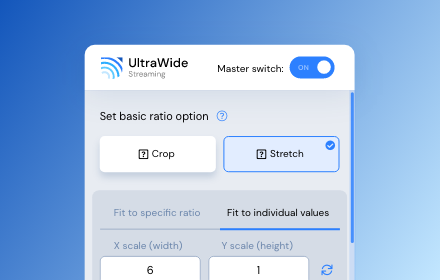
UltraWide Streaming: custom ratios [QVI]
Go fullscreen on your ultrawide monitor. Fit the video to 21:9, 32:9, or custom ratio. Supports most streaming platforms.
10.0K
★ 4.2

Disney+ AutoSkip
This is an extension that skips the resume and intro of Disney+ videos and jumps to the next episode
1.0K
★ 4.0

YouTube Video Zoom
Resizes YouTube videos to fill the entire screen, removing black bars
148
★ 1.0

AMC+ UltraWide: custom fullscreen ratios
Go fullscreen on your ultrawide monitor. Fit the video to 21:9, 32:9, or custom ratio.
4

UltraWide for U-NEXT: custom fullscreen ratios
Go fullscreen on your ultrawide monitor. Fit the video to 21:9, 32:9, or custom ratio. Designed for U-NEXT platform.
29

Voice Control for Disney+
🔊Voice Control for Disney+ 🚀 Play, pause, fast-forward, and more! 🙌🎬
28

Apple TV Extended: boost your viewing [QVI]
Boost your Apple TV viewing experience: adjust speed, skip intros & recaps, hide spoilers.
1.0K
★ 2.2

Skip ads and intros, works with Disney Plus [QVI]
Independent software - not affiliated with Disney. Automatically skip Disney+ ads, intros, recaps and go to next episode.
10.0K
★ 3.6
Data sourced from the Chrome Web Store · last verified Jun 10, 2026.