
MS Edge TTS (Text to Speech)
MsEdge TTS Extension (Text to Speech)
As of June 2026, MS Edge TTS (Text to Speech) has 8,000 users and a 4.13/5 rating from 100 reviews in the Productivity category.
Usersno change0%
8.0K
8,000
Ratingno change0%
4.13
100 reviews
Reviewsup 9.9 percent+9.9%
100
Version
1.4.0
Manifest V3
History
4 snapshotsTracking since Apr 18, 2026.
View as table
| Date | Users | Rating | Reviews | Version |
|---|---|---|---|---|
| Apr 18, 2026 | 8.0K | 4.13 | 91 | 1.4.0 |
| Apr 28, 2026 | 8.0K | 4.14 | 96 | 1.4.0 |
| May 15, 2026 | 8.0K | 4.14 | 96 | 1.4.0 |
| May 24, 2026 | 8.0K | 4.12 | 98 | 1.4.0 |
| Now | 8.0K | 4.13 | 100 | 1.4.0 |
Permissions & access
- Permissions
- storagecontextMenussidePanelscriptingactiveTab
- Host access
- None declared
Screenshots


About
✨ NEW FEATURE: Dark mode is finally here!

This is a text-to-speech browser extension that utilizes Microsoft Edge's Online TTS service. It offers several notable features:

1. Natural Sounding Voices: The extension provides high-quality, natural-sounding voices for a more engaging and enjoyable listening experience.

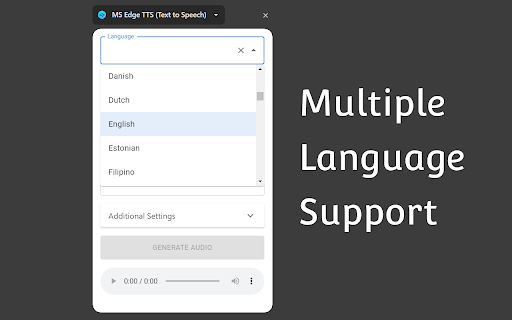
2. Multiple Language Support: It supports a wide range of languages, allowing users to listen to text in their preferred language or translate text into different languages.

3. Context Menu Item: The extension integrates a context menu item, enabling users to quickly and easily convert selected text into spoken audio with just a right-click.

4. Download Generated Audio File: Users have the option to download the generated audio files.

5. Advanced Controls: The extension offers advanced controls for adjusting the rate, pitch, and volume of the generated speech.

6. Free for Personal and Commercial Use: The generated audio files are free to use for both personal and commercial purposes.

7. User-friendly Interface: The extension features a user-friendly interface that is easy to navigate and use. The extension provides language and country auto-complete functionality, making it quick and convenient for users to select the desired language or country for text conversion.

Attribution:
The extension icon is created by Freepik - Flaticon:
https://www.flaticon.com/free-icons/loud-speaker
Technical
- Version
- 1.4.0
- Manifest
- V3
- Size
- 204KiB
- Min Chrome
- 116
- Languages
- 1
- Featured
- No
Metadata
- ID
- oajalfneblkfiejoadecnmodfpnaeblh
- Developer ID
- u077f1e79d658892d60baee5ca156d0ad
- Developer Email
- [email protected]
- Created
- May 1, 2024
- Last Updated (Store)
- Dec 20, 2025
- Last Scraped
- Jun 3, 2026
- Website
- —
- Privacy Policy
- —
Similar extensions
Alternatives to MS Edge TTS (Text to Speech), ranked by description similarity.

SpeakIt - Text to Speech
Highlight any text and listen with natural AI voices. 5-min daily free limit, then ₹500 lifetime.
63
★ 5.0

TtsZone
Enhance your web browsing experience with our text-to-speech (TTS) extension. Easily convert selected text on any webpage into…
—

Text-to-Speech Reader
Reads selected text aloud using your system's Text-to-Speech.
—

Free TTS
High-quality text-to-speech engine for your browser.
1

AudioTTS - Simple Text to Speech Downloader
Save audio from various text-to-speech tools for personal use, with support for platforms like ElevenLabs, Azure, Google, and more.
40.0K
★ 3.6

Text to Voice Converter
Activate this extension and convert any selected text into voice with a simple right-click.
12

Drag Listening
This is a tool that instantly reads aloud any text you highlight.
9
★ 5.0

Text to Speech AI
An advanced text-to-speech AI that reads PDF, DOCX, and TXT files, website content, and includes a super calculator.
65
★ 4.7
Data sourced from the Chrome Web Store · last verified Jun 3, 2026.