
Google Ads Quick Copy
Quickly copy data from Google Ads campaign cells
As of June 2026, Google Ads Quick Copy has 106 users in the Workflow & Planning category.
Usersdown 4.5 percent−4.5%
106
106
Ratingno change0%
—
— reviews
Reviewsno change0%
—
Version
1.0
Manifest V3
History
3 snapshotsTracking since Apr 1, 2026.
View as table
| Date | Users | Rating | Reviews | Version |
|---|---|---|---|---|
| Apr 1, 2026 | 111 | — | — | 1.0 |
| May 2, 2026 | 108 | — | — | 1.0 |
| Jun 1, 2026 | 115 | — | — | 1.0 |
| Now | 106 | — | — | 1.0 |
Permissions & access
- Permissions
- clipboardWriteactiveTab
- Host access
- *://ads.google.com/*
Screenshots

About
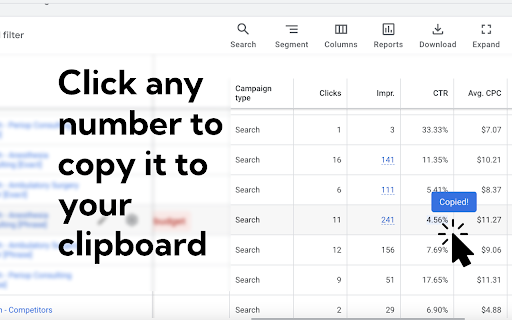
Copy cell data from Google Ads with a single click, and copy an entire row with ⌘+click.

This extension is great if you regularly report on certain metrics in Google Ads, but don't want to export data into a new spreadsheet, copy that, or double-click/drag your cursor over a bunch of numbers in the Ads interface and paste those.

Right now, that's all the extension does. It's a one-trick-pony, but boy howdy is it good at it.

Tips for success:
- This is most effective if you're reporting or looking at data in a spreadsheet.
- Create custom columns in Google Ads that correspond to the columns in your spreadsheet
- Click to copy the cells you need, or ⌘+click to copy the row.
- NOTE: When you use the ⌘+click, only values to the right of your click will be copied. This is to prevent data that's often extraneous (like campaign status) from being pulled in unnecessarily.
Technical
- Version
- 1.0
- Manifest
- V3
- Size
- 13.24KiB
- Min Chrome
- 88
- Languages
- 1
- Featured
- No
Metadata
- ID
- nnjopmpffgpmfpeffghnjmnfcogkhabb
- Developer ID
- u6982079a6a782a102e9ac6d0093f541f
- Developer Email
- [email protected]
- Created
- Feb 20, 2025
- Last Updated (Store)
- Feb 20, 2025
- Last Scraped
- Jun 1, 2026
- Website
- —
- Support URL
- —
- Privacy Policy
- —
Similar extensions
Alternatives to Google Ads Quick Copy, ranked by description similarity.

AdScanner by PPC Ad Editor
AdScanner is an amazing tool for scraping and downloading ads from Google's ad transparency page.
748
★ 1.0

Column to Comma-Separated List
Convert column data into a comma-separated list.
228
★ 5.0

Ads Library Expander
Optimize Facebook Ads Library with our Chrome extension. Streamline research, save time!
814
★ 4.0

Salesforza Sync Chrome Tabs to Google Sheet
Extension Synch to Google Sheet
508
★ 5.0
AdMinerX
Need creative inspiration? Want to save all of your competitor's ads? Quickly download Google search ads with AdMiner.
3.0K
★ 3.7

Google Ads Transparency Pro
Enhanced analysis for Google Ads Transparency reports
124
★ 5.0

Web Content Copier
Copy headings and paragraphs from the current webpage.
6.0K
★ 4.5

Table Range Select & Copy (Like in Firefox!)
The extension enables table range selection like in Firefox!
8.0K
★ 3.6
Data sourced from the Chrome Web Store · last verified Jun 1, 2026.