AdMinerX
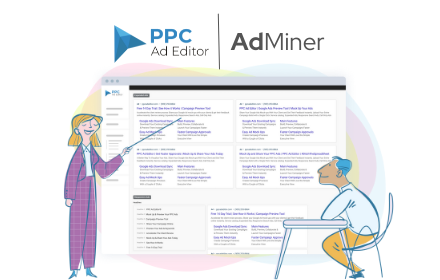
Need creative inspiration? Want to save all of your competitor's ads? Quickly download Google search ads with AdMiner.
As of May 2026, AdMinerX has 3,000 users and a 3.67/5 rating from 9 reviews in the Workflow & Planning category.
Usersno change0%
3.0K
3,000
Ratingno change0%
3.67
9 reviews
Reviewsno change0%
9
Version
1.0.9
Manifest V3
History
1 snapshotsTracking since Apr 30, 2026.
View as table
| Date | Users | Rating | Reviews | Version |
|---|---|---|---|---|
| Apr 30, 2026 | 3.0K | 3.67 | 9 | 1.0.9 |
| Now | 3.0K | 3.67 | 9 | 1.0.9 |
Permissions & access
- Permissions
- storageunlimitedStorage
- Host access
- None declared
Screenshots


About
Scrape Google & Microsoft Bing text + shopping ads and related keywords with this easy to use Chrome Extension

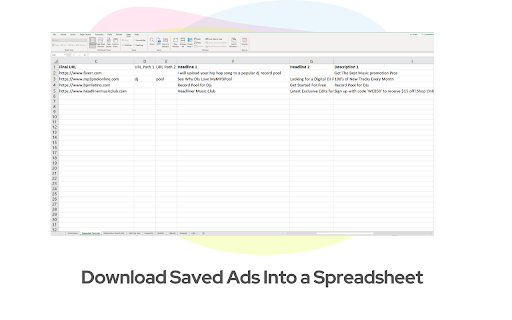
PPC Ad Editor - AdMinerX makes it easy to download and save Google & Microsoft Bing text & shopping ads + keywords into a spreadsheet.

**Bonus**

Now you can also save keywords related to your search query!

This helpful tool makes it easy to get creative inspiration and keep track of your competitor's ads.

Why use AdMinerX?

✅ Spy on your competitor's text and shopping ads + site links
✅ Collect ads for various keywords for creative inspiration
✅ Get ideas on headlines and descriptions
✅ Borrow your competitor's best ads and tweak them to make it your own
✅ No more cutting and pasting ads manually
✅ Keep track of what ads are trigged by keywords
✅ Save keywords related to your search query in seconds
✅ Compatible with PPC Ad Editor Ad Preview tool
✅ Download Google & Microsoft Bing Shopping listings with image links, price, and more!

The chrome extension automatically pulls the ad content into the following columns so you can easily copy and paste into Google Ads Editor:

Search Query
Headline 1
Headline 2
Headline 3
Description 1
Description 2
Display URL
URL Path 1
URL Path 2
Sitelink Extensions
Callout Extensions
Structured Snippet Extensions
Related Keywords

Directions:

Step 1: Search for any keyword you want in Google.com or Bing.com

Step 2: Activate the chrome extension and click on "Capture Ads" or "Capture Keywords"

Step 3: Search for more keywords or click on "Download" to save the spreadsheet to your computer

Step 4: Click "Clear" to delete all previous search ads and start fresh

**PRO TIP**: Upload the spreadsheet to https://www.ppcadeditor.com to see the ads and sitelinks in a visual format (just like on Google).

You can share the ads, make comments and edit the ads with a secure link

**Note, if you see an error when trying to capture the ads, please close all browsers and restart a new session
Technical
- Version
- 1.0.9
- Manifest
- V3
- Size
- 462KiB
- Min Chrome
- 88
- Languages
- 1
- Featured
- Yes
Metadata
- ID
- omhnpaidepkhbjngmhjkphmlofoiocna
- Developer ID
- u1fcc1711b7bbed4cb6bda5275cc272d2
- Developer Email
- [email protected]
- Created
- Mar 24, 2022
- Last Updated (Store)
- Jan 6, 2024
- Last Scraped
- May 27, 2026
- Website
- ppcadeditor.com
- Support URL
- https://www.ppcadeditor.com/contact-us/
- Privacy Policy
- https://www.ppcadeditor.com/privacy-policy/
Similar extensions
Alternatives to AdMinerX, ranked by description similarity.

AdScanner by PPC Ad Editor
AdScanner is an amazing tool for scraping and downloading ads from Google's ad transparency page.
748
★ 1.0

Ad Copy Pasta Writer
Ad Creator: An intuitive interface for quick, easy input of key product details for instant ad generation.
16
★ 5.0

PPC Keyword Wrapper with A/B Test Calculator
Quickly wrap and combine keywords into Exact, Phrase and Broad - now with an A/B Test Calculator!
4.0K
★ 5.0
Google Keyword Getter
Optimise Google Ads and Keyword Research with Google Keyword Getter! Effortlessly copy match-type keywords or full table data.
631
★ 5.0

Ads Library Expander
Optimize Facebook Ads Library with our Chrome extension. Streamline research, save time!
814
★ 4.0

Shuttergen | Free Ads Inspiration Saver
Save and track ads inspiration anyplace, anywhere.
6

Save Facebook & TikTok Ad Library Ads — DatAds
Save and organize ads from the Facebook and TikTok Ad Libraries directly to DatAds — build your swipe file in seconds.
246
★ 5.0

Save to Skaler
Save ads from Facebook, TikTok, Google, and LinkedIn to your Skaler boards
142
★ 5.0
Data sourced from the Chrome Web Store · last verified May 27, 2026.