
Table Range Select & Copy (Like in Firefox!)
The extension enables table range selection like in Firefox!
As of May 2026, Table Range Select & Copy (Like in Firefox!) has 8,000 users and a 3.64/5 rating from 39 reviews in the Workflow & Planning category.
Usersno change0%
8.0K
8,000
Ratingno change0%
3.64
39 reviews
Reviewsno change0%
39
Version
1.5.18
Manifest V3
History
1 snapshotsTracking since May 1, 2026.
View as table
| Date | Users | Rating | Reviews | Version |
|---|---|---|---|---|
| May 1, 2026 | 8.0K | 3.64 | 39 | 1.5.18 |
| Now | 8.0K | 3.64 | 39 | 1.5.18 |
Permissions & access
- Permissions
- None declared
- Host access
- <all_urls>
Screenshots
About
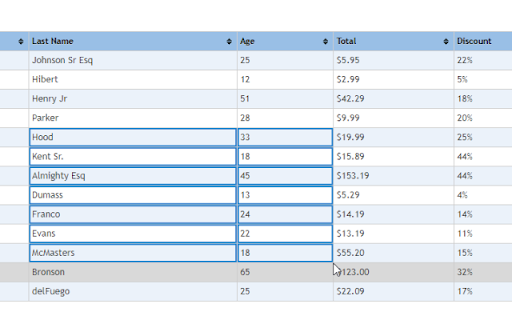
Effortlessly select and copy table cells in Chrome, just like you would in Firefox! This extension enables precise selection of table ranges or individual cells using intuitive keyboard shortcuts, with full compatibility for macOS and Windows. Perfect for data extraction, research, or spreadsheet workflows.

Features
✅ Range Selection
* macOS: Hold Shift + drag to select a range of cells.
* Windows: Hold Ctrl + drag to select a range of cells.
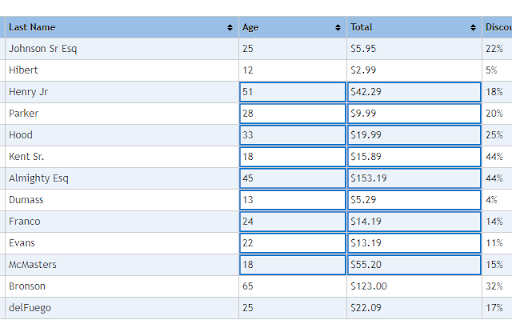
* Visual Highlighting: Selected cells are highlighted in blue for clarity.
✅ Individual Cell Selection
* Hold Alt (macOS/Windows) + click to select non-adjacent cells.
✅ Copy to Clipboard
* macOS: Press Cmd + C to copy selected cells.
* Windows: Press Ctrl + C to copy selected cells.
* Data is formatted with tabs between columns and newlines between rows, ready for pasting into Excel, Sheets, or text editors.
✅ Cross-Platform Compatibility
* Automatically adjusts shortcuts for macOS (Shift/Alt/Cmd) and Windows (Ctrl/Alt).
✅ Lightweight & Non-Intrusive
* No permissions required. Works instantly on any webpage with tables.

How to Use
1. Select Cells:
    * Drag with Shift (macOS) or Ctrl (Windows) to select a range.
    * Hold Alt (all platforms) + click to pick individual cells.
2. Copy: Press Cmd+C (macOS) or Ctrl+C (Windows) to copy.
3. Paste: Paste into spreadsheets or documents with preserved formatting.

Why Choose This Extension?
* Firefox-Like Experience: Replicates Firefox’s native table selection behavior in Chrome.
* No Bloat: Zero ads, trackers, or unnecessary permissions.
* Works Everywhere: Compatible with dynamic tables, paginated data, and complex layouts.

Perfect for: Researchers, analysts, students, or anyone who works with tabular data online!

For feedback, please contact javlon[at]gmail.com.
Technical
- Version
- 1.5.18
- Manifest
- V3
- Size
- 7.67KiB
- Min Chrome
- 88
- Languages
- 1
- Featured
- Yes
Metadata
- ID
- klojbfbefcejadioohmnkhjmbmecfapg
- Developer ID
- uf9e387e95e0b3a8b0be11dcc4e121d78
- Developer Email
- [email protected]
- Created
- Jun 14, 2018
- Last Updated (Store)
- Mar 5, 2025
- Last Scraped
- May 29, 2026
- Website
- —
- Support URL
- —
- Privacy Policy
- —
Similar extensions
Alternatives to Table Range Select & Copy (Like in Firefox!), ranked by description similarity.

TableClipper
Copy any website table to your clipboard & paste into Google Sheets in one click.
14

CopyTables
Copy web-based HTML and DIV Tables to clipboard with ease, supporting dynamic tables and sanitized output
370
★ 1.0

Instant Table Converter
Instantly convert HTML tables to Excel, CSV, JSON, or Markdown locally.
5

Clean Table Exporter
Export web tables to CSV, Google Sheets, or Word. Supports multi-page tables, column editing, and complex layouts.
14
★ 5.0
Table as CSV - Table Capture
Allows to copy, select, export HTML tables to Microsoft Excel, CSV, Google Sheets, etc
1.0K
★ 3.6

Snapsheet - 1-Click HTML Table to CSV Exporter
Automatically detects HTML tables and injects a floating 'Export to CSV' button.
8
★ 5.0

Table to CSV Exporter
Easily export HTML tables to Excel-compatible CSV files with UTF-8 support
104
★ 3.0

Select2Copy - Copy Multiple Text Selections Instantly
Select multiple texts across webpages and copy them all at once - fast, simple, efficient.
99
★ 5.0
Data sourced from the Chrome Web Store · last verified May 29, 2026.