
Colorfy
Change colors of elements on a web page easily.
As of June 2026, Colorfy has 436 users and a 4.67/5 rating from 6 reviews in the Workflow & Planning category.
Usersup 15.0 percent+15.0%
436
436
Ratingno change0%
4.67
6 reviews
Reviewsno change0%
6
Version
1.1.1
Manifest V3
History
5 snapshotsTracking since Apr 20, 2026.
View as table
| Date | Users | Rating | Reviews | Version |
|---|---|---|---|---|
| Apr 20, 2026 | 379 | 4.67 | 6 | 1.1.1 |
| May 5, 2026 | 422 | 4.67 | 6 | 1.1.1 |
| May 16, 2026 | 419 | 4.67 | 6 | 1.1.1 |
| May 29, 2026 | 425 | 4.67 | 6 | 1.1.1 |
| Jun 10, 2026 | 424 | 4.67 | 6 | 1.1.1 |
| Now | 436 | 4.67 | 6 | 1.1.1 |
Permissions & access
- Permissions
- activeTabcontextMenusstoragescripting
- Host access
- <all_urls>
Screenshots
About
Colorfy is a powerful web customization tool that lets you easily change the colors of any website to match your preferences. Create multiple color themes, switch between them instantly, and make the web more comfortable for your eyes.

🎨 KEY FEATURES:
• Multi-Style Support - Create up to 5 different color themes per website (e.g., "Dark Mode", "High Contrast", "Work Theme")
• Instant Theme Switching - Switch between your custom themes and the original design with one click
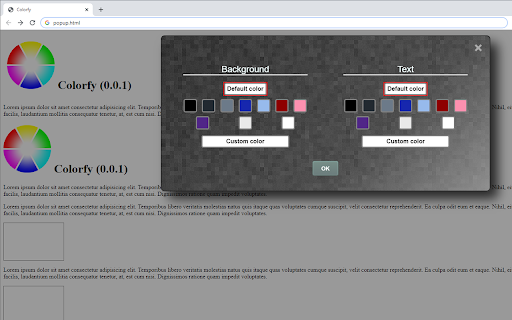
• Smart Element Selection - Click any element on the page to customize its background and text colors
• Professional Color Picker - Choose from curated palettes or use the advanced color picker for precise control
• Advanced Manual Editing - Target specific elements using CSS selectors (class/ID) for power users
• Auto-Save & Sync - All changes are automatically saved to your device for each website

🔧 HOW TO USE:
1. Click the Colorfy extension icon
2. Select a color style from the dropdown (or create a new one)
3. Click on any page element you want to customize
4. Choose background and text colors from the palette
5. Your changes are automatically saved and applied!

🗂️ STYLE MANAGEMENT:
• Create themed color schemes like "Dark Reading", "Eye Comfort", or "High Contrast"
• Compare your custom themes with the original website design
• Rename, duplicate, or delete styles as needed
• Each style maintains independent color changes
• Right-click anywhere → "Colorfy: Switch to Original" for quick toggling

🧹 EASY CLEANUP:
• Switch to "Original" style to temporarily see the unmodified page
• Go to extension options to clear all changes from all websites
• Non-destructive workflow - your custom styles are never accidentally lost

🌍 MULTI-LANGUAGE SUPPORT:
• English, Croatian, and Serbian languages supported
• Automatically detects your browser language

Perfect for users with visual preferences, web designers testing color schemes, or anyone who wants to make websites more comfortable to browse. Compatible with all websites and maintains your customizations across browser sessions.

PRIVACY: All data is stored locally on your device. No information is collected or transmitted.

PERMISSIONS EXPLAINED:
• Active Tab: Required to modify colors on the current webpage
• Storage: Saves your color preferences locally
• Context Menus: Adds right-click option to switch to original design
• Scripting: Injects color modification scripts into webpages
Technical
- Version
- 1.1.1
- Manifest
- V3
- Size
- 365KiB
- Min Chrome
- 88
- Languages
- 3
- Featured
- Yes
Metadata
- ID
- nbdflkflpbgpfmnchfpjmobfgaahnbec
- Developer ID
- u54ca5333590c1028a34345f19980daa5
- Developer Email
- [email protected]
- Created
- Jan 24, 2020
- Last Updated (Store)
- Sep 28, 2025
- Last Scraped
- Jun 10, 2026
- Website
- —
- Support URL
- —
- Privacy Policy
- —
Similar extensions
Alternatives to Colorfy, ranked by description similarity.

Color Picker & Eyedropper Tool for Chrome
Instantly pick colors from any webpage with this lightweight Chrome extension. Save HEX and RGB codes easily.
13

Color Bookmarker (Your Ultimate Color Picker for Capturing Colors Anywhere)
Color Bookmarker is your essential tool for organizing and managing colors while browsing the web.
1.0K
★ 5.0

GlowText: Web Text Highlighter
Highlight and save interesting or useful text from any webpage with a single click.
78
★ 4.4

ColorCheck
Eyedropper, palette extractor & complementary color generator for web designers
3

Font Changer
Change the page font instantly with a simple click from a list of over 1600 different fonts. Save preferences per site.
—
★ 5.0

Color Picker
Build a personalized color palette, select colors from webpages with the eyedropper, create color scales, and blend colors
20.0K
★ 4.2

Chromatics
Chromatics - View and edit live site color palette.
52
★ 5.0

Instant Color Grab
Pick any color from the screen or manually adjust HSV values, copy formats to clipboard, and keep a history of picked colors.
3
Data sourced from the Chrome Web Store · last verified Jun 10, 2026.