
Color Picker
Build a personalized color palette, select colors from webpages with the eyedropper, create color scales, and blend colors
As of May 2026, Color Picker has 20,000 users and a 4.20/5 rating from 10 reviews in the Workflow & Planning category.
Usersno change0%
20.0K
20,000
Ratingno change0%
4.20
10 reviews
Reviewsno change0%
10
Version
2.0.3
Manifest V3
History
1 snapshotsTracking since Apr 28, 2026.
View as table
| Date | Users | Rating | Reviews | Version |
|---|---|---|---|---|
| Apr 28, 2026 | 20.0K | 4.20 | 10 | 2.0.3 |
| Now | 20.0K | 4.20 | 10 | 2.0.3 |
Permissions & access
- Permissions
- activeTabcontextMenusscriptingstorage
- Host access
- None declared
Screenshots


About
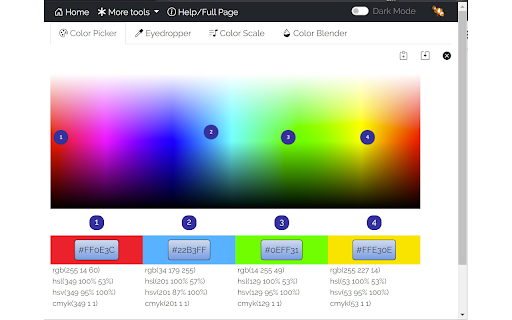
Create your own personalized 4- color palette that you can use for your web pages, pick colors from a web page with the eyedropper, create color scales for chart, and map visualizations, experiment by blending colors.

Color Picker:
Use the color picker by clicking and dragging the markers around the palette. The color selections are shown together with their Hex code values in the boxes below the palette.
The color picker will also display the colors to different formats (i.e.,  HEX, RGB, HSV, HSL, CMYK).

Eyedropper:
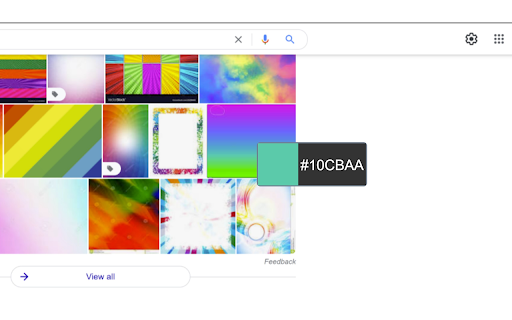
Use the Eyedropper by right-clicking on the page and selecting "Pick a color on the page". You can also use the Eyedropper button on the Eyedropper tab of the extension's popup.
Note that colors are picked from a snapshot of the viewable area of the page. Make sure you scroll to the area of the page that you want to select colors from before starting the eyedropper. Also note that some pages (e.g., chrome://, file://, urls) have security  that prevent eyedropper from working.  The Color Picker tracks a history of the colors you've selected with the eyedropper. You can see the history on the Color Picker's Eyedropper tab.
On hi-dpi (high resolution) screens the eyedropper snapshot may appear blurry.

Color Scale:
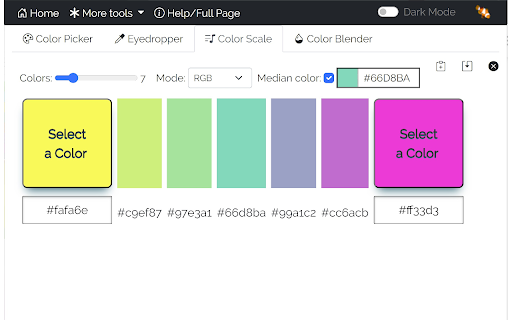
Use the color scale to create a set of visually pleasing colors that are evenly spaced. If you are creating any type of chart or map that relies on colors to visually distinguish elements (or data values) in your chart or map you'll find this very hard to do manually and the results will likely be not ideal - often leaving the viewer to guess the intent of the color. This tool will produce a pleasing color scale from the start and end colors you select. Select from different color modes to get your favorite colors.

Color Blender:
Use the color blender to blend two colors using RGB channel-wise blend functions.

You can also type or paste a Hex code into the text fields to get a particular color.

This tool is useful if you :
- to create a four color personalized 4-color palette
- find the color code of a color on a web page with the eyedropper
- to create a color scale from 3 to 25 colors for use in bar charts, maps, etc.
- blend two colors using different modes

Features:
- available as an icon on your Chrome toolbar
- remembers the current state so when you reopen the color picker you can carry on where you left off.
- convenient buttons to copy color codes to the clipboard and save codes to a text file
- A dark-mode option allows you to view the color picker with a dark background and white text
- provides links to other tools from LinangData from the More tools menu
- It's free!
Technical
- Version
- 2.0.3
- Manifest
- V3
- Size
- 1.74MiB
- Min Chrome
- 88
- Languages
- 1
- Featured
- Yes
Metadata
- ID
- kpppomnoahmhnmmamjfbnnnmeabkjcni
- Developer ID
- u0d278c1b85dfdeb85a4ec169d3ee8c1f
- Developer Email
- [email protected]
- Created
- Aug 8, 2017
- Last Updated (Store)
- Feb 27, 2023
- Last Scraped
- May 25, 2026
- Website
- http://linangdata.com/
- Support URL
- https://linangdata.com/color-picker
- Privacy Policy
- https://linangdata.com/privacy.html
Similar extensions
Alternatives to Color Picker, ranked by description similarity.

Color Picker - Eyedropper Tool
Pick colors from web pages with Eyedropper. Picker, gradient generator, palette. Quickly grab HEX, RGB.
100.0K
★ 4.6

Hex code picker
Use Hex code picker to grab hex color codes from any webpage. Quickly identify colors and copy hex codes for all your design needs!
1.0K
★ 5.0

TabColor color picker
HEX RGB color picker to find and capture color via eyedropper tool with advanced features
20.0K
★ 4.1

Color Picker and Palette Generator
Our Color Picker and Palette Generator helps you create your own brand book effortlessly by extracting colors from ANY webpage on…
42
★ 5.0
Easy Color Picker
Grab colors from webpages anytime, instant color picker and personal color history.
8.0K
★ 4.5

Color Picker & Eyedropper Tool for Chrome
Instantly pick colors from any webpage with this lightweight Chrome extension. Save HEX and RGB codes easily.
13

Online Color Picker
Colors palette with color conversion to RGBA, HEXA and HSVA.
694
★ 1.0

Better Color Picker
Easily pick colors from any website.
389
★ 3.9
Data sourced from the Chrome Web Store · last verified May 25, 2026.